Precautions
Event data is passed to the handler of your function as an input. After configuration, event data is persisted for later use. Each function can have a maximum of 10 test events.
Creating a Test Event
- Log in to the FunctionGraph console, and choose Functions > Function List in the navigation pane.
- Click a function name.
- On the function details page, select a version and click Configure Test Event, as shown in Figure 1.
Figure 1 Configuring a test event
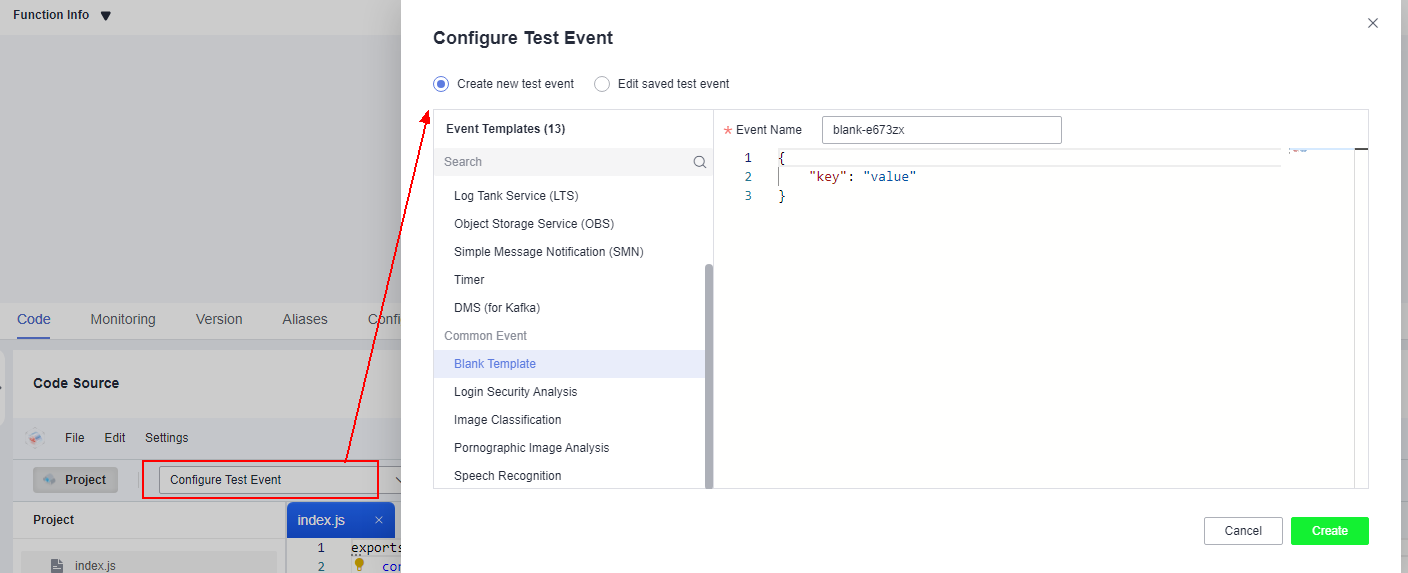
- In the Configure Test Event dialog box, configure the test event information according to Table 1. The parameter marked with an asterisk (*) is mandatory.Table 1 Test event information
Parameter
Description
Configure Test Event
You can choose to create a test event or edit an existing one.
Use the default option Create new test event.
Event Template
If you select blank-template, you can create a test event from scratch.
If you select a template, the corresponding test event in the template is automatically loaded. For details about event templates, see Table 2.
*Event Name
The event name can contain 1 to 25 characters and must start with a letter and end with a letter or digit. Only letters, digits, underscores (_), and hyphens (-) are allowed. For example, even-123test.
Event data
Enter a test event.
Table 2 Event template descriptionTemplate Name
Description
blank-template
The template event is {"key": "value"}, which can be changed based on requirements.
API Gateway (Dedicated Gateway)
Simulates an API Gateway event to trigger your function.
Data Injection Service (DIS)
Simulates a DIS event to trigger your function.
Simple Message Notification (SMN)
Simulates an SMN event to trigger your function.
Object Storage Service (OBS)
Simulates an OBS event to trigger your function.
timer
Simulates a timer event to trigger your function.
Log Tank Service (LTS)
Simulates an LTS event to trigger your function.
Cloud Trace Service (CTS)
Simulates a CTS event to trigger your function.
DMS (for Kafka)
Simulates a Kafka event to trigger your function.
Login Security Analysis
Serves as an input for the loginSecurity-realtime-analysis-python function template.
Pornographic Image Analysis
Serves as an input for the porn-image-analysis function template.
Speech Recognition
Serves as an input for the voice-analysis function template.
Image Classification
Serves as an input for the image-tag function template.
- Click Save.
Testing a Function
After creating a function, you can test it online to check whether it can run properly as expected.
- Log in to the FunctionGraph console, and choose Functions > Function List in the navigation pane.
- Click a function name.
- On the displayed function details page, select a version and test event, and click Test.
- Click Test. The function test result is displayed.Note
The Log Output area displays a maximum of 2 KB logs. To view more logs, see Querying Logs.
Modifying a Test Event
- Log in to the FunctionGraph console, and choose Functions > Function List in the navigation pane.
- Click a function name.
- On the displayed function details page, select a version and click Configure Test Event. The Configure Test Event dialog box is displayed.
- In the Configure Test Event dialog box, modify the test event information according to Table 3.Table 3 Test event information
Parameter
Description
Configure Test Event
Select Edit saved test event.
Saved Test Event
Select the test event you want to modify.
Event data
Modify the test event code.
- Click Save.
Deleting a Test Event
- Log in to the FunctionGraph console, and choose Functions > Function List in the navigation pane.
- Click a function name.
- On the displayed function details page, select a version and click Configure Test Event.
- On the Configure Test Event page, select Edit saved test event. In the Saved Test Events list on the left, select the event to be deleted and click Delete. For test event configuration, see Table 4.Table 4 Configuring test event information
Parameter
Description
Create new test event
Select a test event template.
Edit saved test event
Select the test event you want to delete.