When you use security groups for the first time, the system automatically creates a default security group if there is no security group available.
Default Security Group Rules
Note the following when using default security group rules:
Figure 1 Default security group
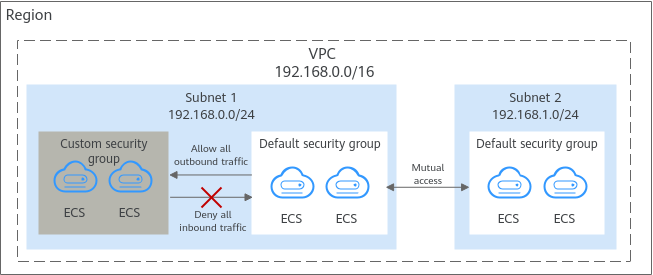
Table 1 describes the default rules in the default security group.
Direction | Action | Type | Protocol & Port | Source/Destination | Description |
|---|---|---|---|---|---|
Inbound | Allow | IPv4 | All | Source: default security group (default) | Allows IPv4 instances in the security group to communicate with each other using any protocol and port. |
Inbound | Allow | IPv6 | All | Source: default security group (default) | Allows IPv6 instances in the security group to communicate with each other using any protocol and port. |
Outbound | Allow | IPv4 | All | Destination: 0.0.0.0/0 | Allows all IPv4 traffic from the instances in the security group to any IP address over any port. |
Outbound | Allow | IPv6 | All | Destination: ::/0 | Allows all IPv6 traffic from the instances in the security group to any IP address over any port. |