What Is a Security Group?
A security group is a collection of access control rules for cloud resources, such as cloud servers, containers, and databases, that have the same security protection requirements and that are mutually trusted. You can define different access control rules for a security group, and these rules are then applied to all the instances added to this security group.
Many cloud services can use security groups, such as ECS, RDS, DDS, DDM, MRS, CCE, CSS, DCS (Redis 3.0), DMS, WAF, and SFS.
When creating an instance (for example, an ECS), you must associate it with a security group. If there are no security groups yet, a default security group will be automatically created and associated with the instance. For details, see Default Security Group Overview. You can also create a security group based on service requirements and associate it with the instance. An instance can have multiple security groups associated, and traffic to and from the instance is matched in descending order of priority.
Each security group can have both inbound and outbound rules. You need to specify the source, port, and protocol for each inbound rule and specify the destination, port, and protocol for each outbound rule to control the inbound and outbound traffic to and from the instances in the security group. As shown in Figure 1, you have a VPC (VPC-A) with a subnet (Subnet-A) in region A. An ECS (ECS-A) is running in Subnet-A and associated with security group Sg-A. Figure 1 Security group architecture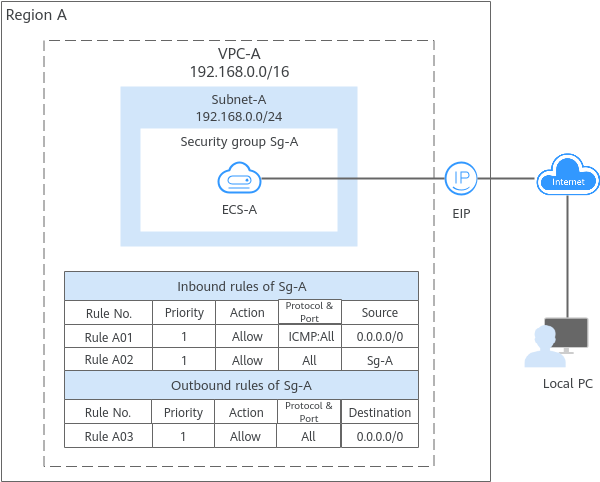
What Are Security Group Rules?
- A security group has inbound and outbound rules to control traffic that is allowed to reach or leave the instances associated with the security group.
- Inbound rules control traffic to the instances in a security group.
- Outbound rules control traffic from the instances in a security group to access external networks.
- You can specify protocol, port, source or destination for a security group rule. The following describes key information about a security group rule.
- Action: Allow or Deny. If the protocol, port, source or destination of the traffic matches a security group rule, traffic will be allowed or denied.
- Priority: The value ranges from 1 to 100. A smaller value indicates a higher priority. Security group rules are matched first by priority and then by action. Deny rules take precedence over allow rules. For more information, see How Traffic Matches Security Group Rules.
- Type: IPv4 or IPv6.
- Protocol & Port: network protocol type and port range.
- Protocol: the protocol that is used to match traffic. The protocol can be TCP, UDP, ICMP, or GRE.
- TCP is ideal for applications that require reliable connections and high data integrity, such as remote login, web browsing, email, and file transfers.
- UDP is ideal for applications demanding high speed and low latency, such as online gaming and video meetings.
- ICMP is used by devices to communicate data transmission errors in a network. For example, ping can be used to test the connectivity between network devices, error reports can be generated for O&M, and diagnosis information can be transmitted for network analysis and optimization.
- GRE is widely used and enables communications between networks that use different protocols by encapsulating one protocol within another, for example, encapsulating IP packets.
- Port: the destination port range that is used to match traffic. The value ranges from 1 to 65535.
- Protocol: the protocol that is used to match traffic. The protocol can be TCP, UDP, ICMP, or GRE.
- Source or Destination: source address of traffic in the inbound direction or destination address of traffic in the outbound direction.
The source or destination can be an IP address, security group, or IP address group.
- IP address: a fixed IP address or CIDR block. Both IPv4 and IPv6 addresses are supported. For example, 192.168.10.10/32 (IPv4 address), 192.168.1.0/24 (IPv4 CIDR block), or 2407:c080:802:469::/64 (IPv6 CIDR block).
- Security group: If the selected security group and the current security group are in the same region, the traffic is allowed or denied to the private IP addresses of all instances in the selected security group. For example, if there is instance A in security group A and instance B in security group B, and there is an inbound rule in security group A that allows traffic from security group B, traffic is allowed from instance B to instance A.
- IP address group: If you have multiple IP addresses with the same security requirements, you can add them to an IP address group and select this IP address group when you configure a rule, to help you manage them in an easier way. For details, see IP Address Group Overview.
How Security Groups Work
- Security groups are stateful. If your instance initiates a request and its security group allows all outbound traffic, the corresponding response traffic is allowed in regardless of the inbound rules of the security group. Similarly, if the security group allows inbound traffic, responses to allowed inbound traffic are allowed to flow out regardless of the outbound rules of the security group.
- Security groups use connection tracking to track traffic to and from instances. Changes to inbound rules take effect immediately for existing connections. Changes to outbound security group rules do not affect existing persistent connections and take effect only for new connections.
If you add, delete, or update rules in a security group, or add or remove instances in a security group, the details are as follows:
- For connections established by inbound traffic, the system automatically clears the connection tracking entries corresponding to the existing persistent connections based on Table 1. That is, the connection tracking entries are expired in advance. Then, the system re-establishes connections to match the new inbound rules of the security group.
- If the security group rules allow the traffic of the connections, the connections can be established and network communication is not affected.
- If the security group rules deny the traffic of the connections, the connections cannot be established again and the network communication will be interrupted.
Table 1 Scenarios and policies for clearing connection tracking entriesScenario
Clearing Policy
Adding instances to security group A
- Clear inbound connection tracking entries of the instances newly added to security group A.
- If an inbound rule of another security group (for example, security group B) denies access from security group A, clear inbound connection tracking entries of all instances in security group B.
Removing instances from security group A
- Clear inbound connection tracking entries of all instances in security group A.
- If an inbound rule of another security group (for example, security group B) allows access from security group A, clear inbound connection tracking entries of all instances in security group B.
Adding rules to security group A
If a Deny rule is added in the inbound or outbound direction, clear inbound connection tracking entries of all instances in security group A.
Deleting rules from security group A
If an Allow rule is deleted in the inbound direction, clear inbound connection tracking entries of all instances in security group A.
Modifying rules in security group A
If the priority, action, protocol, port, or source address of a rule is modified in the inbound direction, clear inbound connection tracking entries of all instances in security group A.
Changing IP address entries in an IP address group
If an IP address group is associated with an inbound rule in security group A, deleting or adding an IP address entry from or to the IP address group will clear inbound connection tracking entries of all instances in security group A.
- The existing outbound persistent connections will not be disconnected, and the original rule will still be applied. All the new connections will match the new rules.
- For connections established by inbound traffic, the system automatically clears the connection tracking entries corresponding to the existing persistent connections based on Table 1. That is, the connection tracking entries are expired in advance. Then, the system re-establishes connections to match the new inbound rules of the security group.
After a persistent connection is disconnected, new connections will not be established immediately until the timeout period of connection tracking expires. For example, after an ICMP persistent connection is disconnected, a new connection will be established and a new rule will be applied when the timeout period (30s) expires.
- The timeout period of connection tracking varies by protocol. The timeout period of a TCP connection in the established state is 600s. For an ICMP connection, it is 30s. For other protocols, if packets are received in both inbound and outbound directions, the connection tracking timeout period is 180s. If packets are received only in one direction, the connection tracking timeout period is 30s.
- The timeout period of TCP connections varies by connection status. The timeout period of a TCP connection in the established state is 600s, and that of a TCP connection in the FIN-WAIT state is 30s.
- Security group rules work like a whitelist. If there are no rules that explicitly allow or deny certain traffic, the security group denies such traffic to or from the instances in the security group.
- Inbound rules: If the source of a request matches the source specified in an inbound rule with Action set to Allow, the request is allowed. For this reason, you do not need to configure a deny rule in the inbound direction.
The inbound rules in Table 2 ensure that instances in a security group can communicate with each other. Do not delete or modify these rules.
- Outbound rules: The outbound rules in Table 2 allow all traffic to leave the instances in the security group so that the instances can access any external IP address. If you delete these rules, the instances in the security group cannot access external networks.
Table 2 Security group rules
Direction
Action
Type
Protocol & Port
Source or Destination
Inbound
Allow
IPv4
All
Source: current security group
Inbound
Allow
IPv6
All
Source: current security group
Outbound
Allow
IPv4
All
Destination: 0.0.0.0/0
Outbound
Allow
IPv6
All
Destination: ::/0
- Inbound rules: If the source of a request matches the source specified in an inbound rule with Action set to Allow, the request is allowed. For this reason, you do not need to configure a deny rule in the inbound direction.
How Traffic Matches Security Group Rules
An instance can have multiple security groups associated, and a security group can contain multiple security group rules. Security group rules are matched first by priority and then by action. Deny rules take precedence over allow rules. The following takes inbound traffic as an example to match security group rules: If the sequence number of security group A is 1 and that of security group B is 2, the priority of security group A is higher than that of security group B. Traffic preferentially matches the inbound rules of security group A. If the priority of security group rule A is 1 and that of security group rule B is 2, the priority of security group rule A is higher than that of security group rule B. Therefore, traffic preferentially matches security group rule A. Figure 2 Security group matching sequence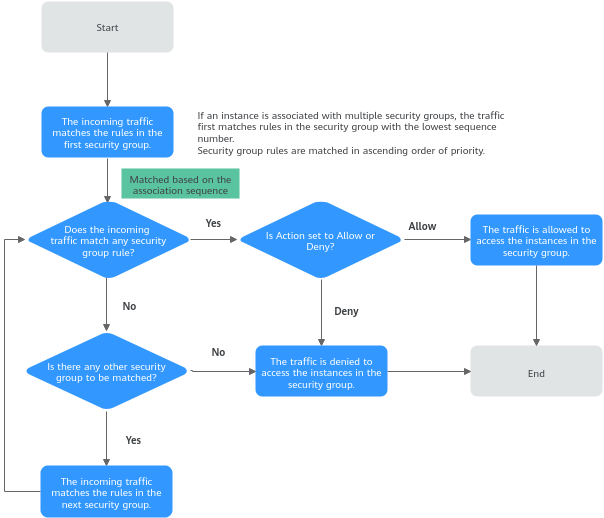
Security Group Examples
You can allow specific IP addresses to access instances in a security group, or allow access from another security group to enable communications between instances in different groups. You can add security group rules to flexibly control the traffic in and out of a network to ensure network security. Here are some examples on how security groups can be used.
Allowing Traffic from Specific IP Addresses or Security Groups
In Figure 3, there are two subnets (Subnet-A and Subnet-B) in VPC-X. ECSs in Subnet-A are associated with Sg-A because these ECSs are used to run the same types of services and have the same network communication requirements. Similarly, ECSs in Subnet-B are associated with security group Sg-B. Figure 3 Allowing traffic from specific IP addresses or security groups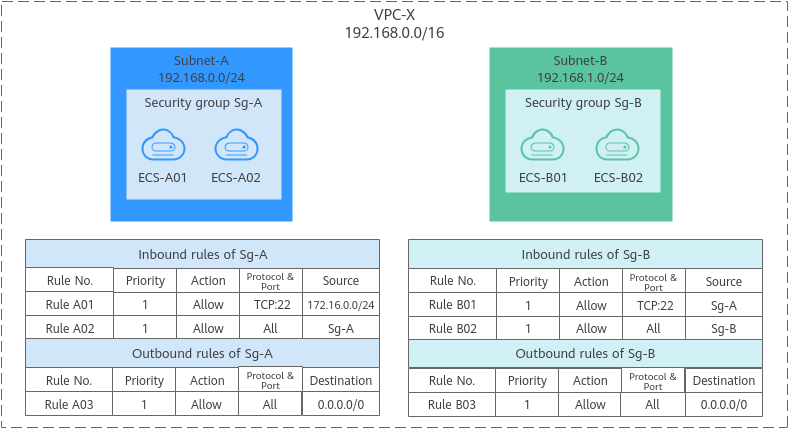
Security Group Examples lists more security group rule configuration examples.
Allowing Traffic from a Virtual IP Address
If you use an intermediate network instance to forward traffic between instances in different subnets, setting the source of the inbound rule to the security group associated with the peer instance does not allow the instances to communicate with each other. To enable communications, set the source to the private IP address or subnet CIDR block of the intermediate network instance. For example, to connect ECSs in Subnet-A and Subnet-B in Figure 4, set the source of the inbound rule to the virtual IP address or the subnet CIDR block.
VPC-X has two subnets: Subnet-A and Subnet-B. ECSs in Subnet-A are associated with security group Sg-A, and ECSs in Subnet-B are associated with security group Sg-B. ECS-A01 and ECS-A02 in Subnet-A work in active/standby pair, forming a Keepalived HA cluster. The ECSs use virtual IP address 192.168.0.21 to communicate with external networks. Figure 4 Allowing traffic from a virtual IP address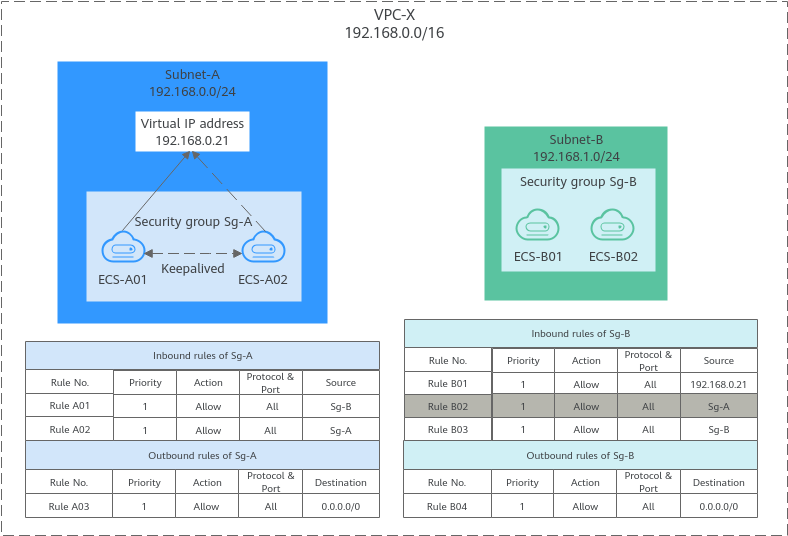
Security Group Examples lists more security group rule configuration examples.
Allowing Communications Between Instances in Two VPCs Connected by a VPC Peering Connection
In Figure 5, VPC-A and VPC-B in region A are connected by VPC peering connection peering-AB. After routes are configured for the VPC peering connection, Subnet-A01 and Subnet-B01 can communicate with each other. However, the ECSs in the two subnets are associated with different security groups. To allow ECSs in Sg-A and Sg-B to communicate with each other, you need to: Figure 5 Allowing communications between ECSs in two VPCs connected by a VPC peering connection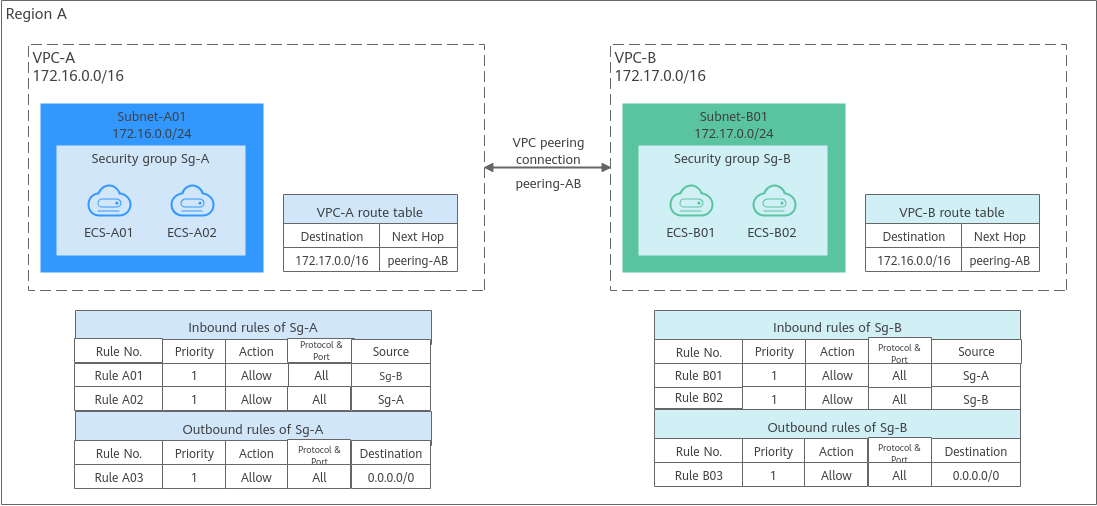
Security Group Examples lists more security group rule configuration examples.
Security Group Configuration Process
Figure 6 Process of using a security group

No. | Step | Description | Reference |
|---|---|---|---|
1 | Create a security group. | When creating a security group, you can use the preset rules. For details about the preset security group rules, see Table 1. | |
2 | Configure security group rules. | After a security group is created, if its rules cannot meet your service requirements, you can add new rules to the security group or modify existing rules. | |
3 | Add instances to the security group. | When you create an instance, the system automatically adds the instance to a security group for protection. If one security group cannot meet your requirements, you can add an instance to multiple security groups. | Adding an Instance to or Removing an Instance from a Security Group |
Constraints on Using Security Groups
- By default, you can add up to 50 security group rules to a security group.
- By default, you can associate no more than five security groups with each cloud server or extended network interface. In such a case, the rules of all the selected security groups are combined and applied.
- A security group can have no more than 6,000 instances associated, or its performance will deteriorate.
- For inbound rules of a security group, the sum of the rules with Source set to Security group, of the rules with Source set to IP address group, and of the rules with non-consecutive ports, cannot exceed 120. Excess rules will not take effect. IPv4 and IPv6 security group rules are counted separately, with up to 120 rules allowed for each.
For outbound rules of a security group, the sum of rules with Destination set to Security group, of the rules with Destination set to IP address group, and of the rules with non-consecutive ports, cannot exceed 120. Excess rules will not take effect.
For example, to add inbound IPv4 rules to a security group (Sg-A), you can refer to Table 4 for rules that meet the constraints. Of these rules, rule A02 uses non-consecutive ports and also specifies a security group as the source. In this case, only one quota is used.
Table 4 Inbound security group rulesRule No.
Action
Type
Protocol & Port
Source
Rule A01
Allow
IPv4
All
Current security group: Sg-A
Rule A02
Allow
IPv4
TCP: 22,25,27
Another security group: Sg-B
Rule A03
Allow
IPv4
TCP: 80-82
IP address group: ipGroup-A
Rule A04
Allow
IPv4
TCP: 22-24,25
IP address: 192.168.0.0/16
- Traffic from load balancers is not limited by network ACL and security group rules if:
Transfer Client IP Address is enabled for the listeners of a load balancer.
The load balancer can still forward traffic to backend servers, even if there is a rule that denies traffic from the load balancer to the backend servers.
Recommendations
- Instances in a security group deny all external access requests by default, but you can add rules to allow specific requests.
- When adding a security group rule, grant the minimum permissions possible. For example, if remote login to an ECS over port 22 is allowed, only allow specific IP addresses to log in to the ECS. Do not use 0.0.0.0/0 (all IP addresses).
- Keep your rule configurations simple in a single security group. There should be a different reason for each security group. If you use the same security group for all your instances, the rules in the security group will likely be redundant and complex. It will make it much harder to maintain and manage.
- You can add instances to different security groups based on their functions. For example, if you want to provide website services accessible from the Internet, you can add the web servers to a security group configured for that specific purpose and only allow external access over specific ports, such as 80 and 443. By default, other external access requests are denied. Do not run internal services, such as MySQL or Redis, on web servers that provide services accessible from the Internet. Deploy internal services on servers that do not need to connect to the Internet and associate these servers with security groups specifically configured for that purpose.
- Do not modify in-use security group rules directly. Before you modify a security group rule that is in use, you can clone the security group and modify the rule in the test environment to ensure that the modified rule works. For details, see Cloning a Security Group.
- After you add instances to or modify rules of a security group, the security group rules are applied automatically. There is no need to restart the instances.
If a security group rule does not take effect after being configured, see Why Are My Security Group Rules Not Working?