Fault Locating
On the details page of a workload, if an event is displayed indicating that the pod fails to be started, perform the following operations to locate the fault:
- Log in to the node where the abnormal workload is located.
- Check the ID of the container where the workload pod exits abnormally.
If the node uses Docker, run the following command:
docker ps -a | grep $podNameIf the node uses containerd, run the following command:
crictl ps -a | grep $podName - View the container logs.
If the node uses Docker, run the following command:
docker logs $containerIDIf the node uses containerd, run the following command:
crictl logs $containerIDRectify the fault of the workload based on logs.
- Check the error logs of the OS. For example, check whether the logs contain any OOM errors.cat /var/log/messages | grep $containerID | grep oom
Check whether a system OOM is triggered based on the logs.
Troubleshooting
Determine the cause based on the logs or events, as listed in Table 1.
Log or Event | Possible Cause | Fault Locating and Solution |
|---|---|---|
Pod logs: exit code 0 | There is no process in the pod. | Check whether the pod can run properly. For details, see No Process in the Pod (Exit Code: 0). |
| The health check fails. | Check whether the liveness probe for the pod is properly configured. For details, see Health Check Failed (Exit Code: 137). |
| The disk space is insufficient. | Expand the disk space or clear unneeded files. For details, see Insufficient Disk Space of the Pod. |
Pod logs: oom | The pod memory is insufficient. | Check whether the pod has proper resource settings. For details, see Insufficient Container Resources. |
Pod logs: Address already in use | A conflict occurs between container ports in the pod. | Check whether there is a container port conflict in the pod. For details, see Container Port Conflict in the Pod. |
Kubernetes event:
| A secret is mounted to the workload, and the value of the secret is not encrypted using Base64. | For details about the solution, see Improper Value of the Secret Mounted to the Workload. |
Kubernetes event:
| The x86 container image may run on an Arm node. | For details about the solution, see Unmatched Container Image Tag with the Node Architecture. |
Kubernetes event:
| The containerd version is incompatible with the tail version. | For details about the solution, see Exit of tail -f xx in the Container Startup Command (Exit Code: 141). |
Other pod logs | Locate the fault based on services. | For details about the fault locating, see Service Setting Checks. |
No Process in the Pod (Exit Code: 0)
- Log in to the node where the abnormal workload is located.
- View the pod status.
If the node uses Docker, run the following command:
docker ps -a | grep $podNameIf the node uses containerd, run the following command:
crictl ps -a | grep $podNameBelow shows an example.

If there is no process in the pod, the status code Exited (0) is displayed.
Health Check Failed (Exit Code: 137)
The health checks configured for a workload are performed on services periodically. If an exception occurs, there will be an event that indicates an unhealthy pod, and the pod restarts will fail.
If a liveness probe is configured for the workload and the number of health check failures exceeds the threshold, the pod will be restarted. On the workload details page, if Kubernetes events contain Liveness probe failed: Get http..., the health check fails.
Solution
Click the workload name to go to the workload details page, click the Containers tab. Then select Health Check to check whether the policy is proper or whether services are running properly.
Insufficient Disk Space of the Pod
The following message refers to the thin pool disk that is allocated from the Docker disk selected during node creation. You can run the lvs command as user root to view the current disk usage.
Thin Pool has 15991 free data blocks which is less than minimum required 16383 free data blocks. Create more free space in thin pool or use dm.min_free_space option to change behavior

Solutions
Solution 1: Clearing images
Perform the following operations to clear unused images: Do not delete system images, such as the cce-pause image. Otherwise, the pod creation may fail.
Solution 2: Expanding the disk capacity
To expand a disk's capacity, perform the following operations:
- Expand the capacity of a data disk on the EVS console.
Only the storage capacity of EVS disks is expanded. You need to perform the following operations to expand the capacity of logical volumes and file systems.
- Log in to the CCE console and click the cluster name to access the cluster console. In the navigation pane, choose Nodes. In the right pane, click the Nodes tab, locate the row containing the node, and choose More > Sync Server Data in the Operation column.
- Log in to the node.
- Run lsblk to view the block device information of the node.
A data disk is divided depending on the container storage Rootfs:
Insufficient Container Resources
If the upper limit of container resources has been reached, OOM will be displayed in the event details as well as in the log:
cat /var/log/messages | grep 96feb0a425d6 | grep oom

When a workload is created, if the requested resources exceed the configured upper limit, the system OOM is triggered and the container exits unexpectedly.
Container Port Conflict in the Pod
- Log in to the node where the abnormal workload is located.
- Check the ID of the container where the workload pod exits abnormally.
If the node uses Docker, run the following command:
docker ps -a | grep $podNameIf the node uses containerd, run the following command:
crictl ps -a | grep $podName - View the container logs.
If the node uses Docker, run the following command:
docker logs $containerIDIf the node uses containerd, run the following command:
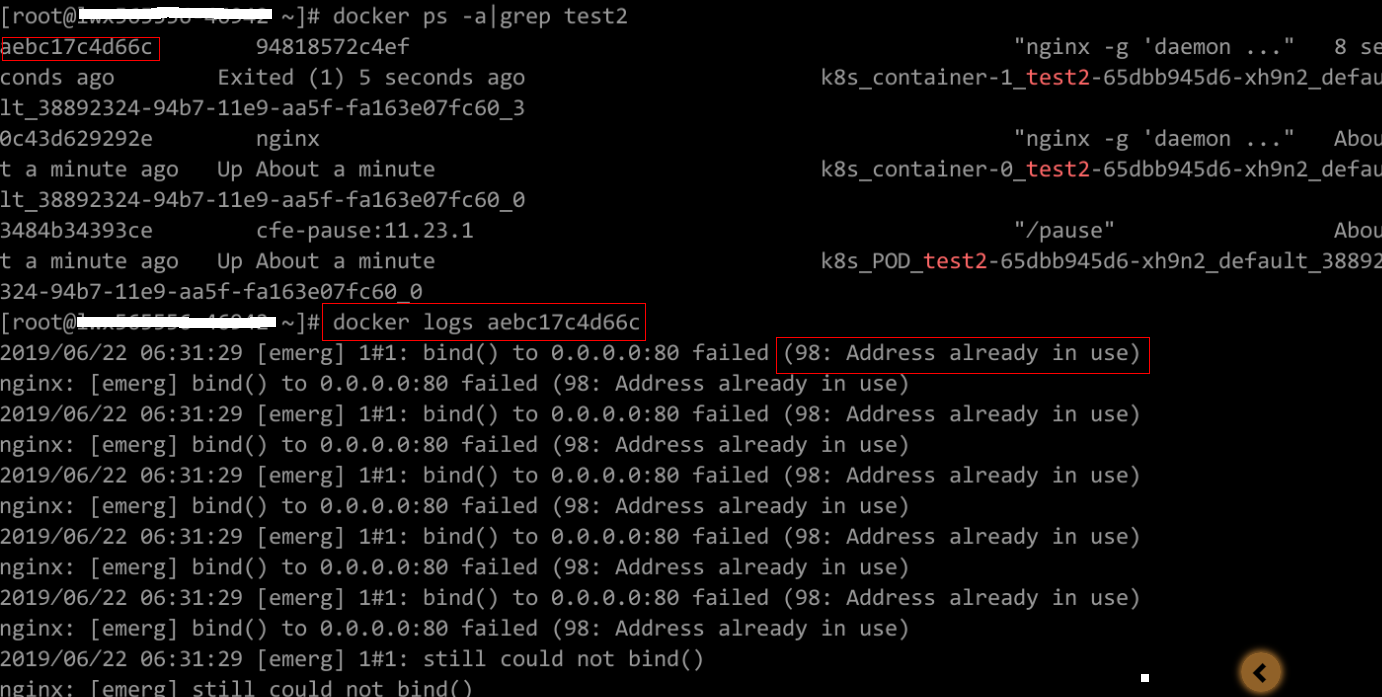
crictl logs $containerIDRectify the fault of the workload based on logs. As shown in the following figure, container ports in the same pod conflict. As a result, the container fails to be started.
Figure 1 Pod restart failure due to a container port conflict
Solution
Configure proper container ports that do not conflict with each other. Then, create the workload again.
If a pod uses the host network (with hostNetwork: true configured), there may be a container port conflict. This is because containers in the pod share the network interface and port range with the host node. Multiple pods using the same port cannot run on the same node.
Improper Value of the Secret Mounted to the Workload
Information similar to the following is displayed in the event:
Error: failed to start container "filebeat": Error response from daemon: OCI runtime create failed: container_linux.go:330: starting container process caused "process_linux.go:381: container init caused \"setenv: invalid argument\"": unknown
The root cause is that a secret is mounted to the workload, but the value of the secret is not encrypted using Base64.
Solution
Create a secret on the console. The value of the secret is automatically encrypted using Base64.
If you use YAML to create a secret, you need to manually encrypt its value using Base64.
echo -n "Content to be encoded" | base64
Unmatched Container Image Tag with the Node Architecture
The proper image tag is not used during the workload creation on an Arm node. To resolve this issue, use the proper image tag.
Exit of tail -f xx in the Container Startup Command (Exit Code: 141)
The Kubernetes event is as follows:
the failed container exited with ExitCode: 141
Possible Cause
The legacy version of containerd is incompatible with the tail version (≥ 8.28) in the container image. As a result, executing the tail -f command leads to an unexpected exit, returning exit code 141.
Solutions
- Solution 1: Upgrade the cluster to v1.25.16-r20, v1.27.16-r20, v1.28.15-r10, v1.29.10-r10, v1.30.6-r10, v1.31.4-r0, or later.
- Solution 2: Reset the node and use the Docker container runtime instead.
Service Setting Checks
Check whether the workload startup command is correctly executed or whether the workload has a bug.
- Log in to the node where the abnormal workload is located.
- Check the ID of the container where the workload pod exits abnormally.
If the node uses Docker, run the following command:
docker ps -a | grep $podNameIf the node uses containerd, run the following command:
crictl ps -a | grep $podName - View the container logs.
If the node uses Docker, run the following command:
docker logs $containerIDIf the node uses containerd, run the following command:
crictl logs $containerIDNote: In the preceding command, containerID indicates the ID of the container that has exited.
Rectify the workload bug based on logs.
Common Issue 1: Incorrect Container Startup Command
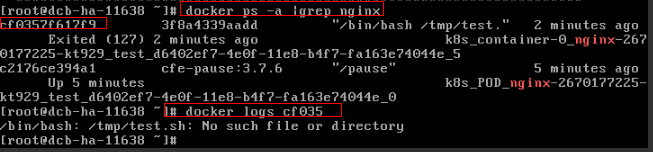
As shown in the figure below, the container fails to start due to an incorrect startup command.
Solution
Create a new workload and configure the correct startup command.
Common Issue 2: "fatal error: procresize: invalid arg" During Startup
After a workload is created, it fails to start. The following error is displayed in the logs:
fatal error: procresize: invalid argruntime stack:runtime.throw(0x75be20, 0x17)/usr/lib/google-golang/src/runtime/panic.go:530 +0x99runtime.procresize(0x180, 0x0)/usr/lib/google-golang/src/runtime/proc1.go:2735 +0xba6runtime.schedinit()/usr/lib/google-golang/src/runtime/proc1.go:72 +0x110runtime.rt0_go(0x7ffcd751f9f8, 0x1, 0x7ffcd751f9f8, 0x0, 0x0, 0x1, 0x7ffcd7520b77, 0x0, 0x7ffcd7520b81, 0x7ffcd7520bc3, ...)/usr/lib/google-golang/src/runtime/asm_amd64.s:109 +0x132
According to the error logs, the Go program crashes on startup because the runtime attempts to set GOMAXPROCS based on the visible CPU count and computes an invalid value due to integer overflow. This occurs when the container's visible CPU count exceeds 255 and the Go version is 1.9 or 1.10. The Go version in the image is 1.10.
In Go 1.9 and 1.10, the runtime uses an 8-bit integer to store the CPU count, which overflows when more than 255 visible cores are present. The overflowed value is passed to the internal procresize function, causing the container to crash.
Run the following command to check the node's CPU limit:
cat /sys/fs/cgroup/cpuset/cpuset.cpus
The output is 0-383, which exceeds 255. This confirms the cause.
Solution
Use one of the following methods to resolve this issue:
- Upgrade the Go program in the image to a version later than 1.10 (latest version recommended). Rebuild the image and redeploy.
- Add environment variables to the workload YAML file to limit GOMAXPROCS.- env:- name: GOMAXPROCSvalue: "1"