DB Instances
The smallest management unit of RDS is a DB instance. A DB instance is an isolated database environment on the cloud. An instance ID uniquely identifies a DB instance. A DB instance can contain multiple user-created databases and can be accessed using tools and applications. Each database name is unique.
A default administrator account is provided when you create a DB instance. You can use this account to create databases and database users and assign permissions to them.
For details about the permissions of user root, see Table 6. You can set the administrator password when creating a DB instance. If you forget the administrator password, reset it.
You can use RDS to create and manage DB instances running various DB engines. For details about DB instance types, specifications, engines, versions, and statuses, see DB Instance Description.
DB Engines
RDS supports the following DB engines:
- MySQL
- PostgreSQL
- Microsoft SQL Server
For details about the supported versions, see DB Engines and Versions.
DB Instance Types
There are two types of RDS instances: single-node and primary/standby. Different series support different DB engines and instance specifications.
For details about RDS for MySQL, see RDS for MySQL.
For details about RDS for PostgreSQL, see RDS for PostgreSQL.
For details about RDS for SQL Server, see RDS for SQL Server.
DB Instance Classes
The DB instance class determines the compute (vCPUs) and memory capacity (memory size) of a DB instance. For details, see DB Instance Classes.
Automated Backups
When you create a DB instance, an automated backup policy is enabled by default. After the DB instance is created, you can modify the policy. RDS will automatically create full backups for DB instances based on your settings.
Manual Backups
Manual backups are user-initiated full backups of DB instances. They are retained until you delete them manually.
Regions and AZs
A region and availability zone (AZ) identify the location of a data center. You can create resources in a specific region and AZ.
- Regions are defined by their geographical location and network latency. Each region is completely independent, improving fault tolerance and stability. After a resource is created, its region cannot be changed.
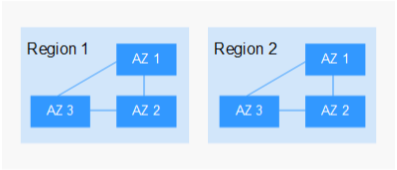
- An AZ is a physical location using independent power supplies and networks. Faults in an AZ do not affect other AZs. A region can contain multiple AZs, which are physically isolated but interconnected through internal networks. This ensures the independence of AZs and provides low-cost and low-latency network connections.
Figure 1 shows the relationship between regions and AZs.
Figure 1 Regions and AZs
Projects
Projects are used to group and isolate OpenStack resources (compute, storage, and network resources). A project can be a department or a project team. Multiple projects can be created for a single account.