Interconnecting with OBS
In an MRS cluster, Location can be set to an OBS file system path during Spark table creation and Spark can connect to OBS through Hive Metastore.
- Setting the location to an OBS path during table creation:
- Log in to the node where the client is installed as the client installation user and access the spark-sql client.
cd Client installation directory
kinit Component operation user
spark-sql --master yarn
- Set Location to the OBS file system path when creating a table.
For example, to create a table named test whose Location is obs://obs-test/test/Database name/Table name, run the following command:
create external table testspark(name string) location "obs://obs-test/test/Database name/Table name";
- Log in to the node where the client is installed as the client installation user and access the spark-sql client.
- Interconnecting Spark with OBS through Hive Metastore:
- Complete the configurations by referring to Interconnecting Hive with OBS using MetaStore.
- Log in to FusionInsight Manager, choose Cluster > Services > Spark and choose Configurations > All Configurations.
- In the navigation pane on the left, choose SparkResource > Customization. In the custom configuration items, add spark.sql.warehouse.location.first to the custom parameter and set its value to true.
Figure 1 spark.sql.warehouse.location.first configuration

- In the navigation pane on the left, choose JDBCServer > Customization. In the custom configuration items, add spark.sql.warehouse.location.first to the custom parameter and set its value to true.
Figure 2 spark.sql.warehouse.location.first configuration

- Click Save to save the configuration. Click the Dashboard tab choose More > Restart Service, enter the password, click OK, and click OK again to restart Spark.
- After Spark is restarted, choose More > Download Client to download and install the Spark client again. Then, go to 7.
If you do not download and install the client again, you can perform the following steps to update the Spark client configuration file (for example, the client directory is /opt/client):
- Log in to the node where the Spark client is deployed as user root and switch to the client installation directory.
cd /opt/client
- Run the following command to modify hive-site.xml in the configuration file directory of the Spark client:
vi Spark/spark/conf/hive-site.xml
Change the value of hive.metastore.warehouse.dir to the corresponding OBS path, for example, obs://hivetest/user/hive/warehouse/.
<property><name>hive.metastore.warehouse.dir</name><value>obs://hivetest/user/hive/warehouse/<value></property> - Run the following command to modify the spark-defaults.conf file in the configuration file directory of the Spark client and set spark.sql.warehouse.location.first to true:
vi Spark/spark/conf/spark-defaults.conf
- Log in to the node where the Spark client is deployed as user root and switch to the client installation directory.
- Configure the OBS directory permission for the component operation user in clusters with Kerberos authentication enabled by referring to Configuring Ranger Permissions.
- Go to the SparkSQL CLI and spark-beeline, create a table, and check whether the location of the table is an OBS path.
source bigdata_env
kinit Service user (skip this step for normal clusters)
- Go to the SparkSQL CLI.
spark-sql
create table d(a int);
desc formatted d;
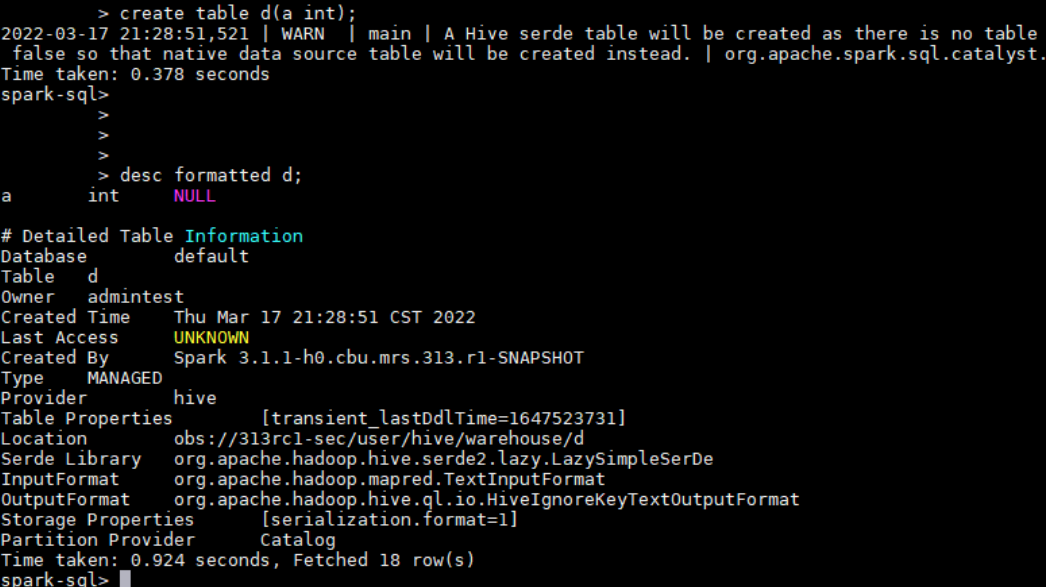
As shown in the following figure, the location of table d is in the specified OBS path.
- Go to spark-beeline.
spark-beeline
create table e(a int);
desc formatted e;
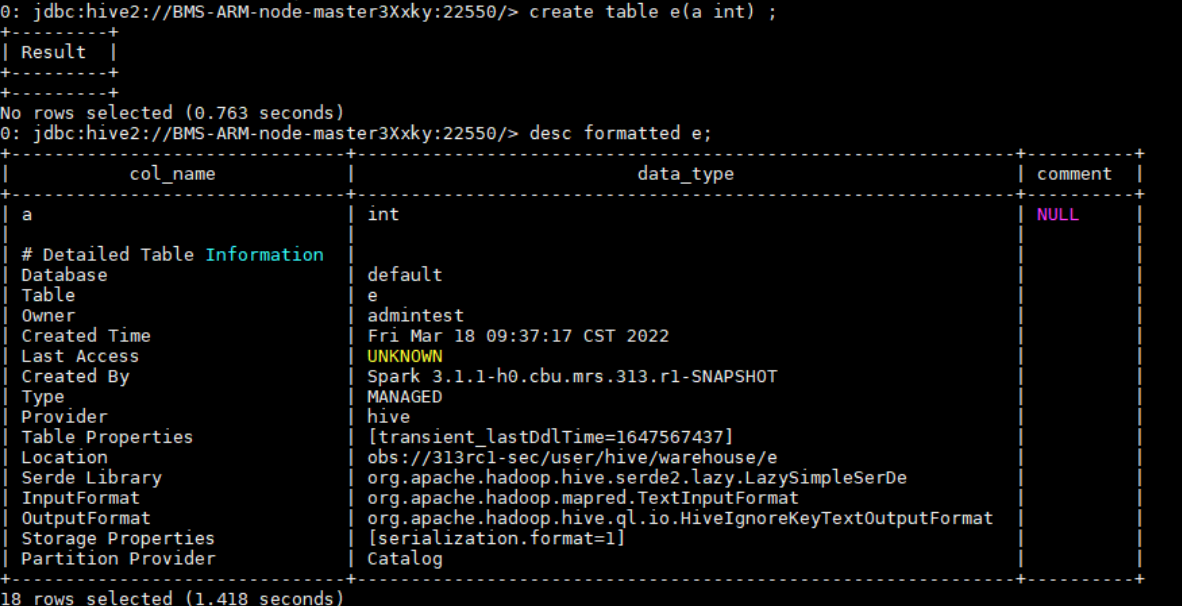
As shown in the following figure, the location of table e is in the specified OBS path.
- Go to the SparkSQL CLI.
Configuring Ranger Permissions
- Log in to FusionInsight Manager and choose System > Permission > User Group. On the displayed page, click Create User Group.
- Create a user group without a role, for example, obs_spark, and bind the user group to the corresponding user.
- Log in to the Ranger management page as the rangeradmin user.
- On the home page, click component plug-in name OBS in the EXTERNAL AUTHORIZATION area.
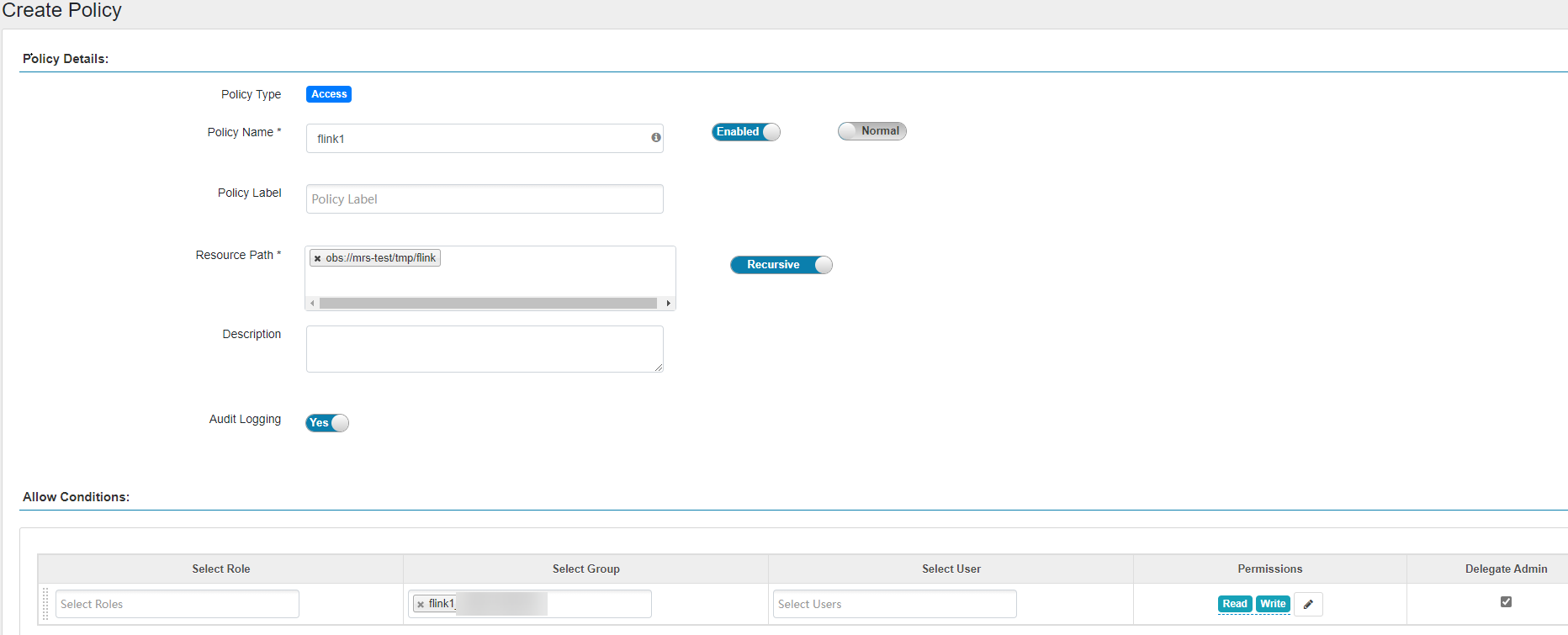
- Click Add New Policy to add the Read and Write permissions on OBS paths to the user group created in 2. If there are no OBS paths, create one in advance (wildcard character * is not allowed).
- Cascading authorization is not supported for view tables.
- Cascading authorization can be performed only on databases and tables, and cannot be on partitions. If a partition path is not in the table path, you need to manually authorize the partition path.
- Cascading authorization for Deny Conditions in the Hive Ranger policy is not supported. That is, the Deny Conditions permission only restricts the table permission and cannot generate the permission of the HDFS storage source.
- The permission of the HDFS Ranger policy is prior to that of the HDFS storage source generated by cascading authorization. If the HDFS Ranger permission has been set for the HDFS storage source of the table, the cascading permission does not take effect.
Configuring Permissions for CDL Service Users
If Kerberos authentication is enabled for the cluster (the cluster is in security mode) and you need to store real-time data to OBS after the interconnection, perform the following operations to grant the Read and Write permissions on the corresponding OBS path to the specific user:
- Log in to FusionInsight Manager and choose System > Permission > User Group. On the displayed page, click Create User Group.
- Create a user group without a role, for example, obs_cdl, and bind the user group to the corresponding CDL service user, for example, cdluser.
- Log in to the Ranger management page as the rangeradmin user.
- On the home page, click component plug-in name OBS in the EXTERNAL AUTHORIZATION area.
- Click Add New Policy to add the Read and Write permissions on OBS paths to the created user group. If there are no OBS paths, create one in advance (wildcard character * is not allowed).
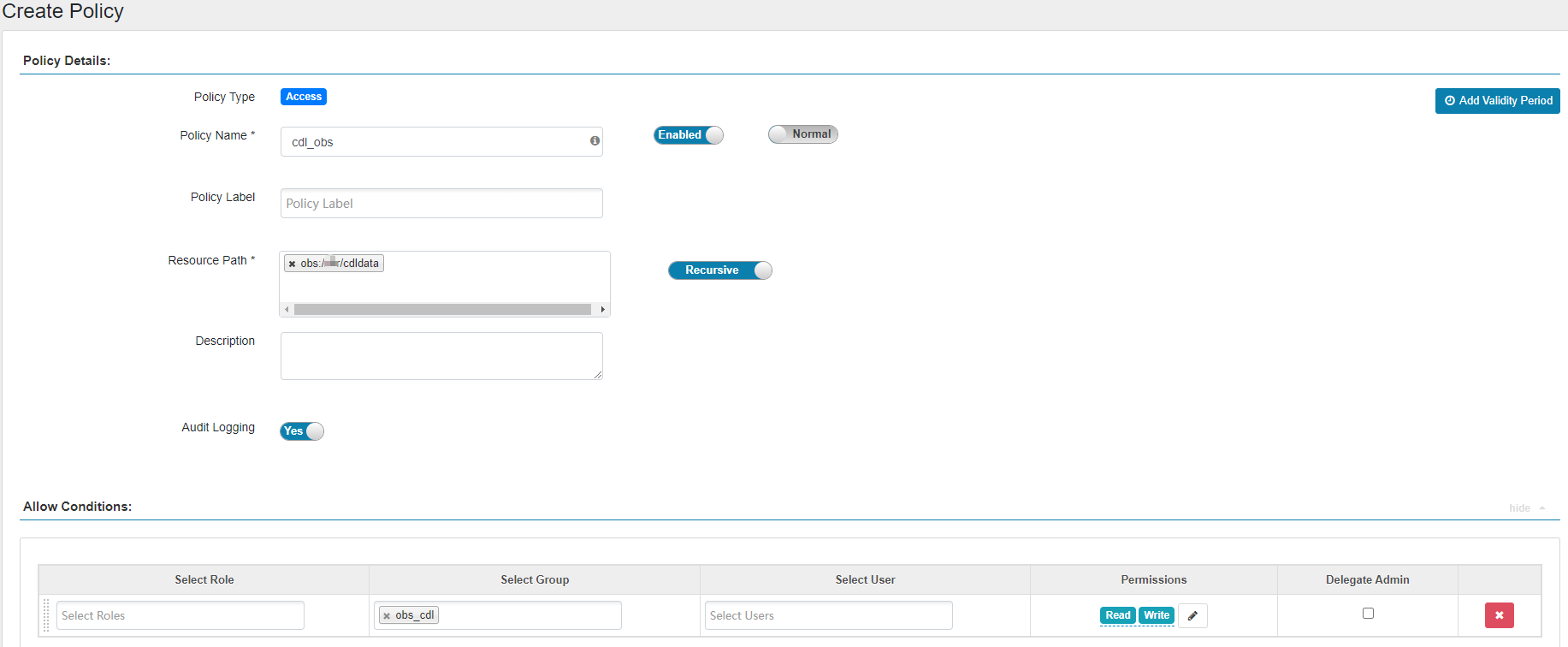
The following figure shows the configurations needed for adding the Read and Write permissions on obs://OBS parallel file system name/cdldata to user group obs_cdl.