Scenarios
A data disk image contains only service data. You can create a data disk image using a local image file or an external image file (image file on another cloud platform). Then, you can use the data disk image to create EVS disks and migrate your service data to the cloud.
Process
The following figure shows the process of creating a data disk image from an external image file.
Figure 1 Creating a data disk image from an external image file
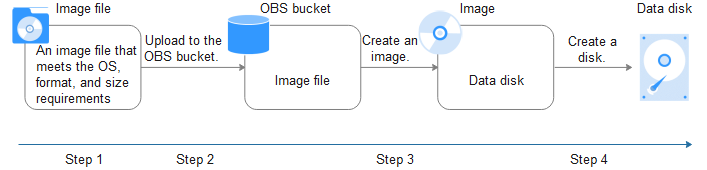
- Prepare an external image file. The file must be in VHD, VMDK, QCOW2, RAW, VHDX, QCOW, VDI, QED, ZVHD, or ZVHD2 format. If you want to use an image file in other formats, convert the file into any of the listed formats before importing it to the cloud platform.
- Upload the external image file to a Standard OBS bucket. For details, see Uploading an Image File.
- Create a data disk image. For details, see Procedure.
- Use the data disk image to create data disks. For details, see Follow-up Procedure.
Procedure
- Log in to the management console.
- Under Computing, click Image Management Service. The IMS console is displayed.
- Create a data disk image.
- Click Create Image in the upper right corner.
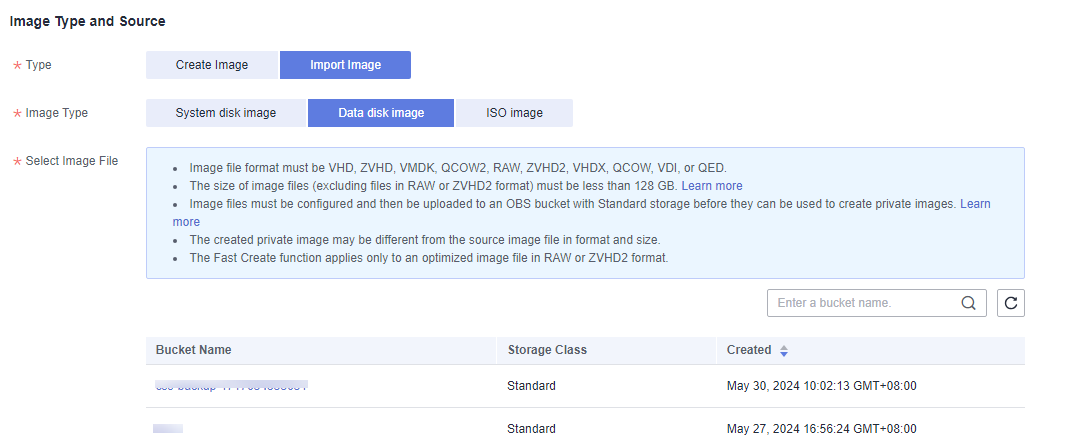
- In the Image Type and Source area, select Import Image for Type and then select Data disk image for Image Type.
- Select the bucket storing the image file from the list and then select the image file.
Figure 2 Creating a data disk image from an external image file
- To register the image file using Fast Create, select Enable Fast Create.Note
- Currently, fast import is only available for ZVHD2 and RAW image files.
- For how to convert image file formats and generate bitmap files, see Fast Import of an Image File.
After you select Enable Fast Create, select the confirmation information following Image File Preparation if you have prepared the required files.
- In the Image Information area, set the following parameters:
- OS Type: The value is Windows or Linux.
- Data Disk: The value ranges from 40 GiB to 2048 GiB and must be no less than the data disk capacity in the image file.
- Name: Enter a name for the image.
- (Optional) Encryption: If you want to encrypt the image, select KMS encryption and then select the key to be used from the list.
- Enterprise Project: Select an enterprise project from the drop-down list. This parameter is available only if you have enabled enterprise projects or your account is an enterprise account. To enable this function, contact your customer manager.An enterprise project groups cloud resources, so you can manage resources and users by project.
- (Optional) Tag: Set a tag key and a tag value for the image to easily identify and manage it.
- (Optional) Description: Describe the image.
- Click Apply Now.
- Confirm the settings and click Submit Application.
- Go back to the private image list and view the new data disk image.
When the image status changes to Normal, the image creation is complete.
Follow-up Procedure
If you want to use the created data disk image to create an EVS disk and attach it to an ECS, you can perform either of the following operations:
- Locate the row that contains the created data disk image and click Create Data Disk to create one or multiple data disks. Then attach the data disks to an ECS.
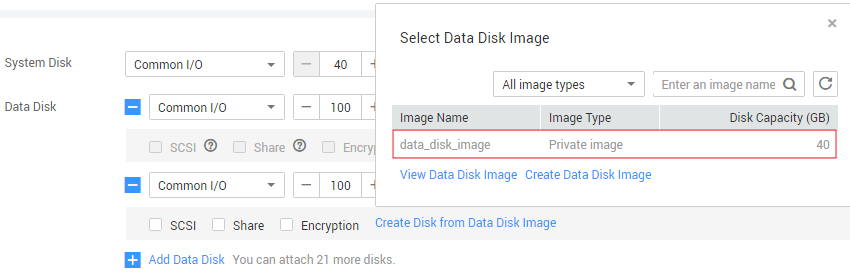
- On the page for creating ECSs, click Create Disk from Data Disk Image and select the data disk image.Note
In this way, a data disk image can be used to create a data disk for an ECS only once. For example, a data disk created from the data disk image data_disk_image has been added to the ECS. No other data disk created from this image can be added to the ECS.
Figure 3 Adding data disks