Scenarios
Keep your password secure. Reset the password if:
- The password is forgotten.
- The password has expired.
This section describes how to reset the root password. After resetting the password, you can log in to the ECS and change the keys or reset passwords for non-root users.
Prerequisites
- A backup has been created for the system disk. For details, see Backing Up an ECS.
- A temporary Linux ECS is available. It is located in the same AZ and has the same CPU architecture as the target ECS.
- You have bound an EIP to the temporary ECS.
Procedure
- Download the script for resetting the password and upload the script to the temporary ECS.
Download the password reset script. Use a connection tool, such as WinSCP, to upload the obtained changepasswd.sh script to the temporary ECS.
To download WinSCP, log in at https://winscp.net/.
- Stop the original Linux ECS, detach the system disk from it, and attach the system disk to the temporary ECS.
- Log in to the management console.
- Click
 in the upper left corner and select a region and project.
 - Under Computing, click Elastic Cloud Server.
- Stop the original ECS, go to the ECS details page, and click the Disks tab.Note
Do not forcibly stop the original ECS. Otherwise, password reset may fail.
- Locate the row containing the system disk to be detached and click Detach to detach the system disk from the ECS.
- Attach the system disk to the temporary ECS.
- On the details page of the temporary ECS, click the Disks tab.
- Click Attach Disk. In the displayed dialog box, select the system disk detached in step 2.e and attach it to the temporary ECS.
- Log in to the temporary ECS remotely and reset the password.
- Locate the row containing the temporary ECS and click Remote Login in the Operation column.
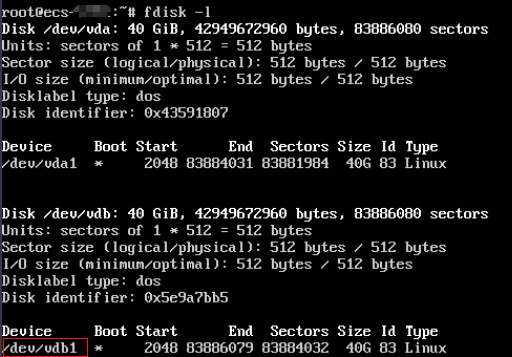
- Run the following command to view the directory of the system disk detached from the original Linux ECS now attached to the temporary ECS:
fdisk -l
Figure 1 Viewing the directory of the system disk
- Run the following commands in the directory where the changepasswd.sh script is stored to run the script for resetting the password:
chmod +x changepasswd.sh
./changepasswd.sh
When you run the password reset script, if the system displays a message indicating that there is no command related to logical volume manager (LVM), such as the message "no lvs command", install an LVM tool on the temporary ECS. The LVM2 tool is recommended, which can be installed by running the yum install lvm2 command.
NoteIf the original ECS and the temporary ECS both run CentOS 7, a mount failure may occur during script execution. To resolve this issue, replace mount $dev $mountPath with mount -o nouuid $dev $mountPath in the script.
- Enter the new password and the directory obtained in step 4.b as prompted.
If the following information is displayed, the password has been changed:
set password success.
- (Optional) Enable remote root login for non-root users.
vi /etc/ssh/sshd_config
Modify the following settings:
- Change PasswordAuthentication no to PasswordAuthentication yes.
Alternatively, uncomment PasswordAuthentication yes.
- Change PermitRootLogin no to PermitRootLogin yes.
Alternatively, uncomment PermitRootLogin yes.
- Change the value of AllowUsers to root.
Search for AllowUsers in the file. If AllowUsers is missing, add AllowUsers root at the end of the file.
- Change PasswordAuthentication no to PasswordAuthentication yes.
- Stop the temporary ECS, detach the system disk, and attach it back to the original Linux ECS. Then, restart the original Linux ECS.
- Restart the original Linux ECS.