Data Warehouse Service (DWS) is an online data analysis and processing database built on the cloud infrastructure and platform. It offers scalable, ready-to-use, and fully managed analytical database services, and is compatible with ANSI/ISO SQL-92, SQL-99, and SQL:2003 syntax. Additionally, DWS is interoperable with other database ecosystems such as PostgreSQL, Oracle, Teradata, and MySQL. This makes it a competitive option for petabyte-scale big data analytics across diverse industries.
Logical Cluster Architecture
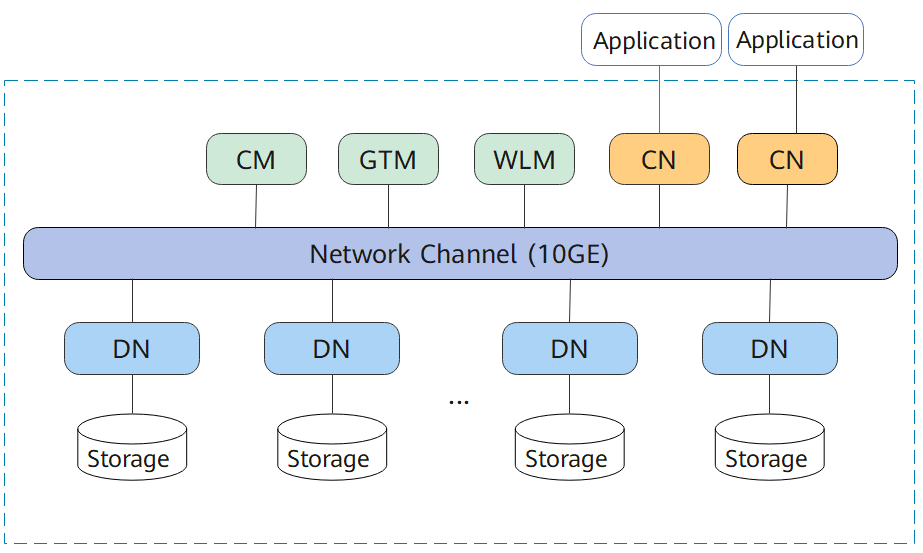
Figure 1 shows the logical architecture of a DWS cluster. For details about the instance, see Table 1.
Figure 1 Logical cluster architecture
|
Name |
Function |
Description |
|---|---|---|
|
Cluster Manager (CM) |
Cluster Manager. It manages and monitors the running status of functional units and physical resources in the distributed system, ensuring system stability. |
The CM consists of CM Agent, OM Monitor, and CM Server.
CM Servers are deployed in primary/standby pairs to ensure system high availability. CM Agent connects to the primary CM Server. If the primary CM Server is faulty, the standby CM Server is promoted to primary to prevent a single point of failure (SPOF). |
|
Global Transaction Manager (GTM) |
Generates and maintains the globally unique information, such as the transaction ID, transaction snapshot, and timestamp. |
The cluster includes only one pair of GTMs: one primary GTM and one standby GTM. |
|
Workload Manager (WLM) |
Workload Manager. It controls allocation of system resources to prevent service congestion and system crash resulting from excessive workload. |
You do not need to specify names of hosts where WLMs are to be deployed, because the installation program automatically installs a WLM on each host. |
|
Coordinator (CN) |
A CN receives access requests from applications, and returns execution results to the client; splits tasks and allocates tasks to different DNs for parallel processing. |
CNs in a cluster have equivalent roles and return the same result for the same DML statement. Load balancers can be added between CNs and applications to ensure that CNs are transparent to applications. If a CN is faulty, the load balancer automatically connects the application to the other CN. For details, see section "Associating and Disassociating ELB". CNs need to connect to each other in the distributed transaction architecture. To reduce heavy load caused by excessive threads on GTMs, no more than 10 CNs should be configured in a cluster. DWS handles the global resource load in a cluster using the Central Coordinator (CCN) for adaptive dynamic load management. When the cluster is started for the first time, the CM selects the CN with the smallest ID as the CCN. If the CCN is faulty, CM replaces it with a new one. |
|
Datanode (DN) |
A DN stores data in row-store, column-store, or hybrid mode, executes data query tasks, and returns execution results to CNs. |
There are multiple DNs in the cluster. Each DN stores part of data. DWS provides DN high availability: active DN, standby DN, and secondary DN. The working principles of the three are as follows:
The secondary DN serves exclusively as a backup, never ascending to active or standby status in case of faults. It conserves storage by only holding Xlog data transferred from the new active DN and data replicated during original active DN failures. This efficient approach saves one-third of the storage space compared to conventional tri-backup methods. |
|
Storage |
Functions as the server's local storage resources to store data permanently. |
- |
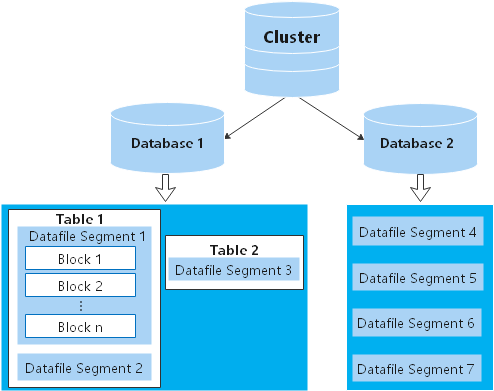
DNs in a cluster store data on disks. Figure 2 describes the objects on each DN and the relationships among them logically.
- A database manages various data objects and is isolated from other databases.
- A datafile segment stores data in only one table. A table containing more than 1 GB of data is stored in multiple data file segments.
- A table belongs only to one database.
- A block is the basic unit of database management, with a default size of 8 KB.
Data can be distributed in replication, round-robin, or hash mode. You can specify the distribution mode during table creation.
Figure 2 Logical database architecture
Physical Architecture of a Cluster
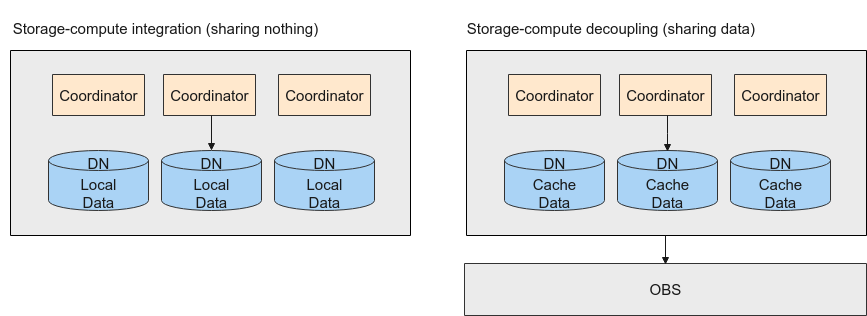
DWS supports the storage-compute coupled and decoupled architectures.
In the storage-compute coupled architecture, data is stored on local disks of DNs. In the storage-compute decoupled architecture, local DN disks are used only for data cache and metadata storage, and user data is stored on OBS. You can select an architecture as required.
Figure 3 Architecture selection
Storage-Compute Coupled Architecture
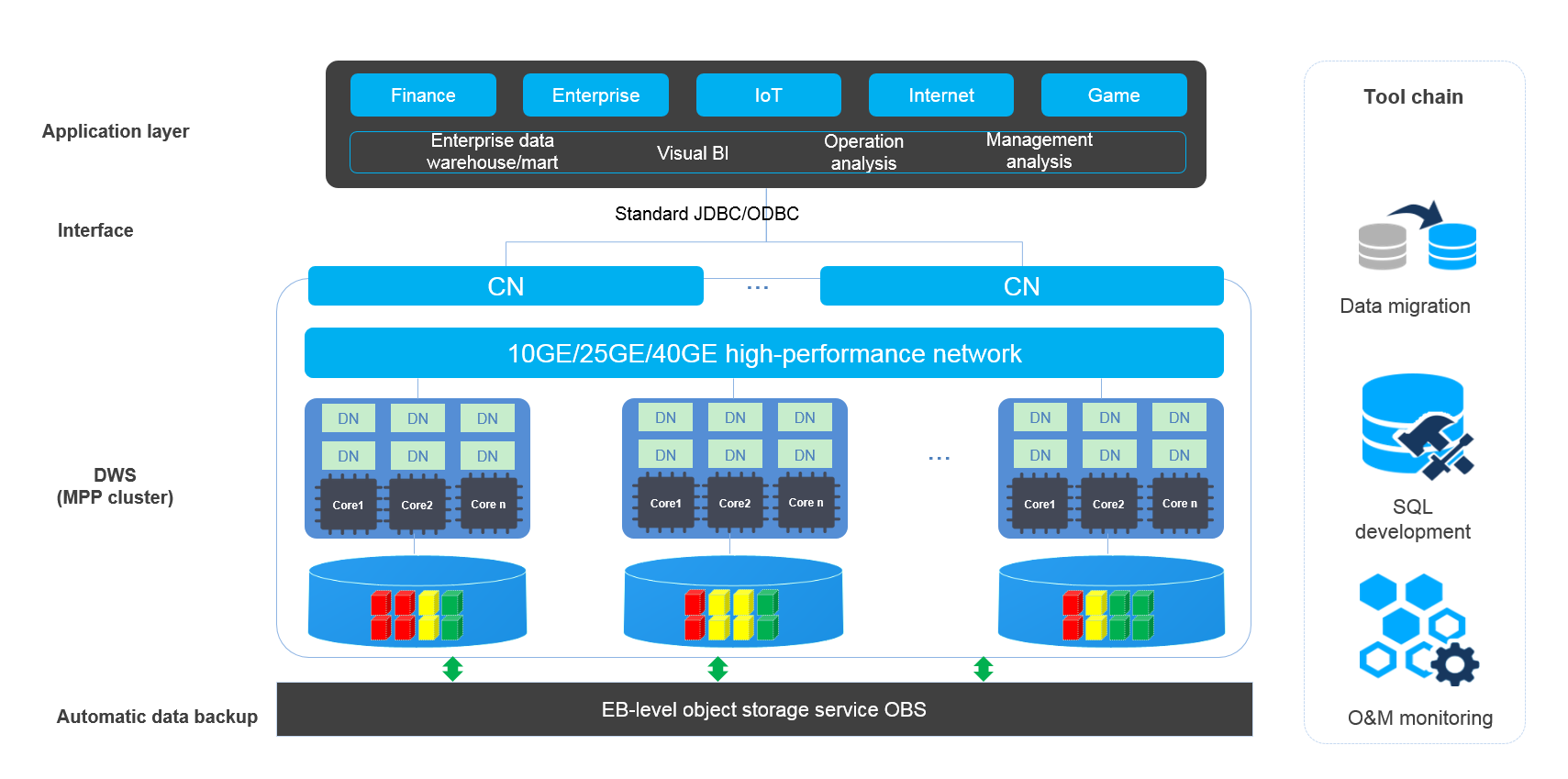
DWS employs the shared-nothing architecture and the massively parallel processing (MPP) engine, and consists of numerous independent logical nodes that do not share the system resources such as CPUs, memory, and storage. In such a system architecture, service data is separately stored on numerous nodes. Data analysis tasks are executed in parallel on the nodes where data is stored. The massively parallel data processing significantly improves response speed.
Figure 4 Architecture
- Application layer
Data loading tools, Extract-Transform-Load (ETL) tools, Business Intelligence (BI) tools, and data mining and analysis tools can be integrated with DWS through standard interfaces. DWS is compatible with the PostgreSQL ecosystem, and the SQL syntax is compatible with Oracle and Teradata. Applications can be smoothly migrated to DWS with only a few changes.
- API
Applications can connect to DWS through standard JDBC and ODBC.
- DWS
A DWS cluster contains nodes of the same flavor in the same subnet. These nodes jointly provide services. Datanodes (DNs) in a cluster store data on disks. CNs, or Coordinators, receive access requests from the clients and return the execution results. They also split and distribute tasks to the Datanodes (DNs) for parallel execution.
- Automatic data backup
Cluster snapshots can be automatically backed up to the EB-level Object Storage Service (OBS), which facilitates periodic backup of the cluster during off-peak hours, ensuring data recovery after a cluster exception occurs.
A snapshot is a complete backup of DWS at a specified time point. It records all configuration data and service data of the cluster at the specified moment.
- Tool chain
DWS provides a broad array of tools, including the General Data Service (GDS) for parallel data loading, SQL editor for SQL development, and GDS-Kafka for data migration. The cluster O&M can be monitored on a console.
Storage-Compute Decoupled Architecture
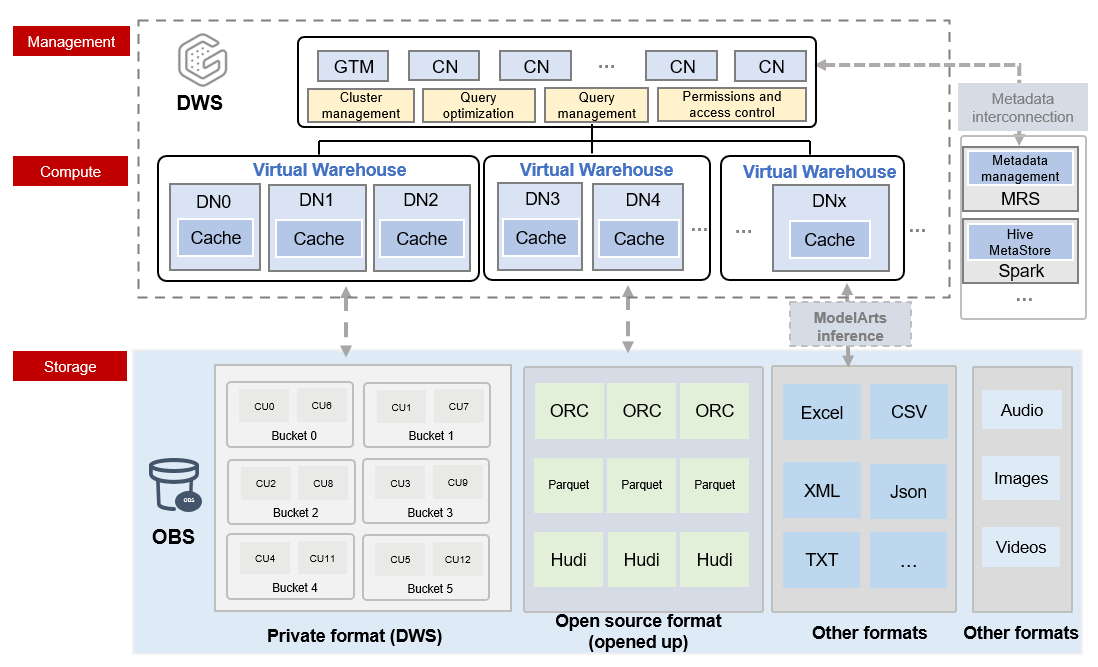
The newly released DWS storage-compute decoupled cloud-native data warehouse provides resource pooling, massive storage, and the MPP architecture with decoupled compute and storage. This enables high elasticity, real-time data import and sharing, and lake warehouse integration.
Cloud-native data warehouse allows for separate scaling of compute and storage resources through decoupled compute and storage. Users can easily adjust their computing capabilities during peak and off-peak hours. Additionally, storage can be expanded limitlessly, allowing for quick and flexible responses to service changes while maintaining cost-effectiveness.
The storage-compute decoupled architecture has the following advantages:
- Lakehouse: It simplifies the maintenance and operation of an integrated lakehouse. It seamlessly integrates with DLI, supports automatic metadata import, accelerates external table queries, enables joined queries of internal and external tables, and allows for reading and writing of data lake formats, as well as easier data import.
- Real-time write: It provides the H-Store storage engine which optimizes real-time data writes and supports high-throughput real-time batch writes and updates.
- High elasticity: Scaling compute resources and using on-demand storage can result in significant cost savings. Historical data does not need to be migrated to other storage media, enabling one-stop data analysis for industries such as finance and Internet.
- Data sharing: Multiple loads share one copy of data in real time, while the computing resources are isolated. Multiple writes and reads are supported.
Figure 5 Storage-compute decoupled architecture
- Superb scalability
- Virtual warehouses (VWs) can be expanded concurrently based on service requirements.
- Data is shared among multiple VWs in real-time, eliminating the need for data duplication.
- Multiple VWs enhance throughput and concurrency while providing excellent read/write and load isolation.
- Lakehouse
- Seamless hybrid query across data lakes and data warehouses
- In data lake analysis, you can enjoy the ultimate performance and precise control of data warehouses.
Comparison Between Storage-Compute Coupled and Decoupled Architectures
|
Version |
Coupled storage and compute |
Decoupled storage and compute |
||
|---|---|---|---|---|
|
Storage medium |
Data is stored on the local disks of compute nodes. The local disks can be cloud SSDs, depending on the storage type you select.
|
Column-store data is stored in Cloud Object Storage Service (OBS). Local disks of compute nodes are used as the query cache of OBS data. Row-store data is still stored in local disks of compute nodes. |
||
|
Advantage |
Data is stored on local disks of compute nodes, providing high performance. |
The architecture separates storage and compute, offering layered elasticity, on-demand storage use, rapid compute scaling, unlimited computing power, and capacity. Data stored on object storage reduces costs and multiple VWs support higher concurrency. Data sharing and lakehouse integration. |
||