Scenarios
If you have deployed ECSs and other cloud services in a VPC, you can configure private zones for the ECSs so that they can communicate with each other or access the cloud services over a private network.
The following are operations for you to create a private zone and add an A record set for it.
Procedure
Figure 1 shows the process of configuring a private zone for an ECS.
Figure 1 Configuring a private zone for an ECS
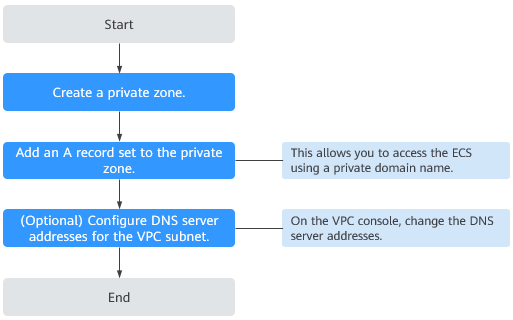
To ensure that a private zone and its record sets are properly applied within a VPC, verify that the VPC subnets use the private DNS server addresses provided by the DNS service.
You can also change the DNS servers of the VPC subnet where the domain name is used.
Step 1: Create a Private Zone
Before using a private domain name (for example, example.com) to access an ECS, you need to create a private zone.
- Log in to the management console.
- In the service list, choose Network > Domain Name Service.
- In the navigation pane on the left, choose Private Zones.
The Private Zones page is displayed.
- Click
 in the upper left corner and select the desired region and project.
 - In the upper right corner of the page, click Create Private Zone.
- On the Create Private Zone page, configure parameters as prompted. For details, see Creating a Private Zone.
- Click OK.
- Switch back to the Private Zones page.
You can view the created private zone in the private zone list.
NoteYou can click the domain name to view SOA and NS record sets automatically added to the zone.
- The SOA record set includes administrative information about your zone, as defined by the Domain Name System (DNS).
- The NS record set defines the authoritative DNS servers for the domain name.
Step 2: Add an A Record Set
Add an A record set for the created private zone.
- On the Private Zones page, locate the private zone you created and click the domain name.
The Record Sets tab is displayed.
- In the upper right corner of the page, click Add Record Set.
- Configure the parameters as follows:
- Name: Leave this parameter blank. This is a record set for the domain name, which is example.com.
- Type: Retain the default setting A – Map domains to IPv4 addresses.
- Value: Enter the private IP address of the ECS.
Retain the default values for other parameters. For details, see Adding an A Record Set.
- Click OK.
- Switch back to the Record Sets tab.
The added record set is in the Normal state.
Step 3: Change the DNS Servers for the VPC Subnet
To ensure that a private zone and its record sets are properly applied within a VPC, verify that the VPC subnets use the private DNS server addresses provided by the DNS service.
If the DNS server addresses used by VPC subnets are different from those provided by the DNS service, change them.
- View the private DNS server addresses provided by the DNS service.
- Log in to the management console.
- In the service list, choose Network > Domain Name Service.
- In the navigation pane on the left, choose Private Zones.
The Private Zones page is displayed.
- Click in the upper left corner and select the desired region and project.
- In the private zone list, locate the private zone and click the domain name.
View the private DNS server addresses for the VPC subnet on the top of the record set list.
- Check whether the private DNS server addresses are the same as those provided by the DNS service. If they are different, go to 2.
- Change the private DNS server addresses for the VPC subnet.
- Go to the private zone list.
- Click the VPC name in the Associated VPCs column.
On the VPC console, change the DNS server addresses for the VPC subnet.
For details, see the Virtual Private Cloud User Guide.