Configure TCP (port 8000) and UDP (ports 7000 to 7100) in the security group inbound rule of the database audit instance to allow the agent to communicate with the audit instance.
This section describes how to configure TCP (port 8000) and UDP (ports 7000 to 7100) for a security group.
You can configure security group rules before or after installing an agent.
Prerequisites
- You have added an agent to your database.
Adding a Security Group Rule
- Log in to the management console.
- Click
 and choose . The Dashboard page is displayed.
- In the navigation tree on the left, choose Database Audit > Databases.
- In the Instance drop-down list, select the instance whose security group rule is to be added.
- Record the IP address of the agent node.
Click
 next to the database to view the information of its agent, and record Installing Node IP Address.
Figure 1 Installing Node IP Address

- Click Add Security Group Rule.
- In the displayed dialog box, record the security group name (for example, default) of the database audit instance, as shown in Figure 2.
Figure 2 Adding a security group rule
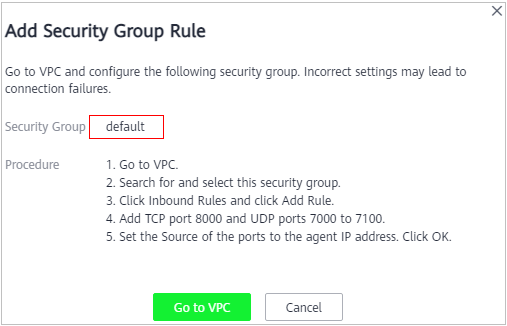
- Click Go to VPC.
- In the security group list, enter the group name default in the search box in the upper right corner of the list, and click
 or press Enter. The group information is displayed in the list.
- Click the group name default.
- Click the Inbound Rules tab.
Check whether TCP (port number 8000) and UDP protocols (port number from 7000 to 7100) are configured in the inbound rules of the security group for the IP address of the installing node.
- If the inbound rules of the security group have been configured for the installing node, go to Downloading an Agent.
- If no inbound rules of the security group have been configured for the installing node, go to 12.
- Add an inbound rule for the installing node.
- On the Inbound Rules tab, click Add Rule.
Figure 3 Adding rules

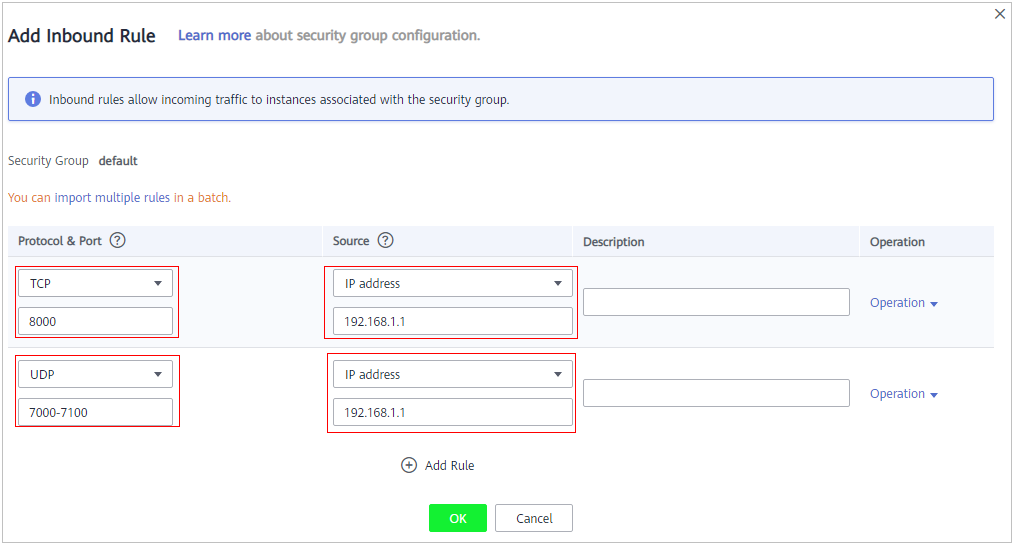
- In the Add Inbound Rule dialog box, add TCP (port number 8000) and UDP protocols (port number from 7000 to 7100).Note
The source can be an IP address, an IP address segment, or a security group. Examples:
- IP address: 192.168.10.10/32
- IP address segment: 192.168.52.0/24
- All IP addresses: 0.0.0.0/0
- Security group: sg-abc
Figure 4 Add Inbound Rule dialog box
- Click OK.
After adding a security group rule, download and install the agent on a database or application, depending on the add mode you chose. Database audit can be enabled only if the audited object is connected to the database audit instance.
- On the Inbound Rules tab, click Add Rule.