The interactions component is used to add interactions to data reports.
Prerequisites
- You have subscribed to DataArts Insight.
- A project for managing data sources has been created. For details, see Creating a Project.
- You have obtained data. For details, see Creating a Data Source.
- You have prepared the required dataset. For details, see Creating a Dataset Through Visual Configuration.
Procedure
- Click
 in the upper left corner to select a region.
 - In the lower left corner of the navigation pane, select an enterprise project from Enterprise Project.
- On DataArts Insight's Workspace page, click Create and select Create Screen.
- In the displayed dialog box, select a project and click Confirm.
- Click the Interactions icon in the navigation pane to switch to the interactions component page.
- Drag an interactions component to the canvas.
- In the right pane, set related parameters for the interactions component.
Interactions Component Types
Type | Description | Data Element |
|---|---|---|
Full Screen | Used to control the full-screen display of the screen. | None |
iFrame | Used to add the iFrame content to the screen. | Link |
Search | Used to add a search box to the screen. | Control variables |
Single-Select Dropdown List | Used to select one option from multiple data options in a drop-down list. | Options/Dimensions and control variables |
Tabs | Used to display multiple screens as tab pages. | Control variables |
Multi-Option Drop-Down List | Used to select several options from multiple data options in a drop-down list. | Options/Dimensions and control variables |
Fields
- iFrame: Enter a link by yourself.
- Single-Select Dropdown List/Multi-Option Drop-Down List:
- In the Data area on the right, select a dataset, and double-click or drag required dimension and metric fields to the corresponding areas on the Fields tab.
- Set a filter.
- Find the data field you need in the dimension and metric lists within the data column.
- Click
 next to the field you wish to filter and you will be directed to the filter settings page.
 - Click OK.
Table 2 Filter parameters Type
Parameter
Description
string
Condition
Filter Mode: The options are Condition and Enumeration.
Condition Type: The options are And condition and Or condition.
Filter Condition: The options are Exact match, Contain, Start with, End with, Not match, Not contain, Null, and Not null.
Enumeration
Query Mode: The options are Single-select and multi-select.
Filter Condition: The options are >, ≥, <, ≤, =, ≠, Null, and Not null.
Metric
Condition Type
The options are And condition and Or condition.
Filter Condition
The options are >, ≥, <, ≤, =, ≠, Null, and Not null. You can select Before aggregation and After aggregation for data.
NOTE:If you select Before aggregation, data is filtered before aggregation. If you select After aggregation, data is filtered after aggregation. For aggregation concepts, see Creating a Dataset.
You can click Create Filter Condition to set multiple filter criteria.
Date
Range value
Select a time range for filtering.
Single value
Set a single time for filtering.
Condition
You can select And condition or Or condition as the condition type and select filter condition like >, ≥, <, ≤, and =.
You can click Create Filter Condition to set multiple filter criteria.
- Set sorting.
- Drag and drop required data fields from the Dimension and Metric (Indicator) areas under Data to the Sorting area.
- Click
 next to a field in the Sorting area and select a sorting mode. The sorting modes are Ascending, Descending, and Custom.
 - To cancel sorting, click
 next to the sorting field.
- Set the maximum number of query results.
Enter the maximum number of records that can be returned in the text box. The default value is 1000.
- Set automatic refresh.
The auto refresh interval supports the following options: no refresh, 1 minute, 5 minutes, 15 minutes, and 30 minutes.
Styles
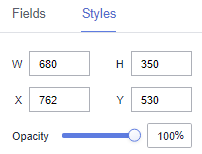
- Size/Position
- W: width of the target, in pixels.
- H: height of the target, in pixels.
- X: position of the target on the canvas, in pixels.
- Y: position of the target on the canvas, in pixels.
- Opacity: Adjust the transparency of the target on the canvas using a slider or by manually entering a percentage. A higher percentage means lower transparency.
Figure 1 Size/Position
- Full Screen
- Global Style
- Full Screen: You can enter an image URL or upload a local image.
- Exit Full Screen: You can enter an image URL or upload a local image.
- Background Color: Set the background color of the full screen.
- Round Corner: Set the round corner of the full screen.
- Display Mode: Select Always or Mouse hover.
- Global Style
- Search
- Styles
- Tooltips: Set the text, font size, and color.
- Font Size: Set the font size for search.
- Font Weight: Set the font weight for search.
- Font Color: Set the font color for search.
- Background Color: Set the background color for search.
- Search Button Color: Set the color of the search button.
- Border: Set the width, color, and type of the border. The border type can be Solid, Dotted, or Dashed.
- Styles
- Single-Select Dropdown List
- Styles
- Background Color: Set the background color of the single-select drop-down list.
- Border: Set the width, rounded corners, color, and type of the border.
- Arrow: Set the color, size, and right margin of the arrow.
- Font Style: Set the font size, font weight, font color, card corner angle, and background color.
- Result Box Style
- Maximum Height: Set the maximum height of the single-select drop-down list.
- Font Size: Set the font size of the single-select drop-down list.
- Font Weight: Set the font weight of the single-select drop-down list.
- Font Color: Set the font color of the single-select drop-down list.
- Hover Option Color: Set the color of a hover option in the single-select drop-down list.
- Selected Option Color: Set the color of a selected option in the single-select drop-down list.
- Background Color: Set the background color of the single-select drop-down list.
- Styles
- Multi-Option Drop-Down List
- Styles
- Background Color: Set the background color of the multi-option drop-down list.
- Border: Set the width, rounded corners, color, and type of the border.
- Arrow: Set the color, size, and right margin of the arrow.
- Card Style: Set the font size, font weight, font color, card corner angle, and background color.
- Result Box Style
Maximum Height: Set the maximum height of the multi-option drop-down list.
- Initial Settings
- Tooltip Text: Set the tooltip text for options in the drop-down list.
- Text Size: Customize the size.
- Styles
- Tabs
- Global Style
- Font: Set the font for tabs.
- Rows: Set the number of rows in the tabs. The value cannot be smaller than 1.
- Border Width: Set the border width of the tabs. The value cannot be smaller than 0.
- Select Type: Set the type of the tabs.
- Tab Configuration: Set the content and values of the tabs.
- Label Configuration
- Font Size: Set the font size. The value ranges from 10 to 100.
- Font Color: Set the label color.
- Font Weight: Set the font weight. The value can be Normal, Bold, Bolder, or Lighter.
- Background Color: Set the background color of the labels.
- Corner Radius: Set the rounded corner radius of labels. The value ranges from 0 to 50.
- Selected Text Color/Selected Background Color/Hover Border Color: Customize the color.
- Single-Select Carousel
- Carousel Switch: Select or deselect the check box to enable or disable carousel.
- Carousel Interval: Set the carousel interval. The value cannot be smaller than 3000.
- Global Style
Interactions
- Interaction Definition
- Click Interactions.
- Choose Interactions > Interaction Definition > Edit interaction event. The interaction editing page is displayed.
Figure 2 Edit interaction

- You can set events.
- Click Add Action to add an action. Actions can be changed between hidden and visible states, with different action values displayed depending on the selected widget.
- Click OK to complete the setting of the interaction event.Note
- Data filtering operators are categorized by string, number, and date types.
- String operators support exact matches, inequalities, inclusions, exclusions, prefixes, suffixes, and checks for emptiness.
- Number operators allow for equality, inequality, range comparisons, and checks for emptiness.
- Date operators support equality and range comparisons.
- Data filtering operators are categorized by string, number, and date types.
- Control Variables
- Click Interactions. Expand Control Variables and click Add Variable.
Figure 3 Add Variable

- Select the event, field value, and variable name, and click Save.
- Click Interactions. Expand Control Variables and click Add Variable.