Scenarios
CTS periodically sends trace files to OBS buckets. A trace file is a collection of traces. CTS generates trace files based on services and transfer cycle, and adjusts the number of traces contained in each trace file as needed. CTS can also save audit logs to LTS log streams.
This section describes how to view historical operation records in trace files downloaded from OBS buckets and in LTS log streams.
Prerequisites
You have configured a tracker in CTS and enabled Transfer to OBS or Transfer to LTS. For details about how to configure a transfer, see Configuring a Tracker.
Querying Traces Transferred to OBS
If you enable Transfer to OBS when configuring the tracker, traces will be periodically transferred to a specified OBS bucket as trace files for long-term storage.
- Log in to the management console.
- Click
 in the upper left corner and choose Management & Deployment > Cloud Trace Service. The CTS console is displayed.
 - Choose Tracker List in the navigation pane.
- Click a bucket in the OBS Bucket column.
- In the OBS bucket, locate the file storage path to view the desired trace, and click Download on the right to download the file to the default download path of the browser. If you need to save it to a custom path, click More > Download As on the right.
- The trace file storage path is as follows:
OBS bucket name/CloudTraces/Region/Year/Month/Day/Tracker name/Cloud service
Example: User-defined name/CloudTraces/Region/2016/5/19/system/ECS
- The trace file naming format is as follows:
Trace file prefix_CloudTrace_Region/Region-project_Time when the trace file was uploaded to OBS: Year-Month-DayTHour-Minute-SecondZ_Random characters.json.gz
Example: FilePrefix_CloudTrace_region-project_2024-12-13T01-29-19Z_47b9d51830deff47.json.gz
Note- The OBS bucket name and trace file prefix are set by you and other parameters are automatically generated.
- File download will incur request fees and traffic fees.
- If you disable Sort by Cloud Service when configuring a tracker to transfer traces to OBS, the cloud service will not be displayed in the transfer path. Example: User-defined name/CloudTraces/Region/2016/5/19/system
For details about key fields in the CTS trace structure, see Trace Structure and Example Traces.
- The trace file storage path is as follows:
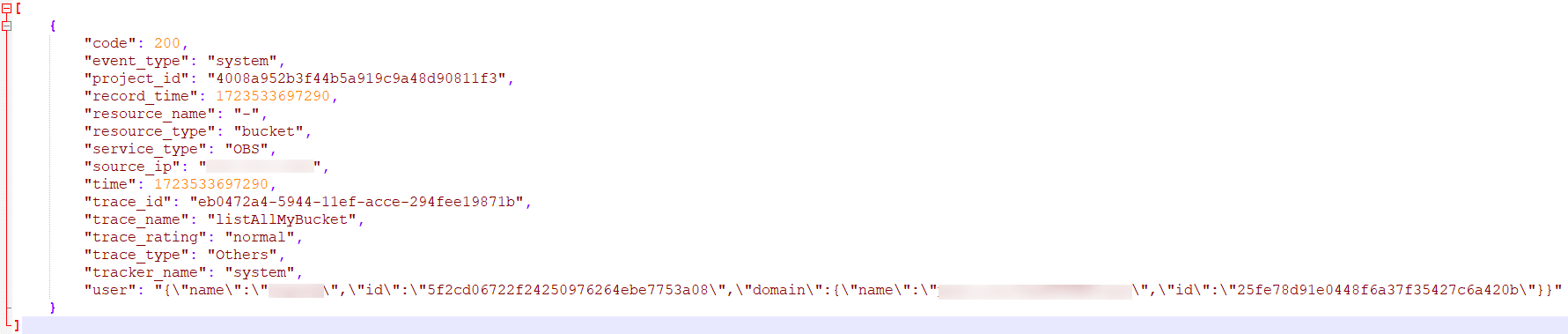
- Decompress the downloaded package to obtain a JSON file with the same name as the package, as shown in Figure 1. Open the JSON file using a text file editor to view traces.
Figure 1 JSON file
Querying Traces Transferred to LTS
If you enable Transfer to LTS when configuring a tracker, traces will be transferred to the CTS/{Tracker Name} log stream for long-term storage. {Tracker Name} indicates the name of the current tracker. For example, the log stream path of the management tracker is CTS/system-trace.
- Log in to the management console.
- Click
 in the upper left corner and choose Management & Deployment > Cloud Trace Service. The CTS console is displayed.
 - Choose Tracker List in the navigation pane.
- Click an LTS log stream in the Storage column.
- On the Log Stream tab page in the CTS log group page, select the {Tracker name} log stream to view trace logs.
For details about key fields in the CTS trace structure, see Trace Structure and Example Traces.
- Click
 to download the log file to your local PC. Each time you can download up to 5,000 log events. If the number of selected log events exceeds 5,000, you cannot download them directly from LTS. Transfer them to OBS and then download them from OBS.