When monitoring big data platforms in real time, O&M teams need to be promptly notified of cluster health status or any abnormal changes in service metrics. Although Elasticsearch provides powerful search capabilities, the native engine lacks deep integration with cloud-native notification services. CSS addresses this by offering a built-in Open Distro alerting plugin that integrates seamlessly with the Simple Message Notification (SMN) service. This integration enables a highly automated monitoring workflow: monitors are configured to query specified indexes periodically; triggers evaluate the query results against predefined thresholds to identify anomalies and generate alerts; CSS then calls the SMN API to push alerts to subscribers.
How the Feature Works
CSS Elasticsearch clusters provide the built-in open-source Open Distro alerting plugin, which triggers alerts and sends notifications via SMN when predefined conditions are met.
Figure 1 Alert notification link

- A monitor defines the query conditions, such as which index to query and how often.
- A trigger checks the monitor's query results to determine whether preset conditions that trigger an alert are met (for example, count > 100). If yes, it generates an alert and triggers a predefined action.
- A destination is a message channel that defines the SMN topic where alerts are to be sent.
- A CSS cluster is granted permission to access SMN through an agency.
- SMN sends the received alert to subscribers.
For details about the Open Distro alerting plugin, see the official document Open Distro Alerting.
Constraints
Only Elasticsearch 7.6.2 and 7.10.2 clusters provide a built-in Open Distro alerting plugin. Only clusters of these versions support alert notification via SMN.
Preparations
- Prepare the needed SMN topic. Create a topic on SMN and add subscribers (mobile number or email address). For details, see "Creating a Topic" and "Adding a Subscription" in the Simple Message Notification User Guide.
- Grant SMN access to CSS. You can configure an IAM agency to authorize CSS to access SMN.
- Use a CSS administrator account to perform: Log in to the CSS management console.
The CSS administrator account must have the following minimum IAM permissions:
"iam:agencies:listAgencies","iam:roles:listRoles","iam:agencies:getAgency","iam:agencies:createAgency","iam:permissions:listRolesForAgency","iam:permissions:grantRoleToAgency","iam:permissions:listRolesForAgencyOnProject","iam:permissions:revokeRoleFromAgency","iam:roles:createRole" - In the navigation pane, choose Service Authorization.
- On the Service Authorization page, click Create Agency for SMN. In the dialog box displayed, confirm that the agency is successfully created.
- If an agency has already been created, the message "The css_smn_agency already exists. Please check the agency permission." is displayed in the upper right corner.
- If you do not have the permission to create an agency, an error message is displayed in the upper right corner indicating "no permission", in which case, check that the administrator account has been assigned the necessary IAM permissions.
- Use a CSS administrator account to perform: Log in to the CSS management console.
Configuring Alert Notifications via SMN
- Log in to the CSS management console.
Log in using an account with CSS permissions.
- In the navigation pane on the left, choose Clusters > Elasticsearch.
- In the cluster list, find the target cluster, and click Kibana in the Operation column to log in to the Kibana console.
- On the Kibana page, choose Open Distro for Elasticsearch > Alerting in the navigation pane on the left.
- Create an SMN destination for sending alert messages.
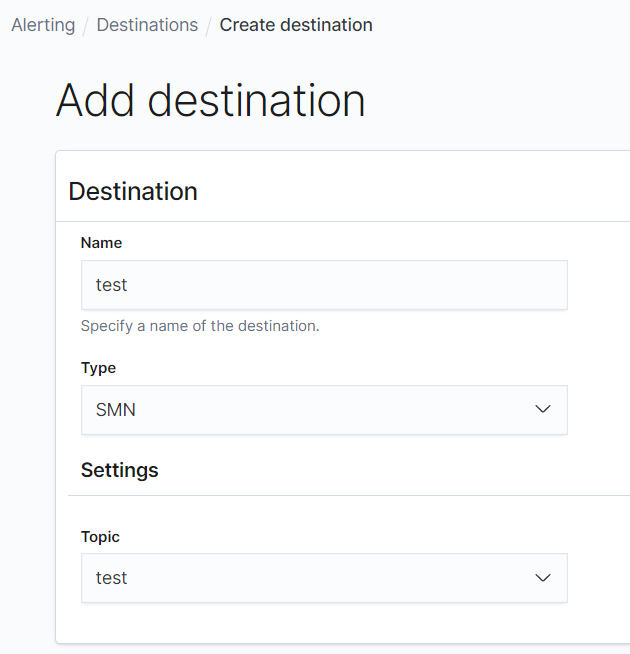
- On the Alerting page, click the Destinations tab and click Add destination to configure destination information.
Table 1 Destinations parameter description Parameter
Description
Name
User-defined destination name. You are advised to use English letters and digits.
Type
Type of the notification. Select SMN.
Topic
An associated SMN topic. Select the SMN topic created in Preparations.
Figure 2 Add destination
- Click Create.
- Return to the Destinations page. If the new destination is displayed, it has been created.
Figure 3 Destination list

- On the Alerting page, click the Destinations tab and click Add destination to configure destination information.
- Create a monitor and trigger to define the alarm triggering conditions and monitor interval.
- Click the Monitors tab on the Alerting page, and click Create monitor to configure the monitor.
Table 2 Monitor parameters Parameter
Description
Configure monitor
Monitor name
User-defined monitor name
Monitor state
Whether to disable the monitor.
- Select Disable monitor: Disable the monitor.
- (Recommended) Deselect Disable monitor: Enable the monitor.
Define monitor
Method of definition
Select a method to define the monitor. You are advised to use Define using extraction query.
- Define using visual graph: use a visual query
- Define using extraction query: use a specific query
Index
Index to be monitored
Time field
Timestamp used for time-based aggregations, such as count.
This parameter is required only when you select Define using visual graph to define the monitor.
Monitor schedule
Frequency
Select the monitor frequency and set the monitor interval. The options include:
- By interval
- Daily
- Weekly
- Monthly
- Custom cron expression
- Click Create. The Create trigger page is displayed.
- On the Create trigger page, set the alert triggering conditions and the actions to be triggered.
Table 3 Trigger parameters Parameter
Description
Define trigger
Trigger name
User-defined trigger name
Severity level
Sensitivity of a trigger, that is, the number of alerts that need to be triggered before a notification is sent. 1 indicates the highest sensitivity.
Trigger condition
Trigger condition. An alert is triggered when the trigger condition is hit.
Configure actions
Action name
Name of a trigger action
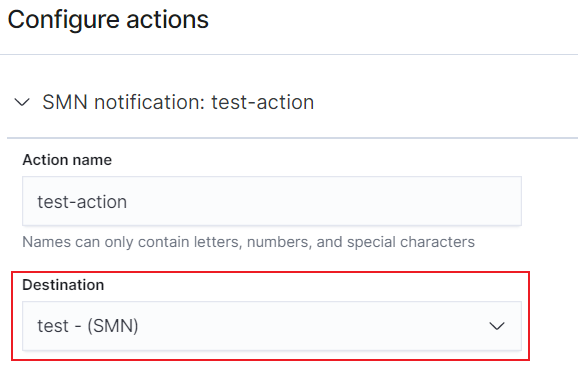
Destination
Select the SMN destination created in 5.
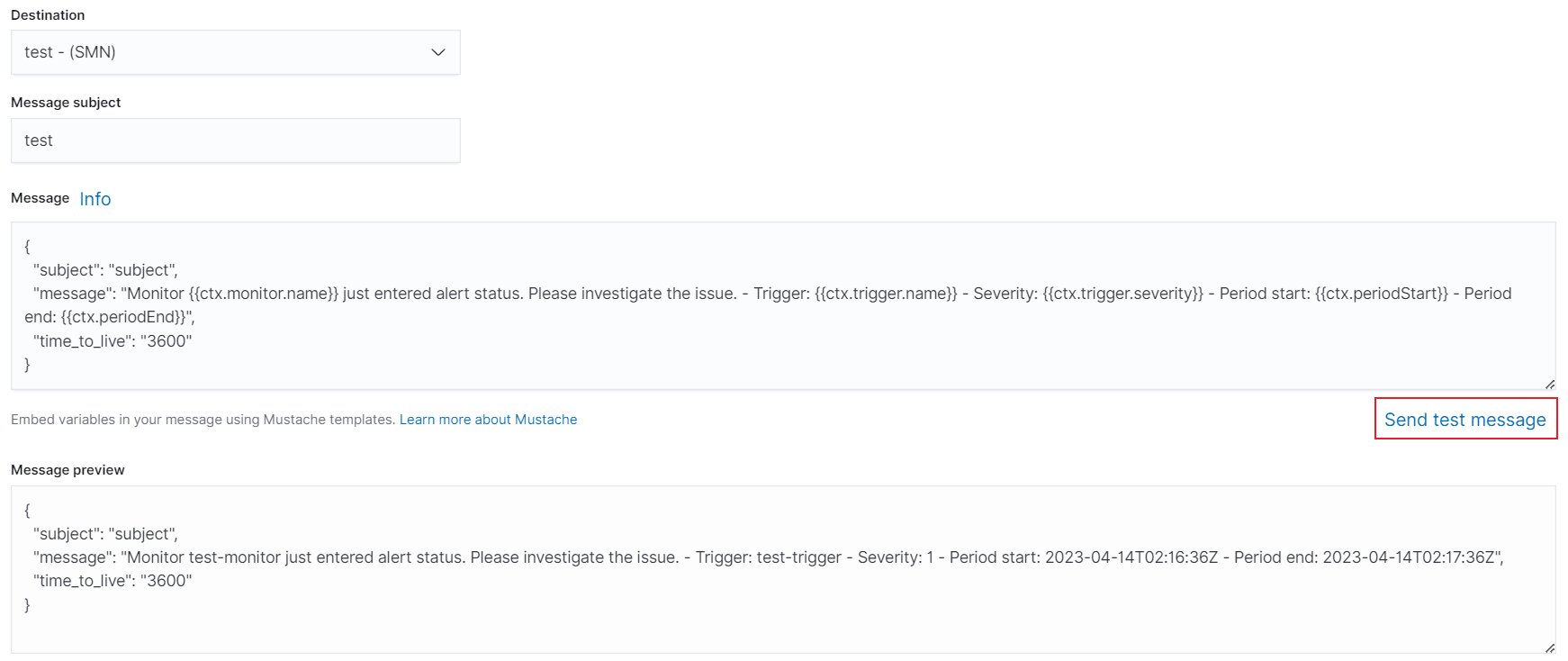
Message subject
Message title. This parameter is required only for Elasticsearch 7.10.2 clusters.
Message
Message body. By default, the subject and body are defined when the destination is an email address.
Action throttling
Specify the message frequency to limit the number of notifications you receive within a given span of time. Without it, high-frequency or low-severity triggers may cause information overload or result in unexpected cloud costs.
For example, if this parameter is set to 10 minutes, SMN sends only one alert notification in the next 10 minutes even if the trigger condition is hit multiple times. After 10 minutes, SMN sends another notification if the trigger condition is met again.
Figure 4 Setting the destination of a trigger action
- Click Send test message to test the alert notification link.
Figure 5 Sending a test message
- As shown in Figure 6, if a subscriber to the SMN topic receives the message, alert notification is configured successfully.
Figure 6 Email notification

- Click Create to go to the monitor details page.
- Click the Monitors tab on the Alerting page, and click Create monitor to configure the monitor.