As business expands, and data volumes and access requests grow exponentially, a monolithic architecture where a single cluster handles both write and query requests faces typical challenges like resource contention and overload. To address these challenges, CSS introduces read/write splitting between Elasticsearch clusters.
Elasticsearch read/write splitting works by having leader and follower clusters collaborate together. The feature delivers the following benefits:
- Decoupled read and write loads: The leader cluster ensures data ingestion performance, while the follower clusters deliver scalable, high-concurrency query performance. There is no more resource contention, and peak loads are reduced.
- Flexible scalability: The write and query clusters can be scaled horizontally and independently. Cross-region cluster deployment is supported.
- Data consistency guarantee: Data can be synchronized in real time, with low latency. Incremental synchronization is also supported.
How the Feature Works
Figure 1 Read/write splitting
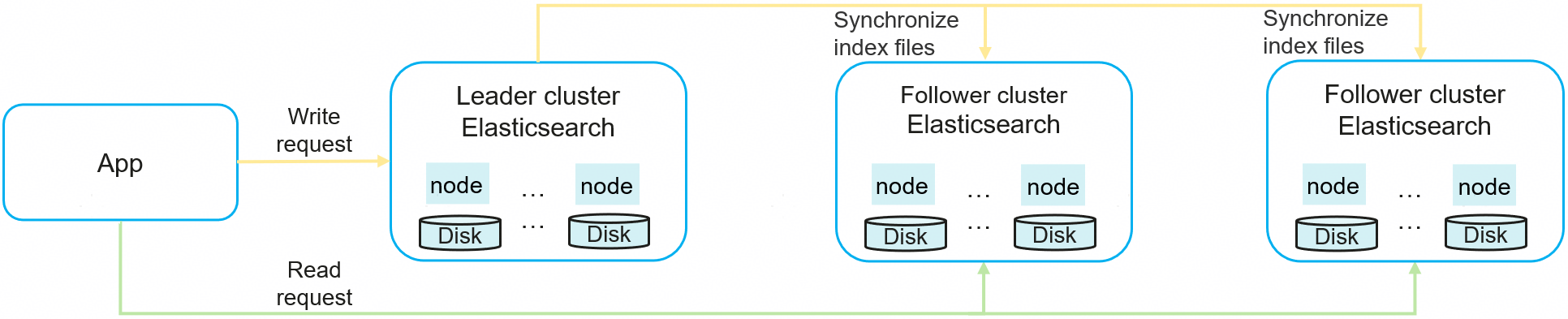
How read/write splitting between Elasticsearch clusters works:
- Data writes: Users send write requests, and the leader cluster handles these requests.
- Data synchronization.
The leader synchronizes data changes to the follower through a REST API. Two synchronization methods are supported:
- Synchronizing a specified index.
- Synchronizing matched indexes, for example, indexes that match a wildcard expression.
- Query processing: Users send query requests. The follower cluster handles these requests and returns the results.
Figure 2 illustrates how read/write splitting works.
Figure 2 How read/write splitting works
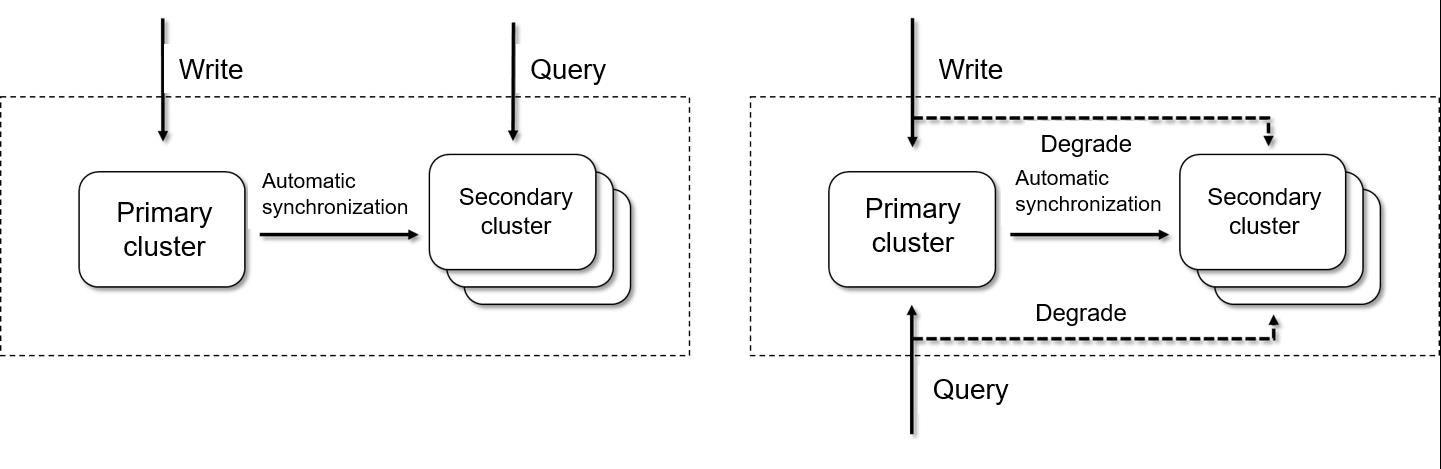
- Read and write split when both clusters are available (left): The leader handles writes, and the follower handles queries.
- Leader-to-follower switchover when the leader fails (right): If the leader becomes unavailable, the follower automatically upgrades to leader to ensure service continuity. For details, see Case: Leader/Follower Switchover.
Constraints
- Only Elasticsearch 7.6.2 and Elasticsearch 7.10.2 clusters support read/write splitting.
- The versions of the leader and follower clusters must be kept consistent, or errors may occur.
Prerequisites
Two Elasticsearch clusters of the same version have been created. One functions as the leader, and the other the follower. The follower cluster must be able to access the REST API (default port: 9200) of the leader cluster.
Logging In to Kibana
Log in to Kibana and go to the command execution page. Elasticsearch clusters support multiple access methods. This topic uses Kibana as an example to describe the operation procedures.
- Log in to the CSS management console.
- In the navigation pane on the left, choose Clusters > Elasticsearch.
- In the cluster list, find the target cluster, and click Kibana in the Operation column to log in to the Kibana console.
- In the left navigation pane, choose Dev Tools.
The left part of the console is the command input box, and the triangle icon in its upper-right corner is the execution button. The right part shows the execution result.
Connecting the Leader and Follower Clusters
- In the follower cluster, run the following command to configure the leader cluster's information to connect them, so that data can be synchronized from the leader to the follower.PUT /_cluster/settings{"persistent" : {"cluster" : {"remote.rest" : {"{leader_name}" : {"seeds" : ["http://10.0.0.1:9200","http://10.0.0.2:9200","http://10.0.0.3:9200"] ,"username": "test","password": "*****"}}}}}
Table 1 Parameters for connecting the leader and follower clusters Parameter
Mandatory
Type
Description
leader_name
Yes
String
Custom name of the leader cluster configuration task, used to identify the leader cluster connection in subsequent index synchronization configuration.
Only letters (both uppercase and lowercase), digits, underscores (_), and hyphens (-) are allowed. Spaces and special characters (such as . # @) are not allowed.
seeds
Yes
String
List of addresses for accessing the leader cluster.
- For a non-security mode cluster or a security-mode cluster that uses HTTP, the address format is http://xx.xx.xx.xx:9200.
- For a security-mode cluster that uses HTTPS, the address format is https://xx.xx.xx.xx:9200.
username
Yes
String
Username of the leader cluster. This parameter is required only when security mode is enabled for the leader cluster.
password
Yes
String
Password of the leader cluster. This parameter is required only when security mode is enabled for the leader cluster.
Example response:
{"acknowledged" : true, //Whether the operation is successful"persistent" : {"cluster" : {"remote" : {"rest" : {"leader1" : {"seeds" : ["http://10.0.0.1:9200","http://10.0.0.2:9200","http://10.0.0.3:9200"] ,"username": "test","password": "*****"}}}}},"transient" : { }} - After the configuration is complete, run the following command in the follower cluster to check the connection between the follower and leader clusters:GET _remote/rest/info
Example response:
{"leader1" : {"connected" : true //The two clusters are connected.}}
Configuring Index Synchronization
- Create an index synchronization task. There are two synchronization modes: synchronizing a specified index; and synchronizing matched indexes.
Table 2 Comparing two different synchronization modes Synchronization Mode
Synchronizing a specified index
Synchronizing matched indexes
Synchronization Logic
Manually specify an index that you wish to synchronize from the leader cluster to the follower.
Specify an index matching pattern. For each index (including any new indexes created in the future) that matches this pattern in the leader cluster, the system automatically creates a task that will synchronize it to the follower cluster.
Scenario
When you want to precisely control the index synchronization scope (for example, to synchronize mission-critical indexes only)
When you want to synchronize many dynamically created indexes (for example, indexes automatically named by timestamp or predefined rules).
Synchronization Policy Modification
A synchronization task can be re-delivered for the same index. That is when you can modify the synchronization policy.
After a synchronization task is started, the synchronization policy can no longer be modified. You can only create a new pattern-matching index synchronization task to replace an existing one. Procedure: Delete an existing task > Stopping Index Synchronization > Create a new task.
The following describes how to configure a task of each type:
- Synchronizing a specified index
Run the following command in the follower cluster to create a single-index synchronization task.
PUT start_remote_sync{"remote_cluster": "{leader_name}","remote_index": "{index_name_leader}","local_index": "{index_name_follower}","settings": {"number_of_replicas": 4},"settings_sync_enable": true,"settings_sync_patterns": ["*"],"settings_sync_exclude_patterns": ["index.routing.allocation.*"],"alias_sync_enable": true,"state_sync_enable": true}Table 3 Parameters for creating a single-index synchronization task Parameter
Mandatory
Type
Default Value
Description
remote_cluster
Yes
String
N/A
The name of the leader cluster configuration task.
The value must be consistent with the value of leader_name set in Connecting the Leader and Follower Clusters, for example, leader1.
remote_index
Yes
String
N/A
The name of the index to be synchronized in the leader cluster.
Enter the name of an existing index in the leader cluster, for example, data_leader.
local_index
Yes
String
N/A
The name of the index in the follower cluster after synchronization from the leader, for example, data_follower.
You can keep it the same as remote_index, but doing so is not recommended. This is because using identical names for indexes in the leader and follower clusters can lead to confusion during index management.
settings
No
Map
N/A
Index settings to be modified and their target values after synchronization to the follower cluster.
This parameter allows you to flexibly configure index settings (such as the number of replicas and refresh interval) to match the hardware resources or service requirements in the follower cluster. If not configured, the index settings of the leader cluster will be used by default.
Key and value:
- key: the name of the setting, for example, number_of_replicas.
- value: its new value, for example, 4.
The following settings cannot be modified: number_of_shards, version.created, uuid, creation_date, and soft_deletes.enabled.
settings_sync_enable
No
Boolean
false
Whether to periodically synchronize index settings from the leader cluster.
The value can be:
- true: Synchronize index settings from the leader cluster.
- false: Not to synchronize index settings from the leader cluster when they are updated. Instead, keep the initial settings.
settings_sync_patterns
No
String
* (matches all settings)
Leader-cluster index settings to be synchronized to the follower cluster.
Specify the names of the settings to be synchronized.
- A single setting: Enter the setting name (for example, index.max_regex_length).
- Multiple settings: Enter multiple setting names and separate them with a comma (,), for example, index.max_regex_length,index.max_refresh_listeners.
- Wildcard: Use the wildcard * to match multiple settings. For example, index* matches all settings whose name starts with index.
Constraints:
- This parameter takes effect only when settings_sync_enable is set to true.
- If the same setting is configured both in settings and settings_sync_patterns, the setting in settings_sync_patterns takes effect.
- The following settings cannot be synchronized to the follower cluster: index.number_of_shards, index.version.created, index.uuid, index.creation_date, index.history.uuid, index.number_of_replicas, index.auto_expand_replicas, and index.version.upgraded.
settings_sync_exclude_patterns
No
String
Null (excludes none)
Leader-cluster index settings not to be synchronized to the follower cluster.
Specify the names of the settings not to be synchronized.
- A single setting: Enter the setting name (for example, index.max_regex_length).
- Multiple settings: Enter multiple setting names and separate them with a comma (,), for example, index.max_regex_length,index.max_refresh_listeners.
- Wildcard: Use the wildcard * to match multiple settings. For example, index* matches all settings whose name starts with index.
Constraints:
- This parameter takes effect only when settings_sync_enable is set to true.
- If both settings_sync_patterns and settings_sync_exclude_patterns are configured, only the settings that are in settings_sync_patterns but not in settings_sync_exclude_patterns will be synchronized to the follower cluster.
- If the indexes you plan to synchronize include cold indexes, make sure the follower cluster contains cold data nodes. Otherwise, data synchronization will fail. The following configuration is required to synchronize cold indexes to the data nodes in the follower cluster (in such case, these indexes cease to be cold indexes in the follower cluster):"settings_sync_exclude_patterns": ["index.routing.allocation.require.box_type"]
alias_sync_enable
No
Boolean
false
Whether to periodically synchronize index aliases from the leader cluster.
The value can be:
- true: Periodically synchronize index aliases from the leader cluster.
- false: Not to periodically synchronize index aliases from the leader cluster.
state_sync_enable
No
Boolean
false
Whether to periodically synchronize index status from the leader cluster.
The value can be:
- true: Periodically synchronize index status from the leader cluster.
- false: Not to periodically synchronize index status from the leader cluster.
- Synchronizing matched indexes
Run the following command in the follower cluster to create a pattern-matching index synchronization task:
PUT auto_sync/pattern/${pattern_name}{"remote_cluster": "{leader_name}","remote_index_patterns": "{index_name}","local_index_pattern": "{{remote_index}}-sync","apply_exist_index": true,"settings": {"number_of_replicas": 4},"settings_sync_enable": true,"settings_sync_patterns": ["*"],"settings_sync_exclude_patterns": ["index.routing.allocation.*"],"alias_sync_enable": true,"state_sync_enable": true}Table 4 Parameters for creating a pattern-matching index synchronization task Parameter
Mandatory
Type
Default Value
Description
pattern_name
Yes
String
N/A
The name of the index name matching pattern.
remote_cluster
Yes
String
N/A
The name of the leader cluster configuration task.
The value must be consistent with the value of leader_name set in Connecting the Leader and Follower Clusters, for example, leader1.
remote_index_patterns
Yes
String
N/A
The leader-cluster index matching pattern.
- Single index: Enter the index name, for example, my_index.
- Wildcard: Use the wildcard (*) to match multiple indexes. For example, myindex* matches all indexes whose name starts with myindex.
local_index_pattern
Yes
String
N/A
Index naming pattern in the follower cluster after synchronization from the leader cluster.
Template replacement is supported. For example, if this parameter is set to {{remote_index}}-sync, the index name log1 changes to log1-sync after synchronization.
CAUTION:If leader/follower switchover is likely to happen, set this parameter to {{remote_index}} to ensure that the leader and follower clusters use identical index names.
apply_exist_index
Yes
Boolean
true
Whether to synchronize existing indexes from the leader cluster.
The value can be:
- true: Synchronize both existing and new indexes, as long as they match the pattern you define.
- false: Synchronize new indexes only. Skipping the synchronization of existing indexes may lead to data inconsistency between the leader and follower clusters. Determine how to set this parameter based on your service needs.
settings
No
Map
N/A
Index settings to be modified and their target values after synchronization to the follower cluster.
This parameter allows you to flexibly configure index settings (such as the number of replicas and refresh interval) to match the hardware resources or service requirements in the follower cluster. If not configured, the index settings of the leader cluster will be used by default.
Key and value:
- key: the name of the setting, for example, number_of_replicas.
- value: its new value, for example, 4.
The following settings cannot be modified: number_of_shards, version.created, uuid, creation_date, and soft_deletes.enabled.
settings_sync_enable
No
Boolean
false
Whether to periodically synchronize index settings from the leader cluster.
The value can be:
- true: Synchronize index settings from the leader cluster.
- false: Not to synchronize index settings from the leader cluster when they are updated. Instead, keep the initial settings.
settings_sync_patterns
No
String
* (matches all settings)
Leader-cluster index settings to be synchronized to the follower cluster.
Specify the names of the settings to be synchronized.
- A single setting: Enter the setting name (for example, index.max_regex_length).
- Multiple settings: Enter multiple setting names and separate them with a comma (,), for example, index.max_regex_length,index.max_refresh_listeners.
- Wildcard: Use the wildcard * to match multiple settings. For example, index* matches all settings whose name starts with index.
Constraints:
- This parameter takes effect only when settings_sync_enable is set to true.
- If the same setting is configured both in settings and settings_sync_patterns, the setting in settings_sync_patterns takes effect.
- The following settings cannot be synchronized to the follower cluster: index.number_of_shards, index.version.created, index.uuid, index.creation_date, index.history.uuid, index.number_of_replicas, index.auto_expand_replicas, and index.version.upgraded.
settings_sync_exclude_patterns
No
String
Null (excludes none)
Leader-cluster index settings not to be synchronized to the follower cluster.
Specify the names of the settings not to be synchronized.
- A single setting: Enter the setting name (for example, index.max_regex_length).
- Multiple settings: Enter multiple setting names and separate them with a comma (,), for example, index.max_regex_length,index.max_refresh_listeners.
- Wildcard: Use the wildcard * to match multiple settings. For example, index* matches all settings whose name starts with index.
Constraints:
- This parameter takes effect only when settings_sync_enable is set to true.
- If both settings_sync_patterns and settings_sync_exclude_patterns are configured, only the settings that are in settings_sync_patterns but not in settings_sync_exclude_patterns will be synchronized to the follower cluster.
- If the indexes you plan to synchronize include cold indexes, make sure the follower cluster contains cold data nodes. Otherwise, data synchronization will fail. The following configuration is required to synchronize cold indexes to the data nodes in the follower cluster (in such case, these indexes cease to be cold indexes in the follower cluster):"settings_sync_exclude_patterns": ["index.routing.allocation.require.box_type"]
alias_sync_enable
No
Boolean
false
Whether to periodically synchronize index aliases from the leader cluster.
The value can be:
- true: Periodically synchronize index aliases from the leader cluster.
- false: Not to periodically synchronize index aliases from the leader cluster.
state_sync_enable
No
Boolean
false
Whether to periodically synchronize index status from the leader cluster.
The value can be:
- true: Periodically synchronize index status from the leader cluster.
- false: Not to periodically synchronize index status from the leader cluster.
- Synchronizing a specified index
- Check the index synchronization status to confirm successful configuration.
After synchronization is enabled, the index in the follower cluster becomes read-only. Synchronization is performed periodically to ensure data consistency. The default synchronization interval is 30 seconds. For how to change it, see Changing the Index Synchronization Interval.
Run the following command in the follower cluster to obtain the synchronization status of a specified index:
GET {index_name}/sync_statsAn example output is as follows:
{"indices" : {"data1_follower" : {"shards" : {"0" : [{"primary" : false, // Whether it is a primary shard"total_synced_times" : 27, // Total synchronization times"total_empty_times" : 25, // Total number of times when no data is synchronized between the leader and follower clusters because they have identical shards and data"total_synced_files" : 4, // Number of synchronized files"total_synced_bytes" : 3580, // Total size of synchronized files"total_paused_nanos" : 0, //Duration of synchronization pauses due to traffic throttling"total_paused_times" : 0, //Number of synchronization pauses due to traffic throttling"current" : {"files_count" : 0, //Number of files that are being synchronized"finished_files_count" : 0, //Number of files that have been synchronized"bytes" : 0, //Size of files that are being synchronized"finished_bytes" : 0 //Size of files that have been synchronized}},{"primary" : true, // Whether it is a primary shard"total_synced_times" : 28, // Total synchronization times"total_empty_times" : 26, // Total number of times when no data is synchronized between the leader and follower clusters because they have identical shards and data"total_synced_files": 20, // Number of synchronized files"total_synced_bytes": 17547, // Total size of synchronized files"total_paused_nanos" : 0, //Duration of synchronization pauses due to traffic throttling"total_paused_times" : 0, //Number of synchronization pauses due to traffic throttling"current" : {"files_count" : 0, //Number of files that are being synchronized"finished_files_count" : 0, //Number of files that have been synchronized"bytes" : 0, //Size of files that are being synchronized"finished_bytes" : 0 //Size of files that have been synchronized}}]}}}} - Enable forced index synchronization.
By default, in a read/write splitting architecture, the system determines whether to synchronize metadata based on the number of documents in indexes in the leader cluster. If the leader cluster only updates existing documents and yet the number of documents remains unchanged, these updates will not be synchronized to the follower cluster.
To forcibly synchronize index metadata from the leader cluster to the follower cluster in each synchronization cycle (even if the number of documents remains the same), run the following command:
PUT _cluster/settings{"persistent": {"remote_sync.force_synchronize": true}}
Managing Pattern-matching Index Synchronization
You can query and delete existing pattern-matching index synchronization tasks.
- Query existing pattern-matching index synchronization tasks.
- Run the following command in the follower cluster to query existing pattern-matching index synchronization tasks:GET auto_sync/pattern
- Run the following command in the follower cluster to query details about a specified pattern-matching index synchronization task:GET auto_sync/pattern/{pattern_name}
Example response:
{"patterns" : [{"name" : "pattern1","pattern" : {"remote_cluster" : "leader","remote_index_patterns" : ["log*"],"local_index_pattern" : "{{remote_index}}-sync","settings" : { }}}]} - Run the following command in the follower cluster to query existing pattern-matching index synchronization tasks:
- Delete an existing pattern-matching index synchronization task.Caution
Deleting a pattern-matching index synchronization task only prevents new synchronization tasks from being created for matched indexes. It does not stop synchronization tasks that have already been created. To stop these tasks, manually perform Stopping Index Synchronization.
- Run the following command in the follower cluster to delete a specified pattern-matching index synchronization task:DELETE auto_sync/pattern/{pattern_name}
- Run the following command to query the list of pattern-matching index synchronization tasks to confirm successful deletion.GET auto_sync/pattern
- Run the following command in the follower cluster to delete a specified pattern-matching index synchronization task:
Changing the Index Synchronization Interval
The default index synchronization interval between the leader and follower clusters is 30 seconds. To change it for a specified index, run the following command:
PUT {index_name}/_settings{"index.remote_sync.sync_interval": "2s"}
Parameter | Type | Default Value | Description |
|---|---|---|---|
index_name | String | N/A | Specifies one or more indexes.
|
index.remote_sync.sync_interval | String | 30s (recommended) | The index synchronization interval. Value format: number + unit
Minimum value: 1s You may reduce this interval if the timeliness of data is prioritized, but doing so will increase the cluster's CPU load. |
Changing the Synchronization Speed
You can change the data synchronization speed between the leader and follower clusters by configuring some cluster-level settings.
The following is an example:
PUT _cluster/settings{"persistent": {"remote_sync.chunk_size": "2MB","remote_sync.max_concurrent_file_chunks": 20,"remote_sync.max_bytes_per_sec": "100MB"}}
Parameter | Type | Default Value | Description |
|---|---|---|---|
remote_sync.chunk_size | String | 1MB | The size of a single chunk for index synchronization. Value format: number + unit
Minimum value: 1 MB (a value lower than this impacts efficiency) |
remote_sync.max_concurrent_file_chunks | Integer | 10 | Maximum number of document chunks synchronized concurrently on a single node. Value range: 1 to 100. Set this parameter based on the node bandwidth and CPU resources available. |
remote_sync.max_bytes_per_sec | String | 40MB | Maximum size of data transmitted per second on a single node during synchronization. You can set this parameter to prevent data synchronization tasks from exhausting the network bandwidth. Value format: number + unit
The value 0 indicates no limit. When your cluster's query traffic is low, you can increase the value, but doing so may increase the network load. |
Stopping Index Synchronization
Run the following command in the follower cluster to stop a single-index synchronization task immediately:
PUT {index_name}/stop_remote_sync
After this command is executed:
- Any subsequent changes made to the index in the leader cluster will no longer be synchronized to the follower cluster.
- The index in the follower cluster will be removed from read-only mode, allowing new data to be written to it.
Index synchronization cannot be stopped when a snapshot is being created for the index. To stop synchronization, you must wait until snapshot creation is complete.
Case: Leader/Follower Switchover
When the leader cluster becomes faulty, you can perform a leader/follower switchover to have the follower cluster take over to ensure service continuity. To allow this to happen seamlessly and ensure data consistency, use identical index names between the leader and follower clusters when configuring index synchronization.
- Determine the index synchronization mode between the leader and follower clusters.
Run the following command in the follower cluster to check for pattern-matching index synchronization tasks:
GET auto_sync/pattern- If there are no such tasks, synchronization is performed for specified indexes between the leader and follower clusters. In this case, go to 3.
- If there are such tasks, index synchronization between the leader and follower clusters is based on an index matching pattern. In this case, perform the next step.
- Run the following command in the follower cluster to delete a specified pattern-matching index synchronization task:DELETE auto_sync/pattern/{pattern_name}
- Stop index synchronization in the follower cluster, and switch read and write traffic to it. Make sure the follower cluster can handle requests independently.
Run the following command in the follower cluster to stop single-index synchronization tasks for specified indexes:
PUT */stop_remote_sync - After the leader cluster recovers, configure information about the follower cluster in the leader cluster, and connect the leader and follower clusters again. For details, see Connecting the Leader and Follower Clusters.
- Under the leader cluster, perform Configuring Index Synchronization to synchronize data from the follower cluster to the leader cluster, and then perform a leader/follower switchover to switch back.