In big data analytics scenarios, Hive excels at batch processing massive datasets, while Elasticsearch enables real-time search and analytics. Integrating the two is key to bridging the gap between large-scale batch processing and low-latency search, effectively breaking down data silos. Using the ES-Hadoop connector (Elasticsearch for Apache Hadoop), you can integrate MRS Hive with CSS Elasticsearch by allowing Hive to directly read and write Elasticsearch data in the form of foreign tables. This approach preserves familiar Hadoop ecosystem workflows while delivering second-level search latency
Solution
ES-Hadoop is a connector library that integrates Elasticsearch with the Hadoop ecosystem, allowing MapReduce, Hive, and Spark to directly read from and write to Elasticsearch indexes.
In the MRS Hive-Elasticsearch integration scenario, ES-Hadoop acts as a query translation layer: When you execute SQL queries in Hive, ES-Hadoop converts Hive's execution plan into Elasticsearch query requests sent over REST.
Figure 1 Connecting MRS Hive to an Elasticsearch cluster

For more information about ES-Hadoop and Hive, see the official document Apache Hive integration.
Prerequisites
- Make sure the CSS and MRS clusters are in the same region, AZ, VPC, and subnet, so they are connected to each other.
- Download the ES-Hadoop installation package and unzip it to obtain the elasticsearch-hadoop-x.x.x.jar file. Keep the ES-Hadoop version consistent with that of the CSS cluster. For example, use ES-Hadoop 7.6.2 with Elasticsearch 7.6.2.
Download address: https://www.elastic.co/downloads/hadoop
- Download the HttpClient dependency package commons-httpclient-x.x.jar. Version: 3.1 or later is recommended.
Download address: https://mvnrepository.com/artifact/commons-httpclient/commons-httpclient
- Obtain the private network address of the CSS cluster.
Connecting MRS Hive to an Elasticsearch Cluster
- Check the network connectivity between MRS and CSS.
- Obtain the private network address of the target Elasticsearch cluster.
- Run the cURL command on each MRS cluster node to make sure it can connect to the CSS Elasticsearch cluster.
- For a cluster with the security mode disabled:curl -X GET http://<host>:<port>
- For a security-mode cluster that uses HTTP:curl -X GET http://<host>:<port> -u <user>:<password>
- For a security-mode cluster that uses HTTPS:curl -X GET https://<host>:<port> -u <user>:<password> -ik
Table 1 Variables Variable
Description
host
IP address of each node in the cluster. If the cluster contains multiple nodes, there will be multiple IP addresses. You can use any of them.
port
Port number for accessing a cluster node. Generally, the port number is 9200.
user
Username for accessing the cluster.
password
Password of the user.
If the password contains special characters, enclose the username and password in single quotation marks, for example, curl -u "user:password!" "http://<host>:<port>".
- For a cluster with the security mode disabled:
- Upload the ES-Hadoop package and dependency package to HDFS. Ensure that all Hive compute nodes can access the ES-Hadoop driver.
- Upload the downloaded elasticsearch-hadoop-x.x.x.jar and commons-httpclient-x.x.jar to the MRS client.
- Create an HDFS directory on the MRS client machine and save the JAR files in the directory.hadoop fs -mkdir /tmp/hadoop-eshadoop fs -put elasticsearch-hadoop-x.x.x.jar /tmp/hadoop-eshadoop fs -put commons-httpclient-x.x.jar /tmp/hadoop-es
- (Optional) Convert and distribute the security certificate. When connecting to a security-mode Elasticsearch cluster that uses HTTPS, make sure the Java environment trusts the self-signed Elasticsearch certificate.
- Obtain the security certificate CloudSearchService.cer.
- Log in to the CSS management console.
- In the navigation pane on the left, choose Clusters > Elasticsearch.
- In the cluster list, click the name of the target cluster. The cluster information page is displayed.
- Click the Overview tab. In the Network Information area, click Download Certificate below HTTPS Access.
- Convert the security certificate. Upload the downloaded security certificate to the client and use keytool to convert the .cer certificate into a .jks certificate that can be read by Java.
- In Linux, run the following command to convert the certificate:keytool -import -alias newname -keystore ./truststore.jks -file ./CloudSearchService.cer
- In Windows, run the following command to convert the certificate:keytool -import -alias newname -keystore .\truststore.jks -file .\CloudSearchService.cer
In the preceding command, newname indicates the user-defined certificate name.
After this command is executed, you will be prompted to set the certificate password and confirm the password. Securely store the password. It will be used for accessing the cluster.
- In Linux, run the following command to convert the certificate:
- Distribute the security certificate. Run the scp command to distribute the .jks certificate file to the same directory on all MRS cluster nodes, for example, /tmp. Ensure that user omm has the permission to read this file. You can run the following command to set the permission:chown -R omm truststore.jks
- Obtain the security certificate CloudSearchService.cer.
- Initialize the Hive session. Load the ES-Hadoop driver to the current Hive process.
- Log in to the Hive client from the MRS client.
- On the Hive client, enter beeline or hive to go to the execution page and run the following commands:add jar hdfs:///tmp/hadoop-es/commons-httpclient-3.1.jar;add jar hdfs:///tmp/hadoop-es/elasticsearch-hadoop-x.x.x.jar;
This command is valid only for the current session.
Create a Hive foreign table and associate it with an Elasticsearch index by mapping the Hive table structure to Elasticsearch index fields.
- For a cluster with the security mode disabled:CREATE EXTERNAL table IF NOT EXISTS student(id BIGINT,name STRING,addr STRING)STORED BY 'org.elasticsearch.hadoop.hive.EsStorageHandler'TBLPROPERTIES('es.nodes' = 'xxx.xxx.xxx.xxx:9200','es.port' = '9200','es.net.ssl' = 'false','es.nodes.wan.only' = 'false','es.nodes.discovery'='true','es.input.use.sliced.partitions'='false','es.resource' = 'student/_doc');
- For a security-mode cluster that uses HTTP:CREATE EXTERNAL table IF NOT EXISTS student(id BIGINT,name STRING,addr STRING)STORED BY 'org.elasticsearch.hadoop.hive.EsStorageHandler'TBLPROPERTIES('es.nodes' = 'xxx.xxx.xxx.xxx:9200','es.port' = '9200','es.net.ssl' = 'false','es.nodes.wan.only' = 'false','es.nodes.discovery'='true','es.input.use.sliced.partitions'='false','es.nodes.client.only'='true','es.resource' = 'student/_doc','es.net.http.auth.user' = 'username','es.net.http.auth.pass' = 'password');
- For a security-mode cluster that uses HTTPS:CREATE EXTERNAL table IF NOT EXISTS student(id BIGINT,name STRING,addr STRING)STORED BY 'org.elasticsearch.hadoop.hive.EsStorageHandler'TBLPROPERTIES('es.nodes' = 'https://xxx.xxx.xxx.xxx:9200','es.port' = '9200','es.net.ssl' = 'true','es.net.ssl.truststore.location' = 'certFilePath','es.net.ssl.truststore.pass' = 'certPassword','es.nodes.wan.only' = 'false','es.nodes.discovery'='true','es.nodes.client.only'='true','es.input.use.sliced.partitions'='false','es.resource' = 'student/_doc','es.net.http.auth.user' = 'username','es.net.http.auth.pass' = 'password');
Table 2 ES-Hadoop parameters Parameter
Default Value
Description
es.nodes
localhost
Address for accessing the Elasticsearch cluster.
es.port
9200
Port number for accessing the cluster. It is typically 9200.
es.nodes.wan.only
false
Whether to perform node sniffing.
es.nodes.discovery
true
Whether to disable node discovery. Retain the default setting.
es.input.use.sliced.partitions
true
Whether to use slices.
Its value can be:
- true
- false
When this parameter is set to true, the prefetch phase may take much longer than the actual query. You are advised to set it to false to improve query efficiency.
es.resource
NA
Target index and type.
es.net.http.auth.user
NA
Username for accessing the cluster. Set this parameter only if the security mode is enabled.
es.net.http.auth.pass
NA
Password of the user. Set this parameter only if the security mode is enabled.
es.net.ssl
false
Whether SSL is enabled.
The value can be:
- true: SSL is enabled, and the security certificate is required.
- false: SSL is disabled.
es.net.ssl.truststore.location
NA
Path of the .jks certificate file, for example, file:///tmp/truststore.jks.
es.nodes.client.only
false
Whether the Elasticsearch cluster has dedicated client nodes.
The value can be:
- true: The cluster has dedicated client nodes.
- false: The cluster does not have dedicated client nodes.
es.net.ssl.truststore.pass
NA
Password of the .jks certificate file.
For details about ES-Hadoop configuration items, see the official configuration description.
- For a cluster with the security mode disabled:
- Verify the result.
- Insert data on the Hive client.INSERT INTO TABLE student VALUES (1, "Lucy", "address1"), (2, "Lily", "address2");
- Query data on the Hive client.select * from student;
The query result is as follows:
+-------------+---------------+---------------+| student.id | student.name | student.addr |+-------------+---------------+---------------+| 1 | Lucy | address1 || 2 | Lily | address2 |+-------------+---------------+---------------+2 rows selected (0.116 seconds) - On the Kibana console, search for the data above and verify data persistence.
- In the Elasticsearch cluster list, find the target cluster, and click Kibana in the Operation column to log in to the Kibana console.
- In the left navigation pane on Kibana, choose Dev Tools.
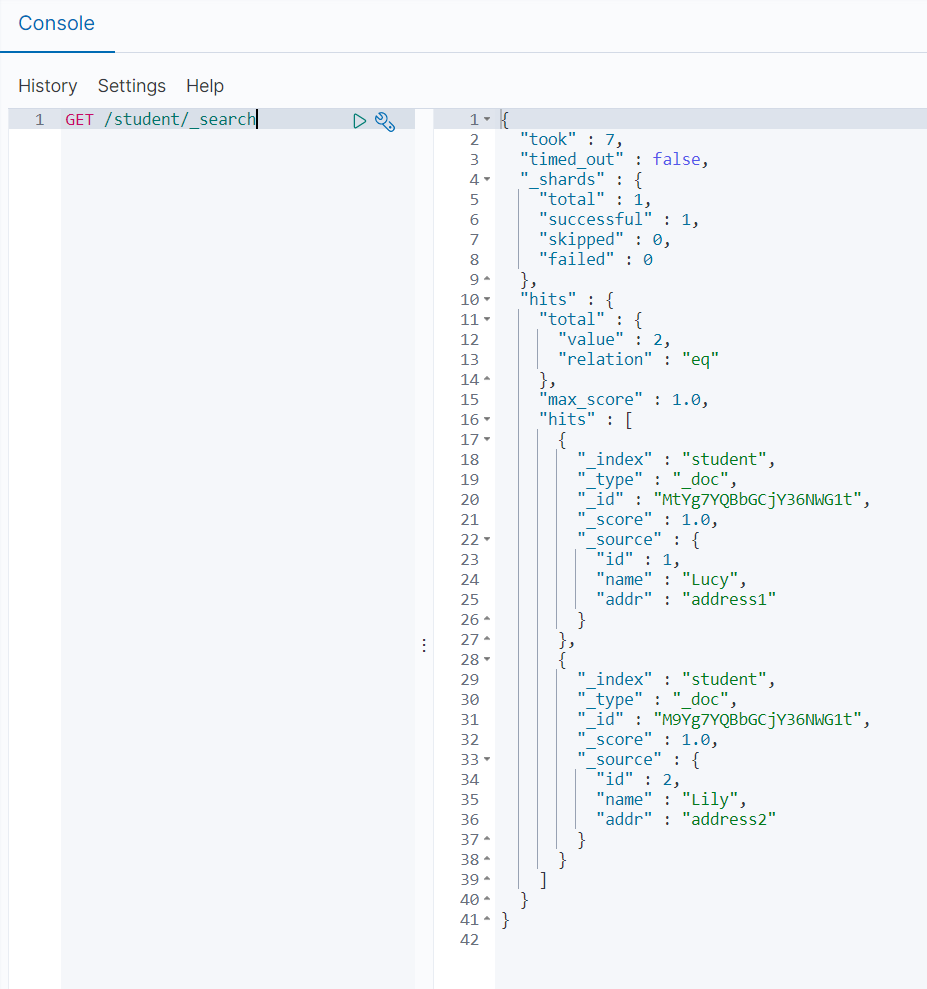
The left part of the console is the command input box, and the triangle icon in its upper-right corner is the execution button. The right part shows the execution result.
- Run the following query command and check the result.GET /student/_search
Figure 2 Kibana query result
- Insert data on the Hive client.