The Light Directory Access Protocol (LDAP) is a lightweight version of the directory access protocol based on the X.500 standard. An LDAP service provides user authentication and authorization. Using the Security plugin for Open Distro for Elasticsearch, CSS adds Active Directory as an authentication backend for clusters, connecting them seamlessly to the LDAP service. This topic describes the steps needed to connect a CSS cluster to an LDAP service.
It also describes how to enable LDAP authentication for a CSS cluster to allow access by LDAP users of specific roles.
Constraints
Only Elasticsearch 7.10.2 security-mode clusters can be accessed through LDAP.
Preparations
- A security-mode Elasticsearch cluster has been created in CSS and its status is available.
- The LDAP service that is in the same VPC as the Elasticsearch cluster and the necessary user data have been prepared. For details, see the OpenLDAP document: A Quick-Start Guide.
Accessing a Cluster
- Install an LDAP service on an ECS. If the LDAP service and user data have already been prepared, skip this step.
- Create an ECS. The ECS must run a Windows OS and must be in the same VPC and security group as the security-mode Elasticsearch cluster of CSS. The Windows Server running on the ECS provides the built-in Active Directory service that supports the LDAP protocol.
- Log in to the ECS, and enable the Active Directory service. Create a domain, administrator, users, and user groups.
- Modify the parameter settings of the security-mode Elasticsearch cluster on CSS. Configure a static parameter in elasticsearch.yml to connect the cluster to the LDAP service.
- Log in to the CSS management console.
- In the navigation pane on the left, choose Clusters > Elasticsearch.
- In the cluster list, click the name of the target cluster. The cluster information page is displayed.
- Choose Cluster Settings > Parameter Settings, and click Edit. Expand Custom, and add the following parameter and value.
- Parameter: opendistro_security.unsupported.restapi.allow_securityconfig_modification
- Value: true
- Then click Submit. In the displayed dialog box, confirm the settings, select the box indicating "I understand that the modification will take effect after the cluster is restarted." and click Yes.
If Status is Succeeded in the parameter change list, the change has been saved. Up to 20 change records can be displayed.
- After saving the change, click Restart in the upper-right corner of the page to restart the cluster, thus making the change take effect.
- You need to restart the cluster after the change, or Configuration not updated will be displayed in the Task Status column in the cluster list.
- If you restart the cluster after the change, and Task Status displays Configuration error in the cluster list, the parameter configuration file has failed to be modified.
- Configure a route for an Elasticsearch cluster on the CSS console to connect the cluster to the LDAP service.
- On the cluster information page, click the Overview tab.
- In the Configuration area, click Add Route next to Cluster Route.
- In the displayed dialog box, configure the route information.
Table 1 Adding a route Parameter
Description
IP Address
Enter the IP address of the LDAP server. If the LDAP service on the ECS is used, enter the IP address of the ECS.
Subnet Mask
Enter the subnet mask of the LDAP server. If the LDAP service on the ECS is used, enter the subnet mask of the ECS.
- Click OK.
- Configure LDAP authentication for a security-mode Elasticsearch cluster.
- On the cluster information page, click Kibana in the upper-right corner to log in to Kibana.
- In the navigation pane on the left, choose Dev Tools.
- Run the following commands to configure LDAP authentication.Note
- Concepts used in an X.500 directory access protocol (including LDAP):
- CN = Common Name
- OU = Organizational Unit
- DC = Domain Component
- DN = Distinguished Name
The CN, OU, and DC must be provided in the correct order. Otherwise, authentication will fail.
- The configuration file consists of two parts: authc and authz.
- authc (authentication): verifies whether a user is truly who they claim they are (password verification).
- authz (authorization): verifies what the current user has access to.
PUT _opendistro/_security/api/securityconfig/config{"dynamic": {"authc": {"basic_internal_auth_domain": {"description": "Authenticate via HTTP Basic against internal users database","http_enabled": true,"transport_enabled": true,"order": 1,"http_authenticator": {"type": "basic","challenge": true},"authentication_backend": {"type": "intern"}},"ldap": {"description": "Authenticate via LDAP or Active Directory","http_enabled": true,"transport_enabled": true,"order": 2,"http_authenticator": {"type": "basic","challenge": false},"authentication_backend": {"type": "ldap","config": {"enable_ssl": false,"enable_start_tls": false,"enable_ssl_client_auth": false,"verify_hostnames": true,"hosts": ["10.0.XXX.XXX:389"], "hosts": ["10.0.XXX.XXX:389"],"bind_dn": "CN=adminAD,DC=test,DC=ldap,DC=com", "bind_dn": "CN=adminAD,DC=test,DC=ldap,DC=com","password": "<password>", "password": "<password>","userbase": "OU=ITDepartment,DC=test,DC=ldap,DC=com", "userbase": "OU=ITDepartment,DC=test,DC=ldap,DC=com","usersearch": "(sAMAccountName={0})","username_attribute": "uid"}}}},"authz": {"roles_from_myldap": {"description": "Authorize via LDAP or Active Directory","http_enabled": true,"transport_enabled": true,"authorization_backend": {"type": "ldap","config": {"enable_ssl": false,"enable_start_tls": false,"enable_ssl_client_auth": false,"verify_hostnames": true,"hosts": ["10.0.XXX.XXX:389"], "hosts": ["10.0.XXX.XXX:389"],"bind_dn": "CN=adminAD,DC=test,DC=ldap,DC=com", "bind_dn": "CN=adminAD,DC=test,DC=ldap,DC=com","password": "<password>", "password": "<password>","rolebase": "OU=groups,DC=test,DC=ldap,DC=com", "rolebase": "OU=groups,DC=test,DC=ldap,DC=com","rolesearch": "(member={0})","userroleattribute": null,"userrolename": "disabled","rolename": "CN","resolve_nested_roles": true,"userbase": "OU=ITDepartment,DC=test,DC=ldap,DC=com", "userbase": "OU=ITDepartment,DC=test,DC=ldap,DC=com","usersearch": "(uid={0})"}}}}}}Table 2 Parameter description Parameter
Description
hosts
Address of the LDAP service. The port number is 389. If the LDAP service on the ECS is used, enter the IP address of the ECS.
bind_dn
It is similar to the LDAP user name (CN - OU - DC) and is used to access the LDAP server. Select a user name from the user data of the LDAP service.
password
Password of the LDAP user configured using bind_dn.
userbase
After the LDAP service is connected, the DN that the user belongs to is obtained. In this example, all user information in the ITDepartment directory is synchronized.
rolebase
The collection of permissions that can be configured for the userbase user group of the LDAP service.
- Concepts used in an X.500 directory access protocol (including LDAP):
- Configure the mapping between LDAP user permissions and Elasticsearch permissions in the Elasticsearch security-mode cluster to enable fine-grained access control.
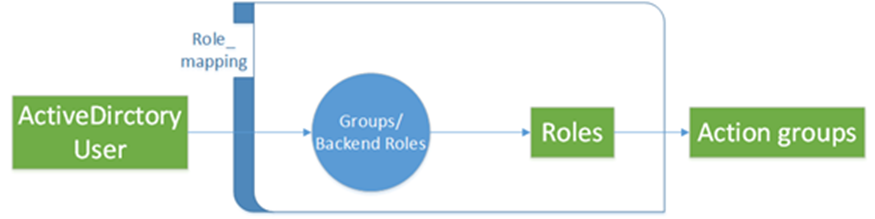
The rolebase permissions group of the LDAP server must be mapped to the roles in the Elasticsearch cluster. Figure 1 illustrates the mapping. For details about the configuration, see Creating Users for an Elasticsearch Cluster and Granting Cluster Access.
Figure 1 Permissions mapping
- On the Kibana console, expand the menu in the upper-left corner, and choose Security. The Security page is displayed.
- Click Roles to go to the Open Distro Security Roles page. Click Create Role, set Name, Cluster Permissions, Index Permissions, and Tenant Permissions. Then click Save Role Definition to save the role settings. The parameters are as follows:
- Name (name of the role)
- Cluster permissions
- Index permissions
- Tenant permissions
- Click the newly created role, select Mapped users, enter a permissions group of the LDAP service in Backend roles, and click Map.
- Check the configuration result.
Figure 2 Permissions mapping

- Repeat 5.b to 5.d to map other permissions groups.
- Log in to Kibana using the LDAP user to verify the configuration.
- Log in to the CSS management console.
- In the navigation pane on the left, choose Clusters > Elasticsearch.
- In the cluster list, find the target cluster, and click Kibana in the Operation column. Use the LDAP user to log in to the Kibana console.
If the login is successful, the configuration is successful, and users can access the Elasticsearch cluster through LDAP. The specific permissions authorized are controlled by role permissions configured in Elasticsearch.