Before creating a cluster on CCE, determine the number of VPCs, the number of subnets, pod CIDR block, and Service CIDR block based on service requirements.
This section describes the IP addresses in a CCE cluster in a VPC and how to plan CIDR blocks.
Basic Concepts
- VPC CIDR Block
A VPC enables you to provision logically isolated, configurable, and manageable virtual networks for cloud servers, cloud containers, and cloud databases. You can configure CIDR blocks, subnets, security groups, and more in a VPC, and assign EIPs and bandwidth to your service systems.
- Subnet CIDR Block
A subnet manages ECS network planes. It supports IP address management and DNS. ECSs in a subnet are assigned IP addresses from this subnet.
Figure 1 VPC CIDR block architecture
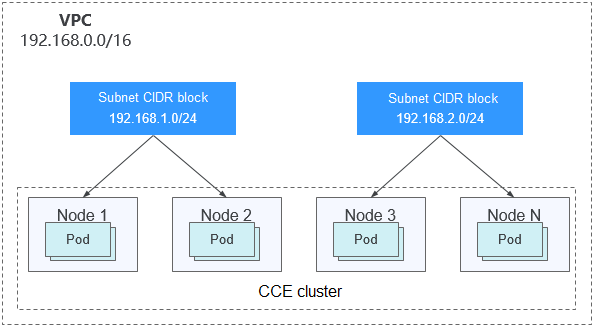
By default, ECSs in all subnets of the same VPC can communicate with one another, but ECSs in different VPCs cannot.
You can create a VPC peering connection to enable ECSs in different VPCs to communicate with each other.
- Container (Pod) CIDR Block
Pod is a Kubernetes concept. Each pod has an IP address.
When creating a cluster on CCE, you can specify the pod CIDR block. The pod CIDR block cannot overlap with the VPC CIDR block or subnet CIDR block. For example, if the subnet CIDR block is 192.168.0.0/16, the pod CIDR block of the cluster cannot be 192.168.0.0/18 or 192.168.64.0/18 because these CIDR blocks are covered by 192.168.0.0/16.
- Container Subnet (Only for CCE Turbo Clusters)
In a CCE Turbo cluster, a container is assigned an IP address from the VPC CIDR block. The container subnet can overlap with the subnet CIDR block. Note that the subnet you select determines the maximum number of pods in the cluster.
- Service CIDR Block
Service is also a Kubernetes concept. Each Service has an IP address. When creating a cluster on CCE, you can specify the Service CIDR block. Similarly, the Service CIDR block cannot overlap with the VPC CIDR block, subnet CIDR block, or pod CIDR block. The Service CIDR block can be used only within a cluster.
Notes and Constraints
To access a CCE cluster through a VPN, ensure that the VPN does not conflict with the cluster's VPC CIDR block or the pod CIDR block.
Single-VPC Single-Cluster Scenarios
CCE standard clusters can use the VPC or container tunnel networks. Figure 2 shows the CIDR block planning of a CCE standard cluster. Figure 2 CIDR block planning for a CCE standard cluster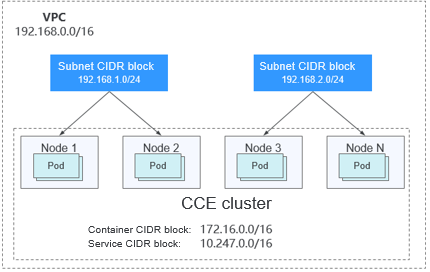
Figure 3 shows the CIDR block planning for a CCE Turbo cluster that uses a Cloud Native 2.0 network. Figure 3 CIDR block planning for a CCE Turbo cluster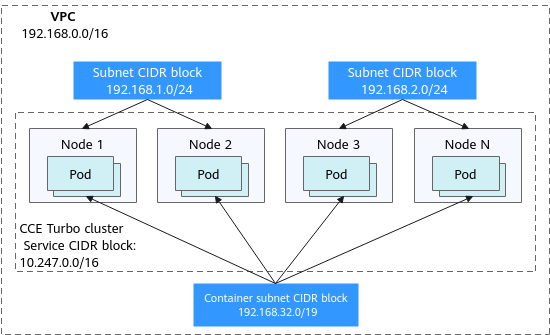
Single-VPC Multi-Cluster Scenarios
Clusters Using the VPC Networks
Pod packets are forwarded through VPC routes. CCE automatically configures a route table on the VPC routes for each pod CIDR block. The network scale is limited by the VPC route table. Figure 4 shows the CIDR block planning of such a cluster. Figure 4 Network planning for multiple clusters using the VPC networks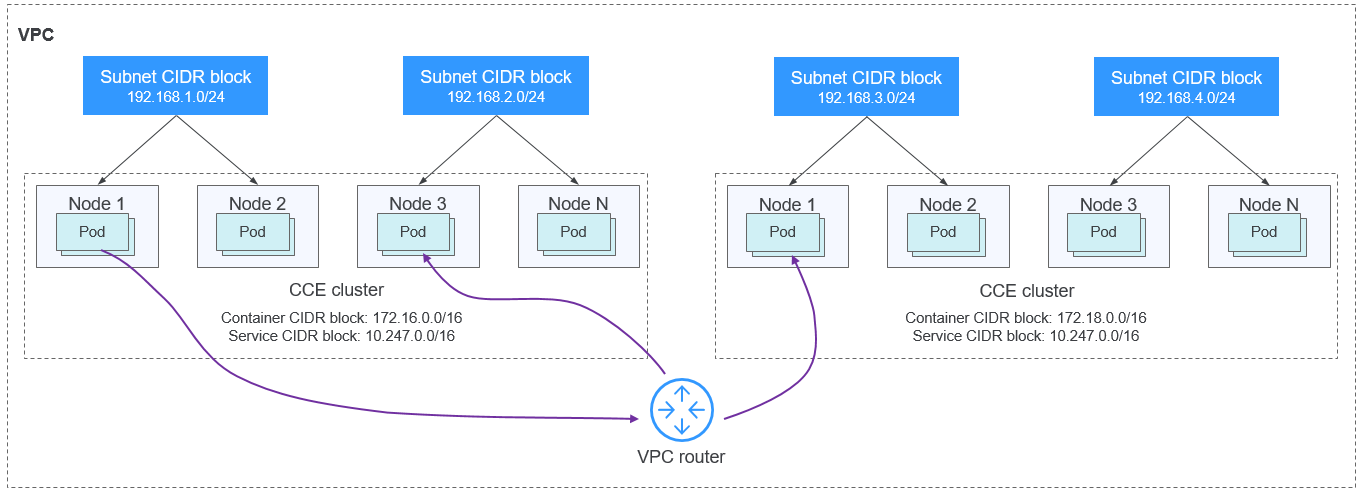
Clusters Using the Tunnel Networks
In a container tunnel network, the container network is an overlay network built on top of the VPC network. Although there is a small amount of performance overhead due to tunnel encapsulation, this kind of network offers strong generality, excellent interoperability, and comprehensive support for advanced features such as network policy-based isolation, making it suitable for most application scenarios. Figure 5 shows the CIDR block planning of the cluster. Figure 5 Network planning for multiple clusters using the tunnel networks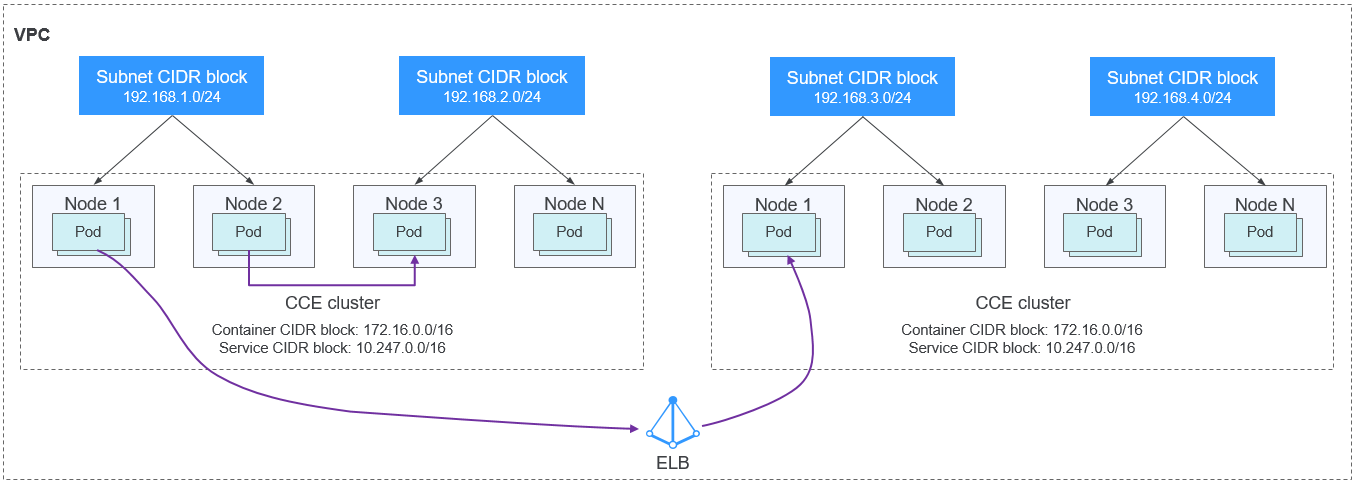
CCE Turbo Clusters Using the Cloud Native 2.0 Networks
In a Cloud Native 2.0 network, container IP addresses are allocated from the VPC CIDR block. Clusters using this kind of network support multiple VPC-based capabilities, such as ELB passthrough networking to pods and direct association of security groups with containers. They can deliver faster network connection and forwarding. Figure 6 Network planning for multiple clusters using the Cloud Native 2.0 networks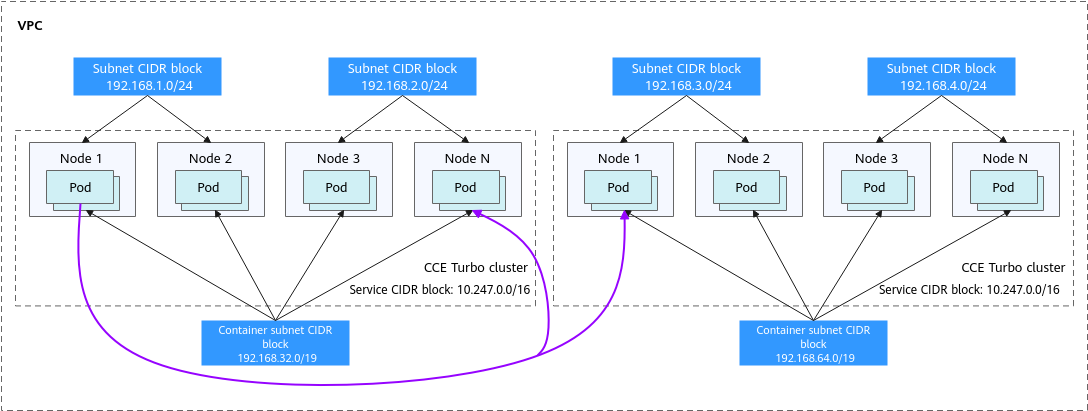
Clusters Using Different Networks
For a VPC that contains clusters using different networks, comply with the following rules when creating a cluster:
- All these clusters are in the same VPC CIDR block. Ensure that there are sufficient available IP addresses in the VPC.
- A subnet CIDR block cannot overlap with any pod CIDR block. Even in some scenarios, for example, where there are also CCE Turbo clusters, the subnet CIDR block can overlap with the pod (subnet) CIDR block. However, this is not recommended.
- The pod CIDR blocks of the clusters that use the VPC networks cannot overlap with each other.
- The Service CIDR blocks of all these clusters can overlap with each other, but cannot overlap with any subnet CIDR block or pod CIDR block of the clusters.
Cross-VPC Cluster Connection
Different VPCs cannot communicate with each other. A VPC peering connection can connect VPCs in the same region. For two VPC networks that are connected, you can use route tables to configure the packets to be sent to the peer VPC.
Clusters Using the VPC Networks
To allow clusters that use the VPC networks to access each other across VPCs, add routes to both ends of the VPC peering after a VPC peering connection is created.
Figure 7 Network planning for clusters in different VPCs
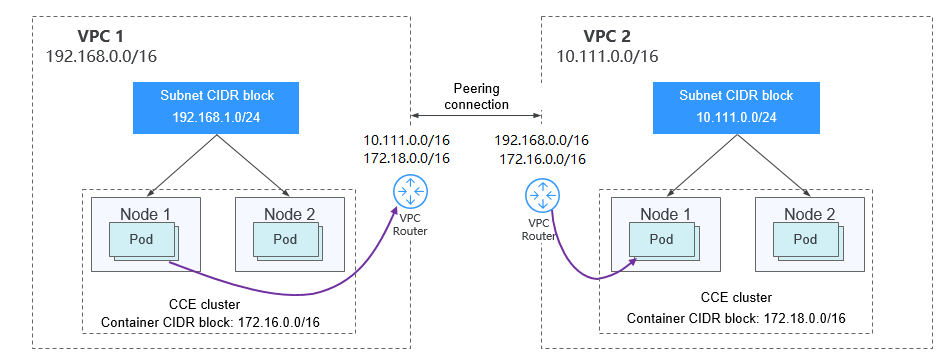
When creating a VPC peering connection for clusters in different VPCs, pay attention to the following points:
- The VPCs to which the clusters belong must not overlap with each other. In each cluster, the subnet CIDR block cannot overlap with the pod CIDR block.
- The pod CIDR blocks of the clusters at both ends cannot overlap with each other, but the Service CIDR blocks can.
- If the request end cluster uses the VPC network, check whether the node security group in the peer cluster allows the pod CIDR block of the request end cluster. If yes, pods in these clusters can directly access each other through the pod IP addresses. Similarly, if nodes running in the clusters at the both ends of the VPC peering connection need to access each other, the node security group must allow the VPC CIDR block of the peer cluster.
- Both VPC route tables must include routes to the peer CIDR block. For example, the route table of VPC 1 must include a route to the VPC 2 CIDR block, and likewise, the route table of VPC 2 must include a route to the VPC 1 CIDR block.
- Add the peer cluster's VPC CIDR block: After adding the route of the VPC CIDR block, pods can access nodes in the other cluster, such as reaching a NodePort Service.
- Add the peer cluster's pod CIDR block: After adding the route of the pod CIDR block, pods can directly access pods in the other cluster using their IP addresses.
Clusters Using the Tunnel Networks
To allow clusters that use the tunnel networks to access each other across VPCs, add routes to both ends of the VPC peering after a VPC peering connection is created.
Figure 8 Network planning for clusters using the tunnel networks
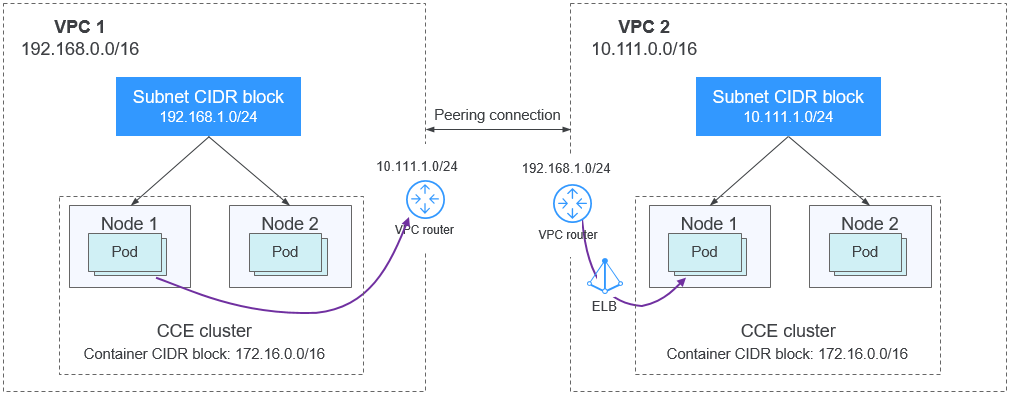
Pay attention to the following:
- The VPC CIDR blocks of the clusters at the two ends must not overlap with each other.
- The pod CIDR blocks of the clusters can overlap with each other, so can the Service CIDR blocks.
- If the request end cluster uses the tunnel network, check whether the node security group in the destination cluster allows the VPC CIDR block (including the node subnets) of the request end cluster. If yes, nodes in both clusters can access each other. However, pods in these clusters cannot directly access each other using pod IP addresses. To achieve this, Services are needed. The LoadBalancer Services are recommended.
- Both VPC route tables must include routes to the peer cluster's VPC CIDR block. For example, the route table of VPC 1 must include a route to the VPC 2 CIDR block, and likewise, the route table of VPC 2 must include a route to the VPC 1 CIDR block. After the routes of the VPC CIDR blocks are added, pods can access nodes in the other cluster, such as reaching a NodePort Service.
CCE Turbo Clusters Using the Cloud Native 2.0 Networks
After creating a VPC peering connection, add routes of the VPC peering connection to both ends so that the two VPCs can communicate with each other. Pay attention to the following:
Clusters Using Different Networks
If clusters using different networks need to communicate with each other across VPCs, every one of them may serve as the request end or destination end. Pay attention to the following:
- The VPC CIDR block of a cluster cannot overlap with the VPC CIDR block of the other cluster.
- The subnet CIDR blocks cannot overlap with any of the pod CIDR blocks.
- The pod CIDR blocks in these clusters cannot overlap with each other.
- If pods or nodes in these clusters need to access each other, the security groups in the clusters on both ends must allow the corresponding CIDR blocks based on the following rules:
- If the request end cluster uses a VPC network, the node security group of the destination cluster must allow the VPC CIDR block (including the node subnets and pod CIDR block) of the request end cluster.
- If the request end cluster uses a tunnel network, the node security group of the destination cluster must allow the VPC CIDR block (including the node subnets) of the request end cluster.
- If the request end cluster uses a Cloud Native 2.0 network, the network interface security group and node security group of the destination cluster must allow the VPC CIDR block (including node subnets and pod CIDR block) of the request end cluster.
- Both VPC route tables must include routes to the peer cluster's VPC CIDR block. For example, the route table of VPC 1 must include a route to the VPC 2 CIDR block, and likewise, the route table of VPC 2 must include a route to the VPC 1 CIDR block. After the routes of the VPC CIDR blocks are added, pods can access nodes in the other cluster, such as reaching a NodePort Service.
If one of the clusters uses a VPC network, both VPC route tables must also include the pod CIDR blocks. After the routes of the pod CIDR blocks are added, pods can directly access pods in the other cluster using their IP addresses.