kubectl is a command-line tool provided by Kubernetes, enabling you to manage cluster resources, view cluster status, deploy applications, and debug issues through the CLI. To access a CCE cluster using kubectl, you can use either of the following methods:
This section uses a CCE standard cluster as an example to describe how to access a CCE cluster using kubectl.
How It Works
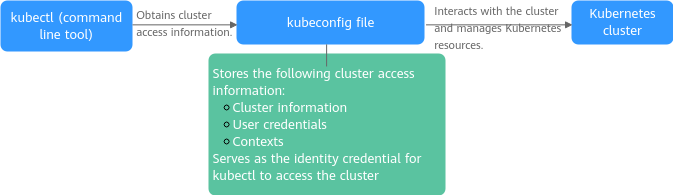
kubectl retrieves cluster information from a kubeconfig file and communicates with the Kubernetes API server. The kubeconfig file is the credential for kubectl to access a Kubernetes cluster. It contains the cluster connection information (such as the API server address and CA certificate), user authentication credentials (such as the client certificate and token), and context (cluster, user, and default namespace). With these details, kubectl can interact with the Kubernetes cluster to perform management tasks.
Figure 1 Using kubectl to access a cluster
Prerequisites
- A client that can access the Internet is available. The client IP address cannot be in the CIDR block where the cluster control plane resides. For details, see Common Issues.
- If private access is used, the client and the cluster to be accessed must be in the same VPC.
- If public access is used, the cluster to be accessed has an EIP bound. For details about how to bind an EIP, see Procedure.Note
In a cluster with an EIP bound, kube-apiserver will be exposed to the Internet and may be attacked. To resolve this issue, you can configure Advanced Anti-DDoS for the EIP of the node on which kube-apiserver runs or configure security group rules.
Constraints
A kubeconfig file contains user authentication credentials. When you use this file to access a cluster, kubectl accesses the cluster based on the credentials and permissions specified in the file.
For details about user permissions, see Relationship Between IAM Role/Policy Permissions and Namespace Permissions.
Step 1: Download kubectl
Before using kubectl to access a cluster, install kubectl on the client. Run the kubectl version command to check whether kubectl is installed. If it is installed, skip this step. This section uses Linux as an example to describe how to install and configure kubectl. For details, see Installing kubectl.
- Log in to your client and download kubectl. v1.35.0 is used as an example version. Replace it with your target version as needed.cd /homecurl -LO https://dl.k8s.io/release/v1.35.0/bin/linux/amd64/kubectl
- Run the following command to install kubectl:chmod +x kubectlmv -f kubectl /usr/local/bin
- Run the following command to check whether kubectl has been installed:kubectl version
If information similar to the following is displayed, kubectl has been installed:
Client Version: xxxKustomize Version: xxxServer Version: xxx
Step 2: Obtain the kubectl Configuration File (kubeconfig)
Obtain kubeconfig (the kubectl configuration file) from the cluster for access.
- Log in to the CCE console and click the cluster name to access the cluster console.
- On the Overview page of the cluster console, locate the Connection Information area and click Configure next to kubectl.
- On the slide-out panel, locate the Download the kubeconfig file area, select Private access or Public access for Current data, and copy the configuration file.
Note
- kubeconfig is used for cluster authentication. If the file is leaked, your cluster may be attacked.
- The Kubernetes permissions assigned by the configuration file downloaded by IAM users are the same as those assigned to the IAM users on the CCE console.
- In Linux, if the KUBECONFIG environment variable is set, kubectl will load it instead of $home/.kube/config.
- An issued kubeconfig certificate remains valid even if the user who requested it is deleted. To ensure cluster security, manually revoke the user's cluster access credentials. For details, see Revoking a Cluster Access Credential.
Step 3: Configure kubectl
The kubeconfig file is stored on the client, and kubectl uses it to access and interact with the cluster.
- Log in to your client.
- Create the kubeconfig.yaml file. You can change the file name as needed. The file is used to store the configuration file information obtained in 3.vim kubeconfig.yaml
Copy the configuration file information obtained in 3 to kubeconfig.yaml and save the file.
- Save the kubeconfig.yaml file to $HOME/.kube/config. kubectl will automatically read from it. If you save the kubeconfig.yaml file in a different path, set the KUBECONFIG environment variable to point to that path.Note
To persist the environment variable, add export KUBECONFIG="<your-path>" to your shell configuration file (for example, ~/.bashrc), and run source ~/.bashrc to apply the changes.
cd /homemkdir -p $HOME/.kubemv -f ~/kubeconfig.yaml $HOME/.kube/config # Change kubeconfig.yaml to the file name. - Switch the kubectl access mode based on service scenarios.
- If private access is used through a VPC, run the following command:kubectl config use-context internal
- If public access is enabled and two-way domain name trust is not required, ensure that an EIP is bound to the cluster. Then, run the following command:kubectl config use-context external
- If public access is enabled and two-way domain name trust is required, ensure that an EIP is bound to the cluster. Then, run the following command:kubectl config use-context externalTLSVerify
For more details, see Two-Way Domain Name Trust.
- If private access is used through a VPC, run the following command:
- Run the following command on the client to check whether the client can access the cluster using kubectl:kubectl cluster-info # Check the cluster information.
If the following information is displayed, the client can access the cluster using kubectl:
Kubernetes control plane is running at https://xx.xx.xx.xx:5443CoreDNS is running at https://xx.xx.xx.xx:5443/api/v1/namespaces/kube-system/services/coredns:dns/proxyTo further debug and diagnose cluster problems, use 'kubectl cluster-info dump'.
Two-Way Domain Name Trust
Two-way domain name trust is a mutual authentication mechanism that verifies the identities of both the client and server. This mode enhances security between clusters and clients, preventing unauthorized access.
- After an EIP is bound to an API server, two-way domain name trust is disabled by default if kubectl is used to access the cluster. You can run kubectl config use-context externalTLSVerify to enable the two-way domain name trust.
- When an EIP is bound to or unbound from a cluster, or a custom domain name is configured or updated, the cluster access address (including the EIP bound to the cluster and all custom domain names configured for the cluster) will be added to the cluster server certificate.
- Asynchronous cluster synchronization takes about 5 to 10 minutes. You can view the synchronization result in Synchronize Certificate in Operation Records.
- For a cluster that has an EIP bound, if the authentication fails (x509: certificate is valid) when two-way domain name trust is used, bind the EIP again and download kubeconfig.yaml again.
- If the two-way domain name trust is not supported, kubeconfig.yaml contains the "insecure-skip-tls-verify": true field, as shown in Figure 2. To use two-way domain name trust, download the kubeconfig.yaml file again and enable two-way domain name trust.
Figure 2 Two-way trust disabled for domain names

Common Issues
- Error from server Forbidden
When you use kubectl to create or query Kubernetes resources, the following output is returned:
# kubectl get deploy Error from server (Forbidden): deployments.apps is forbidden: User "0c97ac3cb280f4d91fa7c0096739e1f8" cannot list resource "deployments" in API group "apps" in the namespace "default"The cause is that the user does not have the permissions to operate the Kubernetes resources. For details about how to assign permissions, see Configuring Namespace Permissions (Kubernetes RBAC-based).
- The connection to the server localhost:8080 was refused
When you use kubectl to create or query Kubernetes resources, the following output is returned:
The connection to the server localhost:8080 was refused - did you specify the right host or port?The cause is that cluster authentication is not configured for the kubectl client. For details, see Step 2: Obtain the kubectl Configuration File (kubeconfig).
- use of X25519 is not allowed in FIPS 140-only mode
When you run kubectl, the following information is displayed:
failed to download openapi: Get "https://x.x.x.x:5443/openapi/v2?timeout=32s": crypto/ecdh: use of X25519 is not allowed in FIPS 140-only mode; if you choose to ignore these errors, turn validation off with --validate=falsePerform the following steps to resolve this issue:
- Add --validate=false to kubectl apply -f to skip the verification.
- Download the latest version of kubectl. For details, see Accessing a Cluster Using kubectl.
- Kubernetes API access fails when the client IP address is in the CIDR block of the cluster control plane.
Log in to the CCE console and click the cluster name to access the cluster console. In the Networking Configuration pane on the Overview page, view the CIDR block where the cluster control plane resides.
If the client IP address is in the CIDR block where the cluster control plane resides, the system's internal routing may identify traffic sent to the API server as loopback or local node traffic. As a result, access to the Kubernetes API may fail. If the access fails, switch the client IP address to another CIDR block and try again.