Network policies are designed by Kubernetes to restrict pod access. Like a firewall at the application layer, network policies enhance network security. The capabilities supported by network policies depend on the capabilities of the network add-ons of the cluster.
By default, if a namespace does not have any policy, pods in the namespace accept traffic from any source and send traffic to any destination.
The following selectors are available for network policies:
- namespaceSelector: selects particular namespaces for which all pods should be allowed as ingress sources or egress destinations.
- podSelector: selects particular pods in the same namespace as the network policy which should be allowed as ingress sources or egress destinations.
- IPBlock: selects particular CIDR blocks to allow as ingress sources or egress destinations.
Relationships Between Network Policies and Cluster Types
Cluster Type | CCE Standard Cluster | CCE Standard Cluster | CCE Turbo Cluster |
|---|---|---|---|
Network Model | Tunnel | VPC | Cloud Native Network 2.0 |
NetworkPolicy | Enabled by default | Disabled by default (To use network policies, enable DataPlane V2 when creating a cluster.) | Disabled by default (To use network policies, enable DataPlane V2 when creating a cluster.) |
Data plane implementation | OpenvSwitch | eBPF | eBPF |
Cluster version for ingress rules | All versions | Cluster version: v1.27.16-r30, v1.28.15-r20, v1.29.13-r0, v1.30.10-r0, v1.31.6-r0, or later | Cluster version: v1.27.16-r10, v1.28.15-r0, v1.29.10-r0, v1.30.6-r0, or later |
Cluster version for egress rules | v1.23 and later | ||
Selector for ingress rules | namespaceSelector podSelector | namespaceSelector podSelector IPBlock | namespaceSelector podSelector IPBlock |
Selector for egress rules | namespaceSelector podSelector IPBlock | ||
Supported OS | EulerOS CentOS HCE OS 2.0 | HCE OS 2.0 | HCE OS 2.0 |
IPv6 network policies | Not supported | Not supported | Supported |
Secure containers | Not supported | Not supported | Not supported |
IPBlock scope | Not limited | Subnets within the pod CIDR block, Service CIDR block, and node IP addresses | Subnets within the pod CIDR block, Service CIDR block, and node IP addresses |
Limit ClusterIP access through workload labels | Not supported | Supported | Supported |
Limit the internal cloud server CIDR block of 100.125.0.0/16 | Supported | Supported | Not supported |
SCTP | Not supported | Supported | Not supported |
Always allow access to pods on a node from other nodes | Supported | Supported | Supported |
Configure EndPort in network policies | Not supported | Supported | Not supported |
- CCE DataPlane V2 is released with restrictions. To use this feature, submit a service ticket to CCE.
- Secure containers (such as Kata as the container runtime) are not supported by network policies.
- If you upgrade a CCE standard cluster with a tunnel network to a version that supports egress rules in in-place mode, the rules will not work because the node OS is not upgraded. In this case, reset the node.
- When a network policy is enabled for a cluster with a tunnel network, a pod's source IP address is embedded in the optional field of packets it sends to any Service CIDR block. This enables the configuration of network policy rules on the destination pod, taking into account the source IP address of the pod.
Using Ingress Rules Through YAML
- Scenario 1: Controlled by a preset network policy, a pod can only be accessed by pods with specific labels.
Figure 1 podSelector
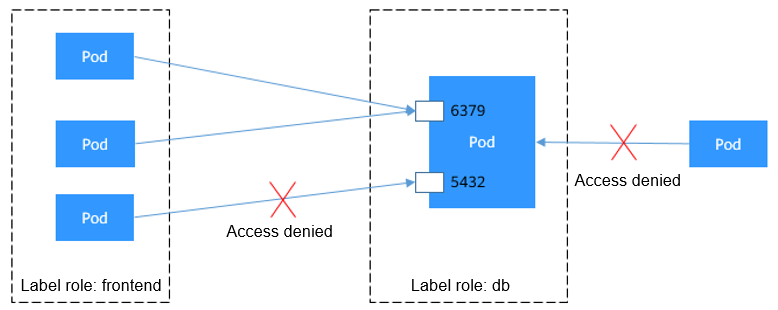
The pod labeled with role=db only permits access to its port 6379 from pods labeled with role=frontend. To achieve this, take the following steps:
- Create the access-ingress1.yaml file.vim access-ingress1.yaml
File content:
apiVersion: networking.k8s.io/v1kind: NetworkPolicymetadata:name: access-ingress1namespace: defaultspec:podSelector: # The rule takes effect for pods with the role=dbrole=db label.matchLabels:role: dbingress: # This is an ingress rule.- from:- podSelector: # Only allows the access of the pods labeled with role=frontendrole=frontend.matchLabels:role: frontendports: # Only TCP can be used to access port 6379.- protocol: TCPport: 6379 - Run the following command to create the network policy defined in the access-ingress1.yaml file:kubectl apply -f access-ingress1.yaml
Expected output:
networkpolicy.networking.k8s.io/access-ingress1 created
- Create the access-ingress1.yaml file.
- Scenario 2: Configure a network policy to allow only pods in a specific namespace to access the target pod.
Figure 2 namespaceSelector
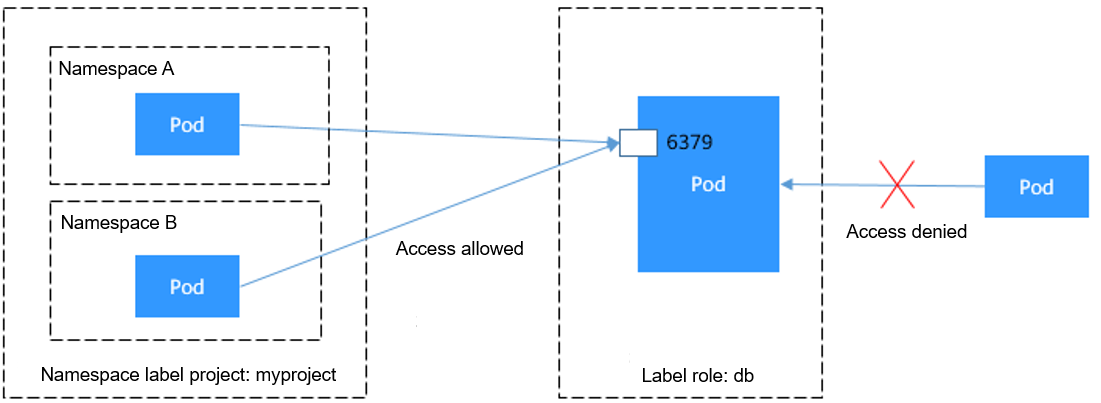
The pod labeled with role=db only permits access to its port 6379 from pods in the namespace labeled with project=myproject. To achieve this, take the following steps:
- Create the access-ingress2.yaml file.vim access-ingress2.yaml
File content:
apiVersion: networking.k8s.io/v1kind: NetworkPolicymetadata:name: access-ingress2spec:podSelector: # The rule takes effect for pods with the role=dbrole=db label.matchLabels:role: dbingress: # This is an ingress rule.- from:- namespaceSelector: # Only allows the access of the pods in the namespace labeled with project=myprojectproject=myproject.matchLabels:project: myprojectports: # Only TCP can be used to access port 6379.- protocol: TCPport: 6379 - Run the following command to create the network policy defined in the access-ingress2.yaml file:kubectl apply -f access-ingress2.yaml
Expected output:
networkpolicy.networking.k8s.io/access-ingress2 created
- Create the access-ingress2.yaml file.
- Scenario 3: Configure a network policy to allow only pods with specific labels in a specific namespace to access the target pod.
Figure 3 Using both podSelector and namespaceSelector
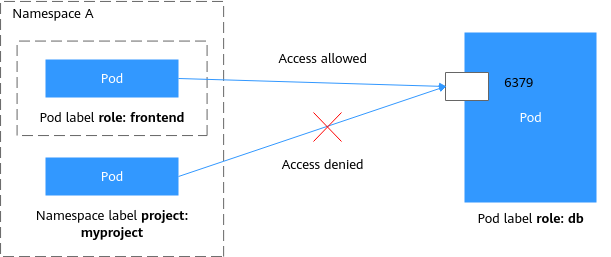
The pod labeled with role=db only allows access to its port 6379 from pods with label role=frontend in the namespace labeled with project=myproject. To achieve this, take the following steps:
- Create the access-ingress3.yaml file.vim access-ingress3.yaml
File content:
apiVersion: networking.k8s.io/v1kind: NetworkPolicymetadata:name: access-ingress3spec:podSelector: # The rule applies only to pods labeled with role=dbrole=db.matchLabels:role: dbingress: # This is an ingress rule.- from:- namespaceSelector: # Only allow the access of the pods in the namespace labeled with project=myprojectproject=myproject.matchLabels:project: myprojectpodSelector: # Allow access only from pods labeled with role=frontendrole=frontend.matchLabels:role: frontendports: # Only TCP can be used to access port 6379.- protocol: TCPport: 6379 - Run the following command to create the network policy defined in the access-ingress3.yaml file:kubectl apply -f access-ingress3.yaml
Expected output:
networkpolicy.networking.k8s.io/access-ingress3 created
- Create the access-ingress3.yaml file.
Using Egress Rules Through YAML
Clusters of v1.23 or later that use a tunnel network support egress rules. The node OS can only be CentOS 7.x or HCE OS 2.0.
Egress rules are only available in CCE Turbo clusters or other CCE clusters using VPC networks. The cluster version must be v1.27.16-r10, v1.28.15-r0, v1.29.10-r0, v1.30.6-r0, or later, and DataPlane V2 must be enabled. Additionally, nodes in these clusters must run HCE OS 2.0.
- Scenario 1: Controlled by a preset network policy, pods can only access specific addresses.
Figure 4 IPBlock
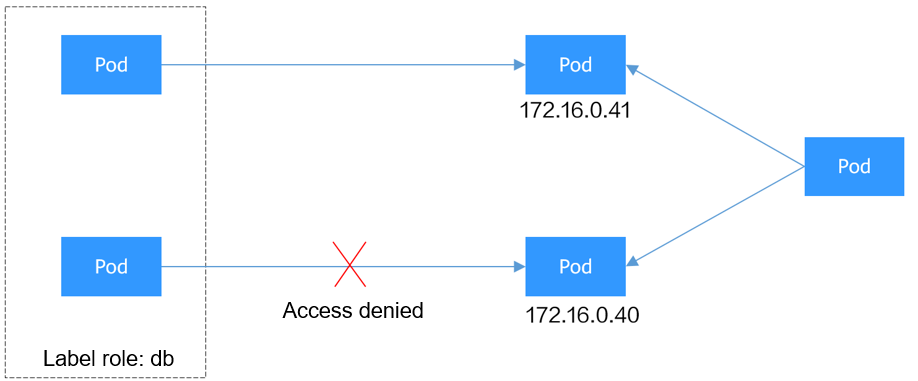
The pods labeled role=db only allow access to 172.16.0.0/16, excluding 172.16.0.40/32. To achieve this, take the following steps:
- Create the access-egress1.yaml file.vim access-egress1.yaml
File content:
apiVersion: networking.k8s.io/v1kind: NetworkPolicymetadata:name: access-egress1namespace: defaultspec:policyTypes: # This policy type must be specified for egress rules.- EgresspodSelector: # The rule takes effect for pods with the role=dbrole=db label.matchLabels:role: dbegress: # This is an egress rule.- to:- ipBlock:cidr: 172.16.0.0/16 # Allows access to this CIDR block in the outbound direction.except:- 172.16.0.40/32 # Blocks access to this CIDR block. This CIDR block is in the allowed CIDR block. - Run the following command to create the network policy defined in the access-egress1.yaml file:kubectl apply -f access-egress1.yaml
Expected output:
networkpolicy.networking.k8s.io/access-egress1 created
- Create the access-egress1.yaml file.
- Scenario 2: Controlled by a preset network policy, a pod can only be accessed by pods with specific labels, while this pod itself can only access specific pods.
Figure 5 Using both ingress and egress
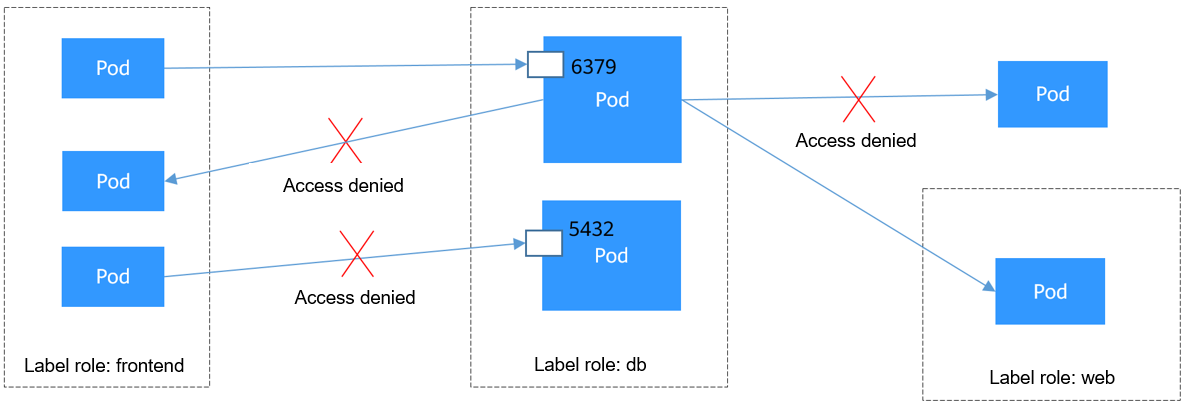
The pod labeled with role=db only permits access to its port 6379 from pods labeled with role=frontend, and this pod can only access the pods labeled with role=web. You can use the same rule to configure both ingress and egress in a network policy. To achieve this, take the following steps:
- Create the access-egress2.yaml file.vim access-egress2.yaml
File content:
apiVersion: networking.k8s.io/v1kind: NetworkPolicymetadata:name: access-egress2namespace: defaultspec:policyTypes:- Ingress- EgresspodSelector: # The rule takes effect for pods with the role=dbrole=db label.matchLabels:role: dbingress: # This is an ingress rule.- from:- podSelector: # Only allows the access of the pods labeled with role=frontendrole=frontend.matchLabels:role: frontendports: # Only TCP can be used to access port 6379.- protocol: TCPport: 6379egress: # This is an egress rule.- to:- podSelector: # The rule takes effect for pods with the role=webrole=web label.matchLabels:role: web - Run the following command to create the network policy defined in the access-egress2.yaml file:kubectl apply -f access-egress2.yaml
Expected output:
networkpolicy.networking.k8s.io/access-egress2 created
- Create the access-egress2.yaml file.
Creating a Network Policy on the Console
- Log in to the CCE console and click the cluster name to access the cluster console.
- Choose Policies in the navigation pane, click the Network Policies tab, and click Create Network Policy in the upper right corner.
- Policy Name: Specify a network policy name.
- Namespace: Select a namespace in which the network policy is applied.
- Selector: Enter a label, select the pod to be associated, and click Add. You can also click Reference Workload Label to use the label of an existing workload.
- Inbound Rule: Click
 to add an inbound rule. For details about parameter settings, see Table 1.
Table 1 Adding an inbound rule Parameter
Description
Protocol & Port
Select the protocol type and port. Currently, TCP and UDP are supported.
Source CIDR Block
For clusters of v1.27.16-r10, v1.28.15-r0, v1.29.10-r0, v1.30.6-r0, or later versions with DataPlane V2 enabled, you can configure the source CIDR block.
The specified source CIDR block allows traffic from a destination CIDR block (multiple exception CIDR blocks can be specified). Separate the destination and exception CIDR blocks using a vertical bar (|). If there are multiple exception CIDR blocks, separate them using commas (,). For example, 172.17.0.0/16|172.17.1.0/24,172.17.2.0/24 indicates that 172.17.0.0/16 is accessible, but 172.17.1.0/24 and 172.17.2.0/24 are inaccessible.
Source Namespace
Select a namespace whose objects can be accessed. If this parameter is not specified, the object belongs to the same namespace as the current policy.
Source Pod Label
Allow accessing the pods with this label. If this parameter is not specified, all pods in the namespace can be accessed.
- Outbound Rule: Click
 to add an outbound rule. For details about parameter settings, see Table 2.
Table 2 Adding an outbound rule Parameter
Description
Protocol & Port
Select the protocol type and port. Currently, TCP and UDP are supported. If this parameter is not specified, the protocol type is not limited.
Destination CIDR Block
Allow requests to be routed to a specified CIDR block (and not to the exception CIDR blocks). Separate the destination and exception CIDR blocks using a vertical bar (|). If there are multiple exception CIDR blocks, separate them using commas (,). For example, 172.17.0.0/16|172.17.1.0/24,172.17.2.0/24 indicates that 172.17.0.0/16 is accessible, but 172.17.1.0/24 and 172.17.2.0/24 are inaccessible.
Destination Namespace
Select a namespace whose objects can be accessed. If this parameter is not specified, the object belongs to the same namespace as the current policy.
Destination Pod Label
Allow accessing the pods with this label. If this parameter is not specified, all pods in the namespace can be accessed.
- Click OK.