When disks on a server are faulty or their data is lost, you can use a backup to restore the server to its state when the backup was created.
You can also restore the backup to another server. For details, see How Do I Restore Data to a New Server?
The server is stopped before a data restoration, and automatically starts up after the restoration is complete. If you deselect Start the server immediately after restoration, you need to manually start the server after the restoration is complete.
Constraints
- A data disk backup cannot be restored to the system disk.
- Data cannot be restored to servers in the Faulty state.
- Concurrent data restoration is not supported.
- An ongoing restoration task cannot be terminated.
- Data cannot be restored for a cloud server that is being backed up.
Prerequisites
- Disks are running properly on the server whose data needs to be restored.
- The server has at least one available backup.
Procedure
- Log in to the CBR console.
- In the upper left corner, click
 and select a region.
 - Click
 and choose Storage > Cloud Backup and Recovery.
- In the upper left corner, click
- Click the Backups tab. Locate the desired backup. For details, see Viewing a Backup.
- Click Restore Server in the Operation column, as shown in Figure 1.Warning
- The current server data will be overwritten by the data captured at the time of backup. The restoration cannot be undone.
- Servers will be shut down during restoration. It is recommended that you perform restoration during off-peak hours.
Figure 1 Restoring a server
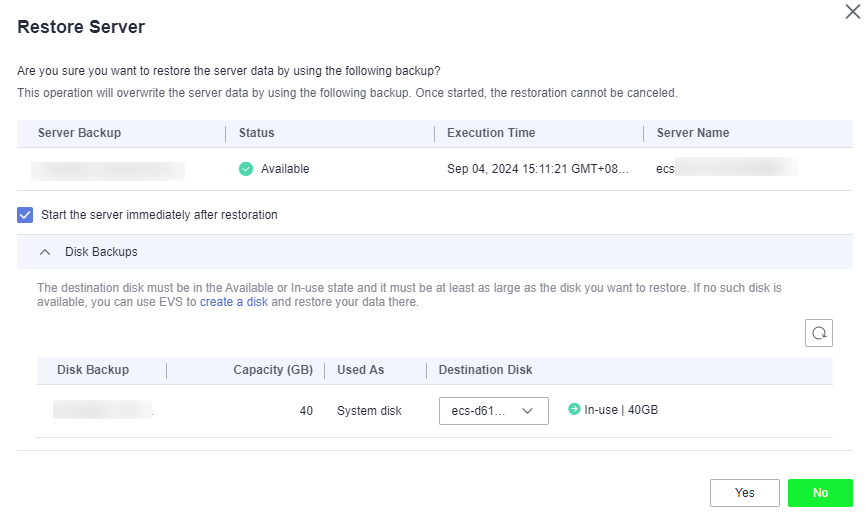
- (Optional) Deselect Start the server immediately after restoration.
If you do so, manually start the server after the restoration is complete.
- In the Destination Disk drop-down list, select the target disk to which the backup will be restored.Warning
If the number of disks to be restored is greater than the number of disks that were backed up, restoration may cause data inconsistency.
For example, if the Oracle data is scattered across multiple disks and only some of the disks are restored, data may become inconsistent and the application may fail to start.
Note- If the server has only one disk, the backup is restored to that disk by default.
- If the server has multiple disks, the backup is restored to the original disks by default. You can also restore the backup to a different disk of at least the same size as the original disk.
- A data disk backup cannot be restored to the system disk.
- After confirming that the information is correct, enter YES. Click Yes and confirm that the restoration is successful.
You can view the restoration status in the backup list. When the backup enters the Available state and no new restoration tasks failed, the restoration is successful. The data is restored to the state when that backup was created.
For details about how to view failed restoration tasks, see Task Management.
NoteIf you use a cloud server backup to restore a logical volume group, you need to attach the logical volume group again.
Helpful Links
- Due to Windows limitations, data disks may fail to be displayed after a Windows server is restored. If this happens, manually bring these data disks online. For details, see Data Disks Are Not Displayed After a Windows Server Is Restored.
- Can I Use a System Disk Backup to Recover an ECS?
- Can a Server Be Restored from Its Backups After It Is Changed?
- What Can I Do If the Password Becomes a Random One After I Use a Backup to Restore a Server or Use an Image to Create a Server?
- What Changes Will Be Made to the Original Backup When I Use the Backup to Restore a Server?