What Is a Virtual IP Address?
A virtual IP address is a private IP address independently assigned from a VPC subnet. It can be released when no longer needed. You can:
Generally, cloud servers use private IP addresses for internal communications. Virtual IP addresses provide similar access and support communications within a VPC at Layer 2 and Layer 3, between VPCs with VPC peering connections, between cloud and on-premises networks with VPN or Direct Connect, and Internet access with EIPs. Figure 1 describes how private IP addresses, the virtual IP address, and EIPs work together. Figure 1 Different types of IP addresses used by ECSs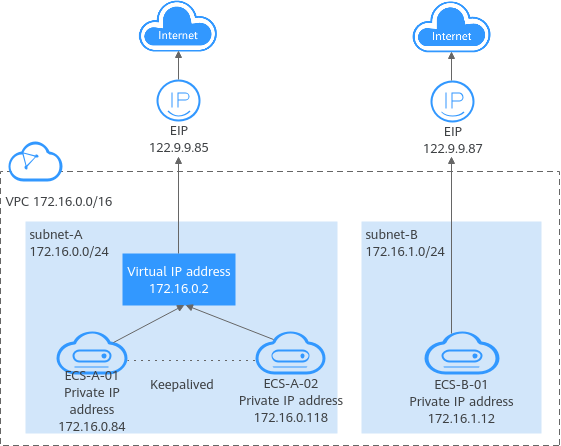
Application Scenarios
You can use a virtual IP address and Keepalived to set up a high-availability active/standby cluster. If the active cloud server goes down, the standby server becomes the active server and continues to provide services. The following describes the typical application scenarios of virtual IP addresses.
Using a Virtual IP Address and Keepalived to Set Up a High-Availability Cluster
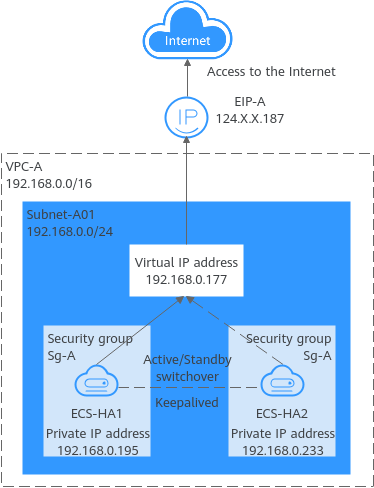
Figure 2 shows a high-availability cluster that is set up using a virtual IP address and Keepalived. They work as follows:
- Virtual IP address 192.168.0.177 is bound to ECS-HA1 and ECS-HA2. Keepalived is configured on the two ECSs.
- EIP-A is bound to the virtual IP address so that the ECSs can be accessed from the Internet.
In this cluster, ECS-HA1 works as the active ECS and provides services accessible from the Internet using EIP-A. ECS-HA2 works as the standby ECS, with no services deployed on it. If ECS-HA1 goes down, ECS-HA2 takes over services, ensuring service continuity.
Figure 2 A high-availability cluster using a virtual IP address and Keepalived
Using a Virtual IP Address and Keepalived/LVS to Set Up a High-Availability Load Balancing Cluster
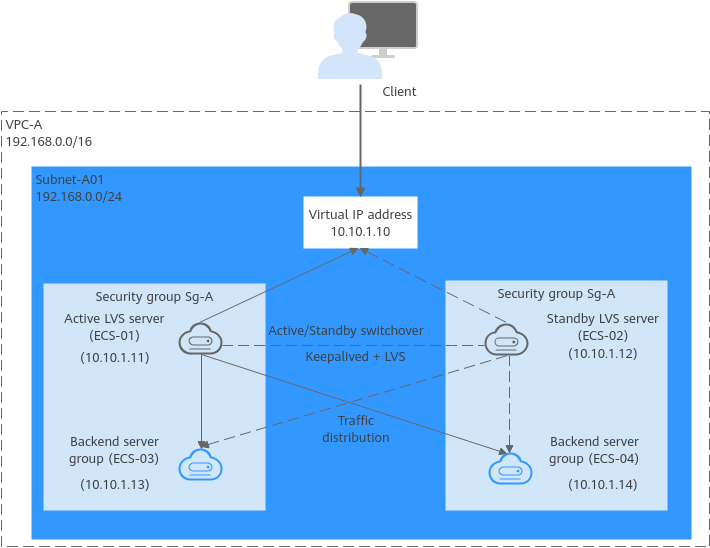
As shown in Figure 3, a virtual IP address, Keepalived, and LVS are used to set up an HA load balancing cluster. LVS is used for load balancing, and Keepalived is used for high availability. They work as follows: When you bind a virtual IP address to an ECS, the source/destination check option of the ECS's network interface is automatically disabled. If the option is not disabled, disable it.
In this load balancing cluster, ECS-01 works as the active LVS server to distribute requests from clients. If ECS-01 is faulty, ECS-02 takes over and distributes requests from clients, ensuring high availability of the LVS cluster.
Figure 3 A high-availability cluster using a virtual IP address and Keepalived/LVS
For details about how to install and configure Keepalived and LVS services and how to configure backend servers, see the common practices in the industry.
Virtual IP Address Quotas
Table 1 lists the quotas about virtual IP addresses. Some default quotas can be increased.
Item | Default Quota | Adjustable |
|---|---|---|
Maximum number of virtual IP addresses per region | 2 | Yes. For details, see Managing Quotas. |
Maximum number of EIPs that a virtual IP address can be bound to | 1 | No |
Maximum number of instances (including cloud servers and network interfaces) that a virtual IP address can be bound to | 10 | No |
Notes and Constraints
- If a cloud server has multiple network interfaces that are in the same subnet, you are not advised to bind virtual IP addresses to the network interfaces. There may be route conflicts on the ECS, which would cause communication failure using the virtual IP address.
- If you use virtual IP addresses and Keepalived to set up a HA cluster with cloud servers working in the active/standby pair, backend cloud servers bound with the same virtual IP address will receive same data packets.
- Cross-VPC communication: After two VPCs are connected through a VPC peering, Direct Connect, or VPN connection, if the active/standby cloud servers in the HA cluster is bound with the same virtual IP address in a VPC, both the cloud servers working in the active/standby pair will receive the request data packets from the other VPC. For example, suppose VPC-A and VPC-B are connected through a VPC peering connection, and ECS-A01 and ECS-A02 in VPC-A work in an active/standby pair and are bound with the same virtual IP address. If ECS-B in VPC-B sends a request to the HA cluster, both ECS-A01 and ECS-A02 will receive the request packet.
- Public network access: If the active/standby servers in the HA cluster are bound with the same virtual IP address that has an EIP bound, both cloud servers working in the active/standby pair will receive request packets when the requests are initiated from the Internet. For example, if ECS-C01 and ECS-C02 in VPC-C are bound with the same virtual IP address, and this virtual IP address is bound with an EIP, both ECSs working in an active/standby pair can provide services accessible from the Internet. If an access request is initiated from the public network, both ECS-C01 and ECS-C02 will receive request packets.