Облачная платформаAdvanced

What Is Virtual Private Cloud?

Язык статьи: Английский
Перевести

VPC Overview

Virtual Private Cloud (VPC) enables you to provision logically isolated virtual networks for Elastic Cloud Servers (ECSs), improving cloud resource security and simplifying network deployment. You can configure and manage the virtual networks as required.

Within your own VPC, you can create security groups and VPNs, configure IP address ranges, specify bandwidth sizes, manage the networks in the VPC, and make changes to these networks as needed, quickly and securely. You can also define rules to control communications between ECSs in the same security group or in different security groups.

Product Architecture

The following describes the basics, security, connectivity, and O&M of VPCs.

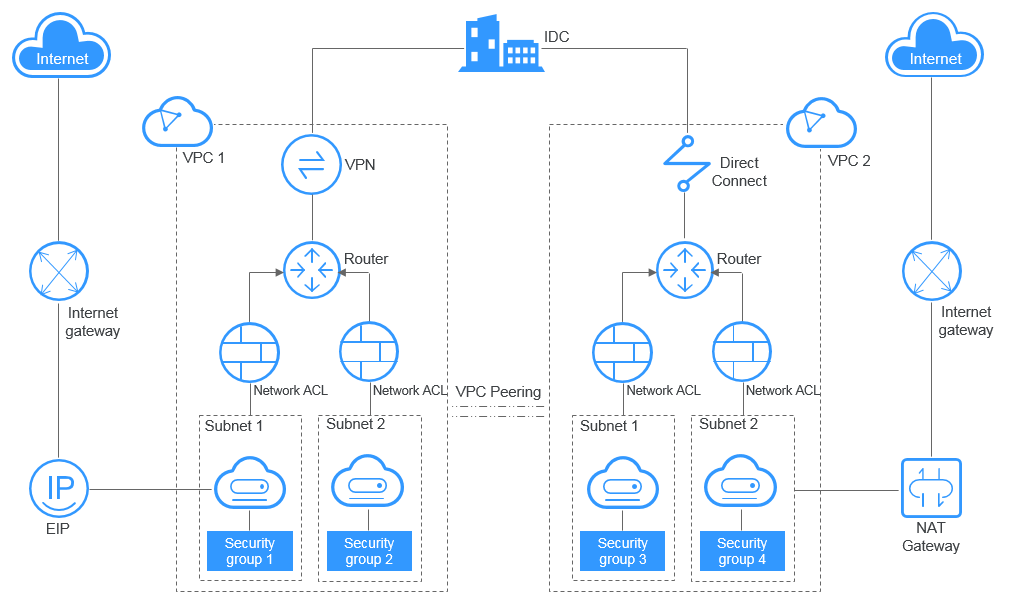
Figure 1 VPC architecture
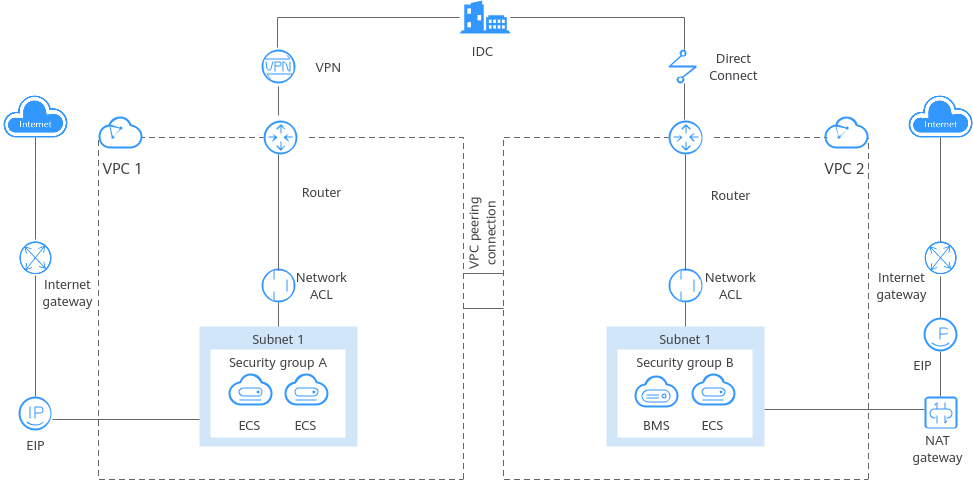

Table 1 Architecture description

Item

Brief

Details

Basic functions

A VPC is a logically isolated virtual private network on the cloud. You can define a CIDR block for each VPC and create one or more subnets in the VPC. You can also configure VPC route tables to control where traffic is directed.

VPCs are logically isolated from each other, but subnets in a VPC can communicate with each other by default.

  • IPv4 CIDR block: When creating a VPC, you need to specify an IPv4 CIDR block for it. Supported IPv4 CIDR blocks are 10.0.0.0/8–24, 172.16.0.0/12–24, and 192.168.0.0/16–24.
  • Subnet: You can create subnets in a VPC as required. A VPC must contain at least one subnet. Instances, such as cloud servers, containers, and databases, must be deployed in subnets. Private IP addresses are then assigned to your instances from the subnets where they are running.

    For more information, see Subnet.

  • Route table: Each VPC comes with a default route table that allows communications between subnets in a VPC. You can add routes to the default route table or create a route table to control traffic.

    For details, see What Is Virtual Private Cloud?.

Access control

Security groups and network ACLs protect instances deployed in a VPC.

  • Security groups protect instances. You can add inbound and outbound rules to protect all the instances in a security group.

  • Network ACLs protect associated subnets. You can add inbound and outbound rules to protect all the resources in a subnet.

    For more information, see Network ACL Overview.

Network ACLs protect subnets, while security groups protect instances in a subnet. If both security group and network ACL rules are configured, traffic matches network ACL rules first and then security group rules.

For more information, see Access Control Overview.

Network connectivity

You can use VPC together with other networking services to build networks for different needs.

  • Use a VPC peering connections to connect two VPCs in the same region.
  • Use EIPs or NAT gateways to allow the instances in a VPC to connect to the Internet.
  • Use Direct Connect or VPN to connect an on-premises data center to VPCs.
  • Connecting VPCs in the same region

    VPC peering connections connect VPCs in the same region under the same account or different accounts. For more information, see VPC Peering Connection Overview.

  • Connecting a VPC to the Internet
    • EIPs are public IP addresses. You can bind an EIP to an instance to enable the instance to communicate with the Internet.

      For more information, see section "What Is Elastic IP?" in the Elastic IP User Guide.

    • Public NAT gateways enable instances (such as ECSs or BMSs) in a VPC to share an EIP to communicate with the Internet. A public NAT gateway supports up to 20 Gbit/s of bandwidth.

      For more information, see section "What Is NAT Gateway?" in the NAT Gateway User Guide.

  • Connecting an on-premises data center to a VPC
    • VPN establishes a secure, encrypted communication tunnel between your on-premises data center and your VPC.

    VPN is a more cost-effective option than Direct Connect and can be deployed faster.

Network O&M

VPC flow logs and traffic mirroring track traffic in a VPC for network O&M.

  • VPC flow logs record traffic to and from a VPC in real time. VPC flow logs help you monitor network traffic, analyze network attacks, and determine whether security group and network ACL rules require modification.

    For more information, see VPC Flow Log.

  • Traffic mirroring mirrors traffic that meets a mirror filter from an elastic network interface to a destination for inspection, audit analysis, and troubleshooting.

    For more information, see Traffic Mirroring Overview.

Figure 2 VPC components


Accessing the VPC Service

You can access the VPC service through the management console or using HTTPS-based APIs.

  • Management console

    You can use the console to directly perform operations on VPC resources. To access the VPC service, log in to the management console and select Virtual Private Cloud from the console homepage.

  • API

    If you need to integrate a VPC into a third-party system for secondary development, you can use APIs to access the VPC service. For details, see the Virtual Private Cloud API Reference.