Symptom
When you use SMS to migrate a source server running Windows, the disks on the target server should be at least the size recommended on the Source Management page. Otherwise, the migration may fail. If you have created a target server running Windows, and the disks on the target server are too small, you can shrink the source server disks to be no larger than the target server disks.
Possible Causes
For a migration to be successful, the target server disks must be at least as large as the source disks. If they are not, you need to either scale up the target server disk or shrink the source server disk. On a Windows server, you can shrink disk partitions of the source server using the Windows Disk Management tool.
Procedure
- Choose Start, enter diskmgmt.msc in the search box.
The Disk Management tool is displayed.
- Right-click the partition of the disk you want to shrink and choose Shrink Volume.
The Shrink Volume dialog box is displayed.
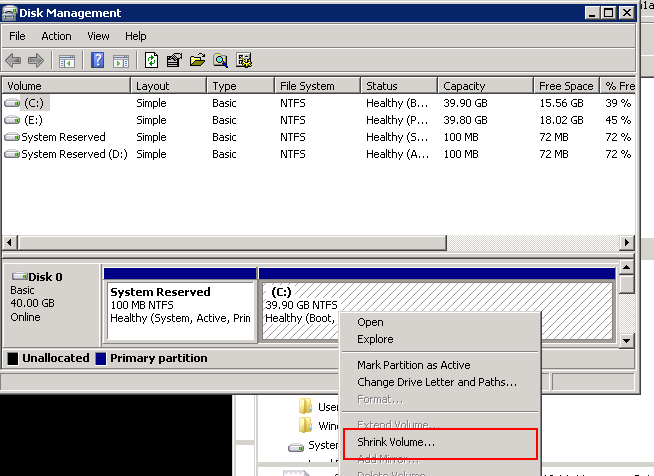
- Enter the amount you wish to shrink the partition by in the Enter the amount of space to shrink in MB text box.
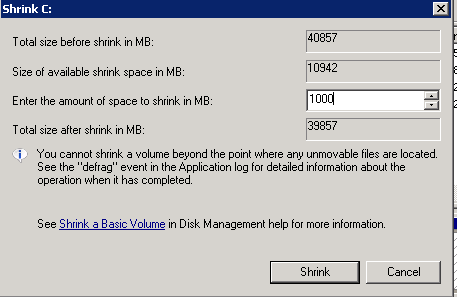
- Click Shrink.
The new space available is displayed as unallocated space.
Figure 1 Disk partition after shrink

- Log in to the management console.
- Click Service List. Choose Migration > Server Migration Service.
The SMS console is displayed.
- In the navigation pane on the left, click Servers.
- Choose More > Delete in the Operation column of the source server.
- Confirm information about the source server to be deleted and click Yes.
- Report the information about the source server to SMS again.
- If the Agent has been uninstalled from the source server, install the Agent again.
- If the Agent has been installed on your source server, restart the Agent to report the source server information to SMS.