Server Migration Service (SMS) helps you migrate applications and data to Elastic Cloud Servers (ECSs) on the cloud platform. The source can be x86 physical servers, VMs on cloud platforms, or VMs on private clouds.
Figure 1 How SMS works
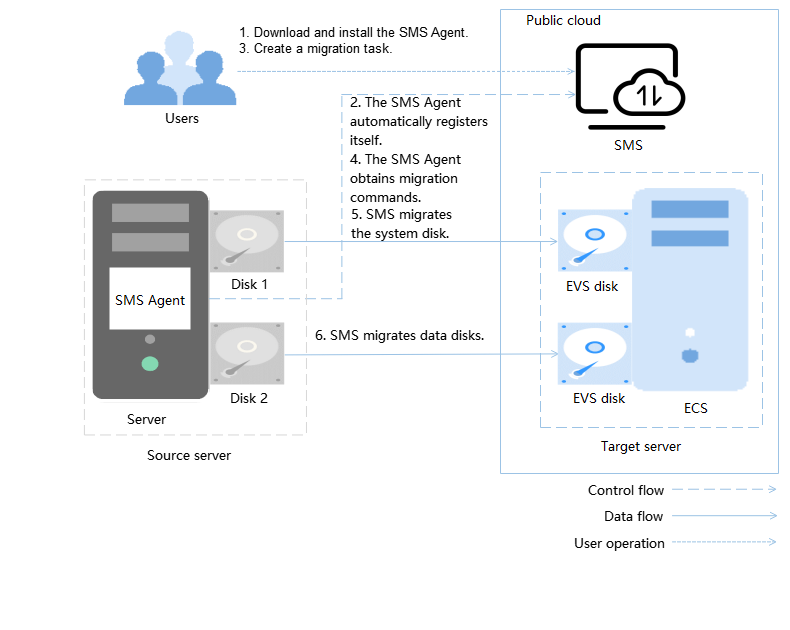
How SMS works
You only need to perform steps 1 and 3, and SMS takes care of the other steps automatically.
- Install the Agent on the source server.
- The Agent registers its connection status with SMS and reports the information about the source server to SMS. Then, SMS evaluates migration feasibility of the server.
- Create a migration task.
- The Agent receives and executes the migration commands sent by SMS.
- SMS migrates the system disk of the source server.
- The Agent starts to migrate data disks of the source server.
Note
- Source server is the x86 physical server or VM running on-premises or on another cloud that you migrate data and applications away from.
- Target server is the ECS that you migrate data and applications to. The target server takes over the migrated data and applications. During the migration, data on the source server is transmitted based on the migration policy you specify and overwrites any existing data on the target server.
- SMS is the SMS service.
Parent topic: Service Overview