Scenarios
You need to install the SMS-Agent on the source server. During the Agent installation, you need to enter the AK/SK pair of your account. After the Agent is started successfully, it automatically reports source server information to SMS. The information is used for migration only. For more information, see What Information Does SMS Collect About Source Servers?
You need to log in to the source Linux server as user root.
Prerequisites
- You have obtained the AK/SK pair of your cloud platform account
- If you use an IAM user for migration, see How Do I Obtain an AK/SK Pair for an IAM User?
- If you use an account for migration, see How Do I Obtain an AK/SK Pair for an Account?.
- You have confirmed that the source server OS is included in Supported Linux OSs.
Installing the SMS-Agent on Linux
- Log in to the management console.
- Click Service List. Choose Migration > Server Migration Service.
- In the navigation pane on the left, choose Agents.
- Select the Linux card, and in the Linux Agent area, click the
 icon next to Agent URL to copy the Agent download command. Run the command on the source server to download the Agent installation package.
 - Run the command following SHA256 File to verify the integrity of the Agent installation package. For details, see How Do I Verify the Integrity of the Agent Installation File?
- Run the following command to decompress the SMS-Agent installation package:tar -zxvf SMS-Agent.tar.gz
- Switch to the SMS-Agent directory on the source server.cd SMS-Agent
- Start the SMS-Agent../startup.sh
- Read the displayed information carefully, enter y, and press Enter.
- Enter the AK/SK pair of the account and the SMS domain name in the region you are migrating to. You can obtain the SMS domain name on the Agents page of the SMS console.
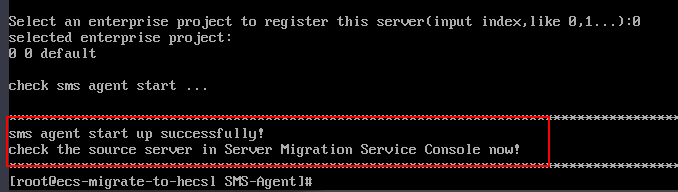
If the EPS service has been enabled for your account, after you entered the AK/SK pair, the Agent will list all enterprise projects your account is allowed to access. You can select the enterprise project you would like to migrate the source server to. This enables you to isolate permissions, resources, and finance during the migration.
When the information shown in the figure below is displayed, the SMS-Agent has been started up and will automatically start reporting source server information to SMS. You can go to the Servers page on the SMS console to check reported source servers.
Figure 1 Agent running
Troubleshooting
- How Do I Resolve the "No such file or directory: 'rsync':'rsync" Error When I Start the Linux Agent?
- How Do I Resolve Error "AK/SK authentication failed. Ensure that the system time is consistent with the standard time and the AK and SK are correct" When I Start the Agent?
- Why Wasn't My Source Server Added to the SMS Console After I Configured the Agent?