Scenarios
You can expand the capacity of a file system when needed.
Constraints
SFS Turbo file systems can only have their capacities expanded, not reduced. Only in-use file systems can be expanded.
Procedure
- Log in to the SFS console.
- In the file system list, click Expand Capacity in the row of the desired file system. A dialog box is displayed. See the following figure.
Figure 1 Expanding the capacity of an SFS Turbo file system
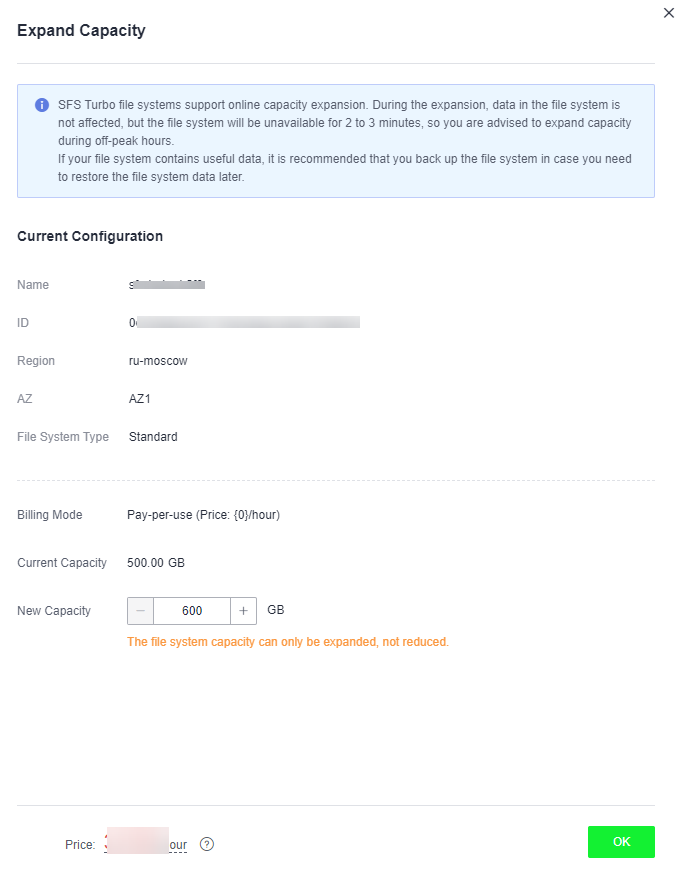
- Enter a new capacity and click OK. The following tables describe the parameters.Table 1 SFS Turbo file system capacity expansion parameters
Parameter
Description
Current Capacity
Current storage capacity of the file system
New Capacity
New storage capacity of the file system
Value constraints:
- For a Standard, Standard-Enhanced, Performance, or Performance-Enhanced file system, the minimum expansion increment is 100 GB. A Standard or Performance file system can be expanded to up to 32 TB, and a Standard-Enhanced or Performance-Enhanced file system can be expanded to up to 320 TB.
- For a 20 MB/s/TiB, 40 MB/s/TiB, 125 MB/s/TiB, or 250 MB/s/TiB file system, the minimum expansion increment is 1.2 TB, and the increment must be an integer multiple of 1.2 TB. The new capacity can be no more than 1 PB.
- On the displayed page, confirm the information and click OK.
- In the file system list, check the capacity information after resizing.