You must restore a Cold object before you can download it, access it with a URL, or configure its ACL or metadata.
Important Notes
- After versioning is enabled, if you do not specify a version ID, OBS restores the current version. You can specify a version ID to restore a specific version.
- If the RestoreObject API is called for the first time, the server returns 202, indicating that the server has received the request. If the RestoreObject API is called again after a successful object restore, 200 OK will be returned.
Constraints
- If a Cold object is being restored, its restore task cannot be suspended or deleted.
- An object being restored cannot be restored again.
- After an object is restored, an object copy in the Standard storage class will be generated. This way, there is a Cold object and also its Standard copy in the bucket. The copy will be automatically deleted once the restoration expires.
Object Restore Options and Time Required
OBS provides two restore options: standard and expedited.
To restore a large number of objects from the Deep Archive storage class, you are advised to use the standard restore. The restore time spent depends on the object size restored.
Storage Class | Restore Option | Time Required |
|---|---|---|
Cold | Expedited | 1 to 5 minutes |
Cold | Standard | 3 to 5 hours |
Cold | Bulk | 5 to 12 hours |
How Object Restore Works
Object Restore Process
The following gives an object restore example:
- Before a restore, an object is in the unrestored state.
- On July 1, you submit the first restore request. The object enters the restoring state.
- On July 1, the server completes the restore operation. The object enters the restored state and becomes readable. Assume that you set the validity period to 10 days this time. The object will remain restored until July 10.
- On July 5, you make another restore request for the object and set the validity period to 10 days. The object will then remain in the restored state until July 15, with a total validity period of 15 days.
- Once the validity period is reached, the object returns to the unrestored state and is stored in its original storage class.
Cumulative Validity Period Rule
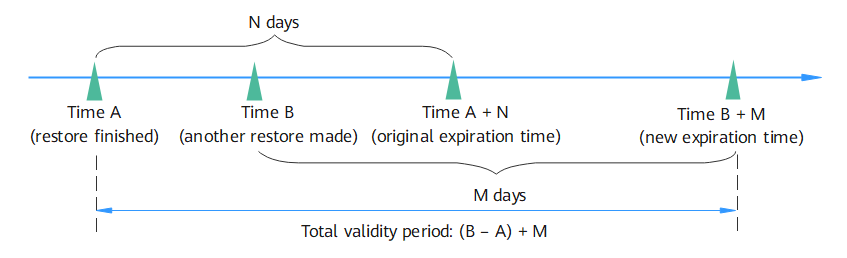
If you initiate a restore request for an object at time A and set the validity period to N days, the restore expiration time will be A + N. Later, you make another restore request for the object at time B (B is earlier than A + N) and set the validity period to M days:
- If B + M is later than A + N, the expiration time changes to B + M, and the total validity period is (B – A) + M, as shown in Figure 1.
Figure 1 Cumulative validity periods
- If B + M is earlier than A + N, the second restore will fail.
Prerequisites
You have the obs:object:RestoreObject permission.
Ways to Restore Objects
You can use OBS Console, APIs, SDKs, or obsutil to restore Cold or Deep Archive objects.
OBS Console Procedure
- In the bucket list of OBS Console, click the required bucket to go to the Objects page.
- Select the file you want to restore, and click Restore on the right. The following dialog box shown in Figure 2 is displayed.
You can select multiple files and click Restore above the file list to batch restore the files.
You can select multiple files and choose More > Restore above the file list to batch restore them.
NoteObjects that are being restored cannot be added for batch restore.
Figure 2 Restoring an object
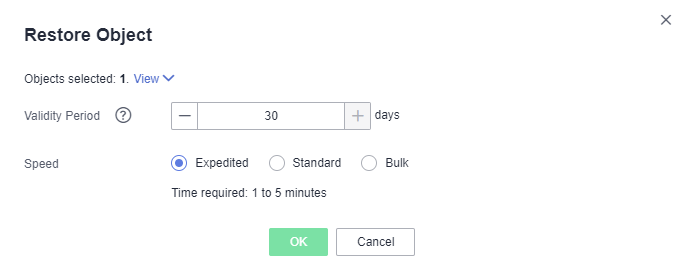
- Configure the validity period and speed of the restore. The following table describes the parameters.
Table 2 Parameters for restoring objects Parameter
Description
Validity Period
How long the object will remain in the Restored state. It starts once the object is restored. The value is an integer ranging from 1 to 30 (days). The default value is 30.
For example, if you set Validity Period to 20 when restoring an object, 20 days after the object is successfully restored, its status will change from Restored to Unrestored.
Speed
How fast objects will be restored.
- Expedited: Cold objects can be restored within 1 to 5 minutes.
- Standard: Cold objects can be restored within 3 to 5 hours.
- Bulk: Large amounts, even gigabytes, of data can be restored within 5 to 12 hours at a low cost.
- Click OK.Note
The system checks the file restore status at UTC 00:00 every day. The system starts counting down the expiration time from the time when the latest check is complete.
Using APIs
For details, see "Restoring Cold Objects" in the API Reference Guide.
Using SDKs
Java | C | Go | Python |
|---|---|---|---|
See "Restoring a Cold Object (SDK for Java)" in the Java SDK Developer Guide. | See "Restoring a Cold Object (SDK for C)" in the C SDK Developer Guide. | See "Restoring a Cold Object (SDK for Go)" in the Go SDK Developer Guide. | See "Restoring a Cold Object (SDK for Python)" in the Python SDK Developer Guide. |
Using the CLI Tool - obsutil
See section "Restoring Objects from the Cold Storage" in the Object Storage Service Tools Guide (obsutil).
Related Operations
Within the validity period of a restored object, you can restore the object again. The validity period is then extended because it will start again when the latest restore is complete.
If a restored object is restored again, its expiration time should be later than the time set for the previous restore. Assume that an object is restored on January 1 and will expire 30 days later (on January 30). If the object is restored again on January 10 and is made to be expired earlier than January 30 (fewer than 20 days), this restore action is considered invalid.