Scenarios
You can share temporary URLs of your objects with others for them to access your objects stored in OBS.
Background Information
File sharing is temporary. All shared URLs are only valid for a limited period of time.
A temporary URL consists of the access domain name and the temporary authentication information of a file.
The temporary authentication information contains the AccessKeyId, Expires, x-obs-security-token, and Signature parameters. AccessKeyId, x-obs-security-token, and Signature are used for authentication. The Expires parameter specifies the validity period of the authentication.
After an object is shared on OBS Console, the system will generate a URL that contains the temporary authentication information, valid for five minutes since its generation by default. Each time you change the validity period of a URL, OBS obtains the authentication information again to create a new shared URL. This new URL is in effect immediately upon the change.
Constraints
- An object shared from OBS Console can be valid for one minute to 18 hours. If you need a longer validity period, use OBS Browser+ that allows a validity period from one minute to 30 days. If you want a shared object to be permanently valid, you can configure a bucket policy or object policy.
- Only version 3.0 buckets support file sharing. You can view the bucket version in the Basic Information area on the Overview page of a bucket.
- To share a cold object, restore it first.
Procedure
- In the bucket list of OBS Console, click the required bucket to go to the Objects page.
- Locate the file to be shared and click Share in the Operation column.
Once the Share File dialog box is opened, the URL is effective and valid for five minutes by default. If you change the validity period, the authentication information in the URL changes accordingly, and the URL's new validity period starts upon the change.
Figure 1 Sharing a file
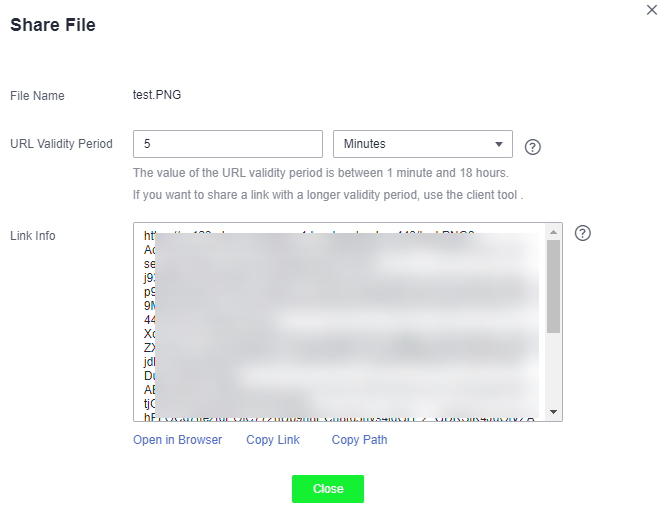
- Operate the URL as follows:
- Click Open in Browser to preview the file on a new page or directly download it to your default download path.
- Click Copy Link to share the link with others for them to access this file in a browser.
- Click Copy Path to share the file path with users who have access to the bucket. The users then can search for the file by pasting the shared path in the search box of the bucket.
NoteWithin the URL validity period, anyone who has the URL can access the file.