This section describes how to configure an SMN event notification rule on OBS Console.
Background Information
For details, see SMN-Enabled Event Notifications.
Procedure
- In the bucket list of OBS Console, click the required bucket to go to the Objects page.
- In the navigation pane, choose Basic Configurations > Event Notification. The Event Notification page is displayed.
- Click Create. The Create Event Notification dialog box is displayed.
Figure 1 Creating an event notification rule
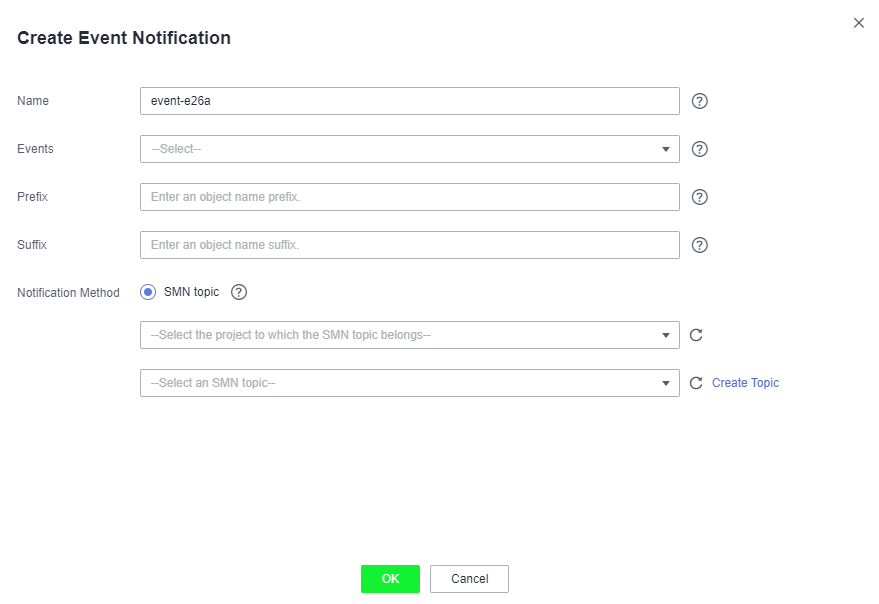
- Configure event notification parameters, as described in Table 1.Table 1 Event notification parameters
Parameter
Description
Name
Name of the event. If the event name is left blank, the system will automatically assign a globally unique ID.
Events
Various types of events. Currently, OBS supports event notification for the following types of events:
- ObjectCreated: all kinds of object creation operations, including PUT, POST, COPY, and part assembling
- Put: Creates or overwrites an object using the PUT method.
- Post: Creates or overwrites an object using the POST (browser-based upload) method.
- Copy: Creates or overwrites an object using the COPY method.
- CompleteMultipartUpload: Assembles parts of a multipart upload.
- ObjectRemoved: Deletes an object.
- Delete: Deletes an object with a specified version ID.
- DeleteMarkerCreated: Deletes an object without specifying a version ID.
Multiple event types can be applied to the same object. For example, if you have selected Put, Copy, and Delete in the same event notification rule, a notification will be sent to you when the specified object is uploaded to, copied to, or deleted from the bucket. ObjectCreated contains Put, Post, Copy, and CompleteMultipartUpload. If you select ObjectCreated, the events ObjectCreated contains are automatically selected. Similarly, if you select ObjectRemoved, Delete and DeleteMarkerCreated are automatically selected.
Prefix
Object name prefix for which notifications will be triggered.
NOTE:If neither the Prefix nor the Suffix is configured, the event notification rule applies to all objects in the bucket.
Suffix
Object name suffix for which notifications will be triggered.
NOTE:- A folder path ends with a slash (/). Therefore, if you want to configure event notification rules for operations on folders and you need to filter folders by suffix, the suffix must also end with a slash (/).
- If neither the Prefix nor the Suffix is configured, the event notification rule applies to all objects in the bucket.
SMN Topic
Project: The project that contains the SMN topic you want to select.
Projects are used to manage and classify cloud resources, including SMN topics. Each project contains different SMN topics. Select a project first and then a topic.
Topic: specifies the SMN topic that authorizes OBS to publish messages. You can create such topics on the SMN management console.
NOTE:- Once SMN topics are selected for pushing OBS event notifications, do not delete them or cancel their authorizations to OBS.
- If the topics are deleted or their authorizations to OBS are canceled, the following conditions may occur:
a. The subscriber of the topic cannot receive messages.
b. Event notifications associated with unavailable topics are automatically cleared.
- For details about how to use SMN, see sections "Creating a Topic", "Adding a Subscription", and "Configuring Topic Policies" in the Simple Message Notification User Guide.
- ObjectCreated: all kinds of object creation operations, including PUT, POST, COPY, and part assembling
- Click OK.
Related Operations
You can click Edit in the Operation column of an event notification rule, to edit the notification rule, or click Delete to delete the rule.
If you want to batch delete event notification rules, select the rules to delete and click Delete above the list.