OBS Overview
Object Storage Service (OBS) is a scalable service that provides secure, reliable, and cost-effective cloud storage for massive amounts of data.
OBS provides unlimited storage capacity for objects of any format, catering to the needs of common users, websites, enterprises, and developers. There is no limitation on the storage capacity of the entire OBS system or of a single bucket, and any number of objects can be stored. As a web service, OBS supports APIs over Hypertext Transfer Protocol (HTTP) and Hypertext Transfer Protocol Secure (HTTPS). You can use OBS Console or OBS tools to access and manage data stored in OBS anytime, anywhere. With OBS SDKs and APIs, you can easily manage data stored in OBS and develop upper-layer applications.
Product Architecture
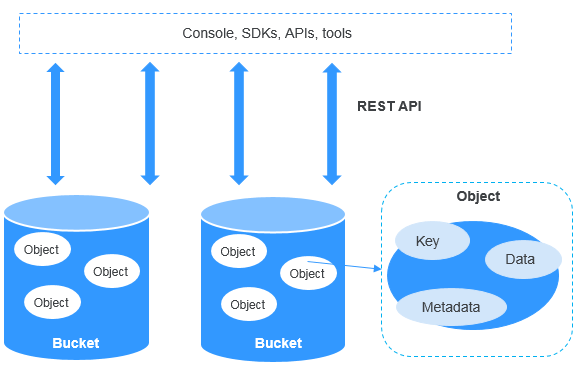
A bucket is a container for storing objects in OBS. Each bucket is specific to a region and has specific storage class and access permissions. A bucket is accessible through its access domain name over the Internet.
An object is the fundamental storage unit in OBS. An object consists of the following:
- A key that specifies the name of an object. An object key is a UTF-8 string up to 1,024 characters long. Each object within a bucket is uniquely identified by a key.
- Metadata that describes an object. The metadata is a set of key-value pairs that are assigned to objects stored in OBS. There are two types of metadata: system-defined metadata and custom metadata.
- System-defined metadata is automatically assigned by OBS. Such metadata includes Date, Content-Length, Last-Modified, ETag, and more.
- You can specify custom metadata to describe the object when you upload an object to OBS.
- Data that refers to the content of an object.
By means of secondary development based on OBS REST APIs, OBS Console, SDKs, and a variety of tools are provided for you to use OBS. You can also use OBS SDKs and APIs to develop applications customized for your business needs.
Figure 1 Product architecture
Storage Classes
OBS offers the storage classes below to meet your requirements for storage performance and cost:
- Standard: The Standard storage class features low latency and high throughput. It is therefore good for storing frequently (multiple times per month) accessed files or small files (less than 1 MB). Its application scenarios include big data analytics, mobile apps, hot videos, and social apps.
- Warm: The Warm storage class is for storing data that is infrequently (less than 12 times per year) accessed, but when needed, the access has to be fast. It can be used for file synchronization, file sharing, enterprise backups, and many other scenarios. This storage class has the same durability, low latency, and high throughput as the Standard storage class, with a lower cost, but its availability is slightly lower than the Standard storage class.
- Cold: The Cold storage class is ideal for storing data that is rarely (once per year) accessed. Its application scenarios include data archive and long-term backups. This storage class is secure, durable, and inexpensive, so it can be used to replace tape libraries. To keep cost low, it may take hours to restore data from the Cold storage class.
An object uploaded to a bucket inherits the storage class of the bucket by default. You can also specify a storage class for an object when you upload it.
Changing the storage class of a bucket does not change the storage classes of existing objects in the bucket, but newly uploaded objects will inherit the new storage class.
Compared Item | Standard | Warm | Cold |
|---|---|---|---|
Feature | Top-notch performance, high reliability and availability | Reliable, inexpensive storage with real-time access | Long-term retention of archived data at a low cost |
Application scenarios | Cloud application, data sharing, content sharing, and hot data storage | Web disk applications, enterprise backup, active archiving, and data monitoring | Archive, medical image storage, video material storage, and replacement of tape libraries |
Minimum storage durationa | N/A | 30 days | 90 days |
Minimum measurement object sizeb | 64 KB | 64 KB | 64 KB |
N/A | Billed for each GB restored. | Data can be restored at a standard, bulk, or an expedited speed. Billed for each GB restored. | |
Image processing | Supported | Supported | Not supported |
Accessing OBS
OBS provides various tools for managing data stored in it. You can use any of the tools listed in Table 2 to access and manage data in OBS.
Tool | Description |
|---|---|
OBS Console | OBS Console is a web-based GUI for you to easily manage OBS resources. |
OBS Browser+ | OBS Browser+ is a Windows client that lets you easily manage OBS resources from your desktop. |
obsutil | obsutil is a command line tool for you to perform common configuration and management operations on OBS. If you are comfortable using the command line interface (CLI), obsutil is recommended for batch processing and automated tasks. |
SDKs | OBS SDKs encapsulate the REST API provided by OBS to simplify development. You can call API functions provided by the OBS SDKs to enjoy OBS capabilities. |
API | OBS offers the REST API for you to access it from web applications with ease. By making API calls, you can upload and download data anytime, anywhere, over the Internet. |