OBS can store multiple versions of an object. You can quickly search for and restore different versions or restore data in the event of accidental deletions or application faults.
By default, the versioning function is disabled for new buckets on OBS. Therefore, if you upload an object to a bucket where an object with the same name exists, the new object will overwrite the existing one.
Enabling Versioning
- Enabling versioning does not change the versions and contents of existing objects in the bucket. The version ID of an object is null before versioning is enabled. If a namesake object is uploaded after versioning is enabled, a version ID will be assigned to the object. For details, see Figure 1.
Figure 1 Versioning (with existing objects)
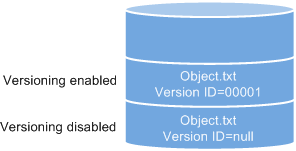
- OBS automatically allocates a unique version ID to a newly uploaded object. Objects with the same name are stored in OBS with different version IDs.
Figure 2 Versioning (for new objects)
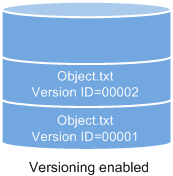
Table 1 Version description Version
Description
Latest version
After versioning is enabled, each operation on an object will result in saving of the object with a new version ID. The version ID generated upon the latest operation is called the latest version.
Historical version
After versioning is enabled, each operation on an object will result in saving of the object with a new version ID. Version IDs generated upon operations other than the latest operation are called historical versions.
- The latest objects in a bucket are returned by default after a GET Object request.
- Objects can be downloaded by version IDs. By default, the latest object is downloaded if the version ID is not specified. For details, see Related Operations in Configuring Versioning.
- You can select an object and click Delete on the right to delete the object. After the object is deleted, OBS inserts a delete marker. The deleted object appears in the Deleted Objects list. For details, see Deleting an Object or Folder. If attempts are then made to access this deleted object, error 404 will be returned.
Figure 3 Object with a delete marker
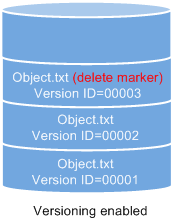
- You can recover a deleted object by deleting the delete marker. For details, see Related Operations in Undeleting an Object.
- After an object is deleted, you can specify the version number in Deleted Objects to permanently delete the object of the specified version. For details, see Related Operations in Deleting an Object or Folder.
- An object appears in either the object list or the list of deleted objects. It will never appear in both lists at the same time.
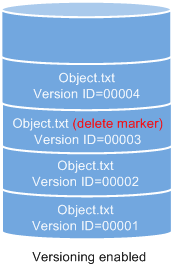
For example, after object A is deleted, it will appear in the Deleted Objects list. If you later upload another object with the same name A, the new object A will appear in the Objects list, but the previously deleted object A will disappear from the Deleted Objects list. For details, see Figure 4.
Figure 4 Uploading a namesake object after the original one is deleted
Suspending Versioning
Once versioning is enabled for a bucket, it cannot be disabled, but it can be suspended. When versioning is suspended, a null, not a specific version ID, will be allocated to a newly uploaded object. If the newly uploaded object has the same name as an existing object with a null version ID, the new object will overwrite the existing object.
Figure 5 Object versions in the scenario when versioning is suspended
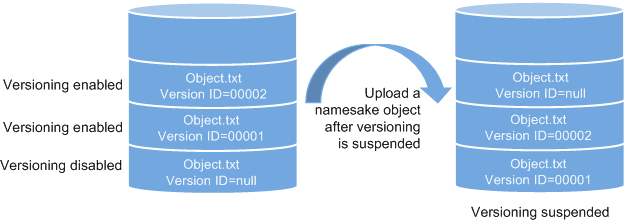
If versioning is no longer needed, you can suspend it. After versioning is suspended:
- Existing object versions are still retained in OBS. If you no longer desire these versions, manually delete them.
- Objects can be downloaded by version IDs. By default, the latest object is downloaded if the version ID is not specified.
Differences Between Scenarios When Versioning Is Suspended and Disabled
If you delete an object after versioning is suspended for the bucket, a delete marker will be created, regardless of whether the object has historical versions. But, if versioning is disabled, the same operation will not generate a delete marker.