LTS manages logs by log stream. Each log stream belongs to exactly one log group, while a log group can contain multiple log streams.
Collected logs of different types are classified and stored in different log streams for easier log management. If there are a large number of logs, you can create multiple log streams and name them for quick log search. For example, you can sort operation logs and access logs into different log streams, making it easier to find specific logs when you need them. You can add tags to log streams to help O&M personnel manage services.
A maximum of 100 log streams can be created in a log group. If you cannot create a log stream, delete unnecessary log streams and try again, or create log streams in another log group.
Prerequisites
You have created a log group. For details, see Managing Log Groups.
Creating a Log Stream
- Log in to the management console and choose Management & Deployment > Log Tank Service.
- On the Log Management page, click
 on the left of the target log group.
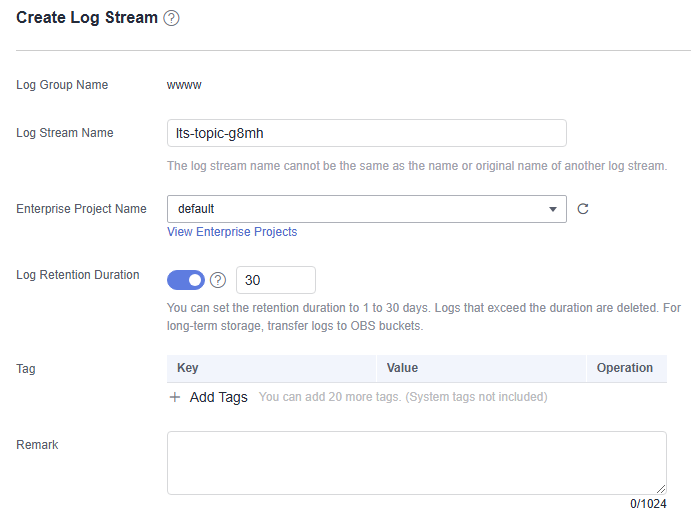
 - Click Create Log Stream. On the displayed page, set log stream parameters by referring to Table 1.Table 1 Log stream parameters
Parameter
Description
Log Group Name
Defaults to name of the log group to which the log stream belongs and be unmodifiable.
Log Stream Name
LTS automatically generates a default log stream name. You are advised to customize one based on your service. You can also change it after the log stream is created. The naming rules are as follows:
- Use only letters, digits, hyphens (-), underscores (_), and periods (.). Do not start with a period or underscore or end with a period.
- Enter 1 to 64 characters.
- Each log stream name must be unique.
Enterprise Project Name
Select the required enterprise project. The default value is default. You can click View Enterprise Projects to view all enterprise projects.
Log Storage
If this function is disabled, Log Retention (Days) cannot be enabled.
- If this function is enabled, logs will be stored in the search engine and all log functions are available.
- If this function is disabled, logs will not be stored to LTS. This saves on index traffic and storage costs, but disables log search, analysis, alarm, consumption, and processing. You will only be allowed to use metric generation and log transfer functions.
Log Retention (Days)
Specify the log retention period for the log stream, that is, how many days the logs will be stored in LTS after being reported to LTS.
By default, logs are retained for 30 days. You can set the retention period to one to 365 days.
- If you enable Log Retention (Days) for the log stream, logs are retained for the period set for the log stream.
- If you disable Log Retention (Days) for the log stream, logs are retained for the period set for the log group.
- The logs that exceed the retention period will be automatically deleted. You can transfer logs to OBS buckets for long-term storage.
Tag
Tag the log stream as required. Click Add Tags and enter a tag key and value. To add more tags, repeat this step. A maximum of 20 tags can be added.
Tag key restrictions:
- A tag key can contain letters, digits, spaces, and special characters (_.:=+-@), but cannot start or end with a space or start with _sys_.
- A tag key can contain up to 128 characters.
- Each tag key must be unique.
Tag value restrictions:
- A tag value can contain letters, digits, spaces, and the following special characters: _.:=+-@
- A tag value can contain up to 255 characters.
Deleting a tag:
Click Delete in the Operation column of the tag.
WARNING:Deleted tags cannot be recovered.
If a tag is used by a transfer task, you need to modify the task configuration after deleting the tag.
Remark
Enter remarks. Up to 1,024 characters are allowed.
Figure 1 Creating a log stream
- Click OK. The created log stream will be displayed under the log group.
Modifying a Log Stream
By default, a log stream inherits the log retention setting from the log group it belongs to.
- In the log stream list, locate the target log stream and click Modify in the Operation column.
- On the page displayed, modify the stream name, log retention period, and tags.
- Click OK. After the modification is successful, move the cursor over the log stream name to view the new and original names along with the log stream ID.
Deleting a Log Stream
You can delete a log stream that is no longer needed. Deleting a log stream will also delete the log data in the log stream.
Before deleting a log stream, check if it is being used by other services, such as log ingestion configurations, log transfer tasks, or log alarm rules. Deleting it while in use may interrupt log reporting.
Deleting a log stream may lead to exceptions in related log tasks. In addition, deleted log streams cannot be restored.
- In the log stream list, locate the target log stream and click Delete in the Operation column.
- In the displayed dialog box, enter DELETE or click Auto Enter.
- Click OK.
The log stream is successfully deleted once it no longer appears in the log stream list.
Other Operations
- Searching for log streams using the following filter criteria:
- Log Stream Name/ID: log stream name or ID (hover your cursor over the log stream name to view the ID)
- Original Log Stream Name/ID: original log stream name (defined during log group or log stream creation) and ID (hover your cursor over the log stream name to view the ID)
- Enterprise Project Name: enterprise project selected during log stream creation.
- Tag: tags set for a log stream.
- Remark: remarks customized during log stream creation.
- Adding a log stream to favorites: Click More > Edit in the Operation column of a log stream. On the displayed dialog box, enable My Favorites and/or My Favorites(Local Cache). The stream is then displayed in the My Favorites/My Favorites(Local Cache) list.
- Viewing log stream details: Click More > Details in the Operation column of a log stream to view its details, including its name, ID, and creation time.