This section describes how to create a custom key on the KMS console.
Prerequisites
When you create a key as an IAM user, you have granted the KMS CMKFullAccess or higher permissions to the IAM user. For details, see Creating a User and Authorizing the User the Permission to Access DEW.
Constraints
- You can create up to 100 custom keys, excluding default keys.
- A custom key is created using the AES-256 algorithm and is 256 bit long.
- Aliases of default keys end with /default. When choosing aliases for your custom keys, do not use aliases ending with /default.
- DEW does not limit the number of times that a key can be called.
Scenarios
- Encrypt data in OBS.
- Encrypt data in EVS.
- Encrypt data in IMS.
- Encrypt an RDS DB instance.
- Use custom keys to directly encrypt and decrypt small volumes of data.
- DEK encryption and decryption for user applications
Creating a Key
- Log in to the management console.
- Click
 in the upper left corner of the management console and select a region or project.
 - Click
 on the left and choose .
 - Click Create Key in the upper right corner.
- Configure the parameters as follows:
Figure 1 Creating a key
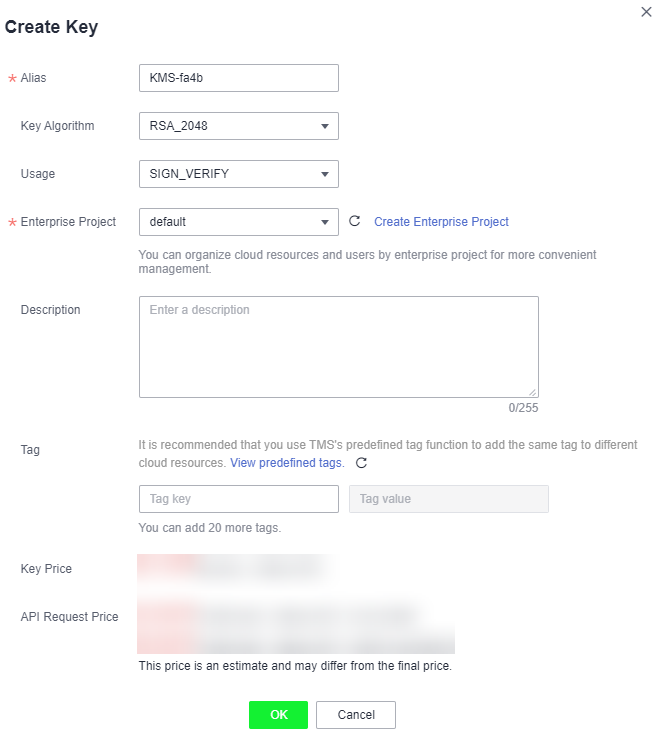 Table 1 Key parameter configuration
Parameter
Description
Alias
Name of the key you are creating.
NOTE:- You can enter digits, letters, underscores (_), hyphens (-), colons (:), and slashes (/).
- You can enter up to 255 characters.
Key Algorithm
Select a key algorithm.
Usage
Key usage. The value cannot be changed after the key is created. The value can be SIGN_VERIFY, ENCRYPT_DECRYPT, or GENERATE_VERIFY_MAC.
- For an AES_256 symmetric key, the default value is ENCRYPT_DECRYPT.
- For an HMAC symmetric key, the default value is GENERATE_VERIFY_MAC.
- For RSA asymmetric keys, select ENCRYPT_DECRYPT or SIGN_VERIFY. The default value is SIGN_VERIFY.
- For an ECC asymmetric key, the default value is SIGN_VERIFY.
NOTE:The key usage can only be configured during key creation and cannot be modified afterwards.
Enterprise Project
This parameter is provided for enterprise users.
If you are an enterprise user and have created an enterprise project, select the required enterprise project from the drop-down list. The default project is default.
If there are no Enterprise Management options displayed, you do not need to configure it.
Description
Add description for a custom key as needed.
NOTE:You can enter up to 255 characters.
Tag
Add tags to the custom key as needed, and enter the tag key and tag value.
NOTE:- After creating a CMK, you can click the alias of the CMK to go to the CMK details page and add a tag to the CMK.
- The same tag (including tag key and tag value) can be used for different custom keys. However, under the same custom key, one tag key can have only one tag value.
- A maximum of 20 tags can be added for one custom key.
- To delete a tag, click Delete next to it.
- Click OK.
Related Operations
- For details about how to upload objects with server-side encryption, see section "Uploading a File with Server-Side Encryption" in Object Storage Service Console Operation Guide.
- For details about how to encrypt data on EVS disks, see section "Creating an EVS Disk" in Elastic Volume Service (EVS) User Guide.
- For details about how to encrypt private images, see section "Encrypting an Image" in Image Management Service (IMS) User Guide.
- For details about how to encrypt disks for a database instance in RDS, see section "Purchasing an Instance" in the Relational Database Service User Guide.
- For details about how to create a DEK and a plaintext-free DEK, see sections "Creating a DEK" and "Creating a Plaintext-Free DEK" in Data Encryption Workshop API Reference.
- For details about how to encrypt and decrypt a DEK for a user application, see sections "Encrypting a DEK" and "Decrypting a DEK" in Data Encryption Workshop API Conference.