This section describes IAM's fine-grained permissions management for your DEW resources. With IAM, you can:
- Create IAM users for employees based on the organizational structure of your enterprise. Each IAM user has its own security credentials to access DEW resources.
- Grant users only the permissions required to perform a task.
- Entrust a cloud account or cloud service to perform professional, efficient O&M on your DEW resources.
If your account does not need individual IAM users, skip this chapter.
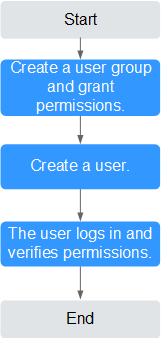
This section describes the procedure for granting permissions (see Figure 1).
Prerequisites
Before granting permissions to a user group, you need to understand the available DEW permissions, and grant permissions based on the real-life scenario. The tables below describe the permissions supported in DEW.
Role/Policy | Description | Type |
|---|---|---|
KMS Administrator | Administrator permissions for the encryption key | Role |
KMS CMKFullAccess | All permissions for the encryption keys | Policy |
KMS CMKReadOnlyAccess | Read-only permission for encryption keys | Policy |
Authorization Process
Figure 1 Authorizing the DEW access permission to a user
- .
Create a user group on the IAM console and grant the user group the KMS CMKFullAccess permission (indicating full permissions for keys).
Create a user on the IAM console and add the user to the user group created in 1.
- Log in as the created user and verify permissions.
Log in to the console as newly created user, and verify that the user only has the assigned permissions.
Click Service List and select a service other than DEW. If a message is displayed indicating that you do not have permission to access the service, the KMS CMKFullAccess policy has taken effect.
Tenant Guest Roles
If you have configured Tenant Guest permissions for the IAM account, apart from the read-only permissions for all cloud services except IAM, you also have the following KMS permissions:
- kms:cmk:create: Create a key.
- kms:cmk:createDataKey: Create a DEK.
- kms:cmk:createDataKeyWithoutPlaintext: Create a plaintext-free DEK.
- kms:cmk:encryptDataKey: Encrypt the DEK.
- kms:cmk:decryptDataKey: Decrypt a DEK.
- kms:cmk:retireGrant: Retire a grant.
- kms:cmk:decryptData: Decrypt data.
- kms:cmk:encryptData: Encrypt data.
- kms::generateRandom: Generate a random number.
If you want to configure the Tenant Guest role for an IAM user but do not want to have the preceding permissions, you need to configure a custom deny policy for the IAM user. For details about how to configure a custom policy, see Creating a Custom DEW Policy.