Creating a System Disk Image from an ECS or a BMS
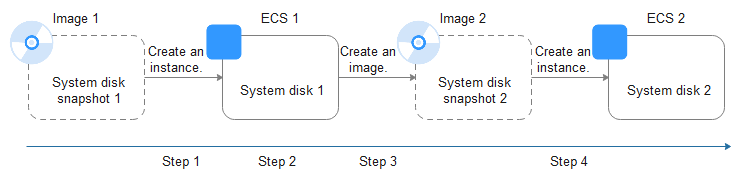
After creating a cloud server, you can set it up, installing whatever software or application environment you need, and then use the preconfigured server to create a system disk image. You can create new cloud servers with the custom configurations from the image, which frees you from a lot of repetitive work.
The following figure shows the process of creating a system disk image from an ECS.
Related operations:
Creating a System Disk Image from an External Image File (Importing an Image)
You can import a system disk image from your local PC or other cloud platforms. Then, you can use the imported image to create new cloud servers or reinstall or change the OS of existing cloud servers.
The following figure shows the process of creating a system disk image from an external image file.
Related operations:
Creating a System Disk Image from an ISO File
An ISO file is a disk image of an optical disc. It contains a large number of compressed data files. Unlike other image files, an ISO file cannot be used before it is decompressed using a tool, such as UltraISO or VirtualBox.
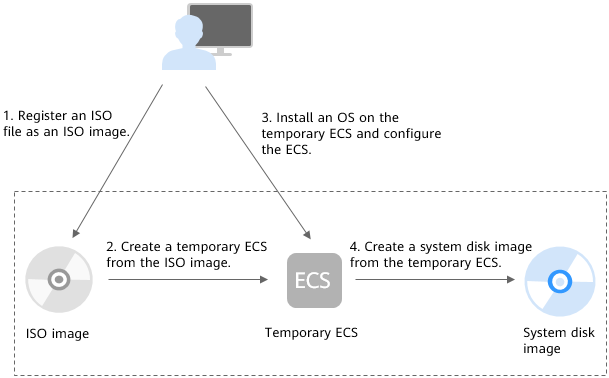
The following figure shows the process of creating a system disk image from an ISO file.
Figure 1 Creating a Windows system disk image
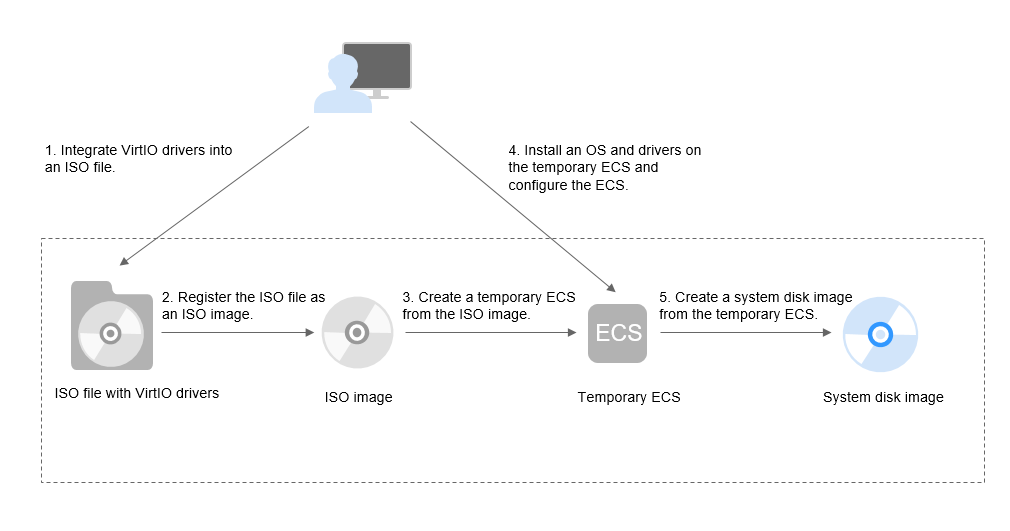
Figure 2 Creating a Linux system disk image
Related operations:
Creating a Data Disk Image from an ECS
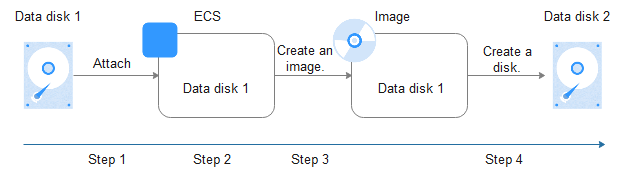
A data disk image only contains user data. You can create a data disk image from an ECS and then use the image to create new EVS disks. This is a convenient way to migrate data from an ECS to EVS disks.
The following figure shows the process of creating a data disk image from an ECS.
Related operations:
Creating a Data Disk Image from an External Image File
You can import the data disk image of a local server or a server on another cloud platform. Then, you can use the imported image to create EVS disks.
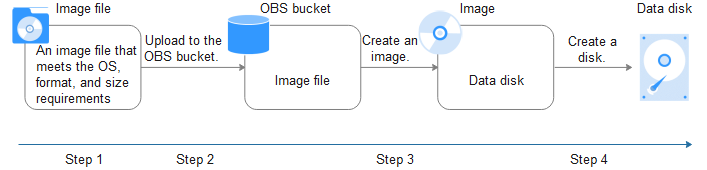
The following figure shows the process of creating a data disk image from an external image file.
Related operations:
Creating a Full-ECS Image from an ECS, a CSBS Backup, or a CBR Backup
You can use an ECS with data disks to create a full-ECS image, complete with an OS, various applications, and your service data. The full-ECS image then can be used to quickly provision identical ECSs for data migration.
A full-ECS image can be created from an ECS, a CSBS backup, or a CBR backup.
Related operations: