An ISO file is a disk image of an optical disc. A large number of data files can be compressed into a single ISO file. Likewise, to access the files stored in an ISO, the ISO file needs to be decompressed. For example, you can use a virtual CD-ROM to open an ISO file, or burn the ISO file to a CD or DVD and then use the CD-ROM to read the image.
This section describes how to create a Linux system disk image using an ISO file.
Creation Process
Figure 1 shows the process of creating a Linux system disk image from an ISO file.
Figure 1 Creating a Linux system disk image
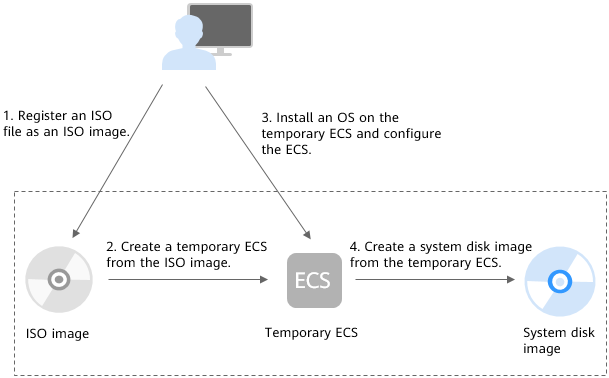
The procedure is as follows:
- Register an ISO file as an ISO image.
On the management console, register the prepared ISO file as an image. The image is an ISO image and cannot be used to provision ECSs. For details, see Registering a Linux ISO File as a Private Image.
- Create a temporary ECS from the ISO image.
Use the registered ISO image to create a temporary ECS. The ECS has no OS or driver installed. For details, see Creating a Linux ECS from an ISO Image.
- Install an OS and necessary drivers for the temporary ECS and configure related settings.
The operations include installing an OS, installing native Xen and KVM drivers, configuring NICs, and deleting files from the network rule directory. For details, see Installing a Linux OS and 1 in Configuring the ECS and Creating a Linux System Disk Image.
- Create a system disk image from the temporary ECS.
On the management console, create a system disk image from the temporary ECS on which the installation and configuration have been completed. After the image is created, delete the temporary ECS to prevent it from occupying compute resources. For details, see Creating a Windows System Disk Image from an ECS.
Constraints
- An ISO image created from an ISO file is used only for creating a temporary ECS. It will not be available on the ECS console. You cannot use it to create ECSs or change ECS OSs. You need to install an OS on the temporary ECS and use that ECS to create a system disk image which can be used to create ECSs or change ECS OSs.
- A temporary ECS has limited functionality. For example, you cannot attach disks to it. You are not advised to use it as a normal ECS.