If an image file is larger than 128 GiB, you can import it using fast import.
Constraints
- The image file must be in RAW or ZVHD2 format.
- The image file size cannot exceed 1 TiB.
Methods
You can import an image file in any of the following methods depending on the file format:
- Fast import is used to quickly import large files. It depends on lazy loading which defers loading of file data until the data is needed. This reduces the initial loading time. However, RAW files do not support lazy loading. When you upload a RAW file, you need to upload its bitmap together.
- For details about the initial configuration required for an image file, see Table 2. Perform the configuration based on the OS in the image file.
Import Process
Assume that you need to convert the file format to ZVHD2 or RAW.
You can use qemu-img-hw or the open-source tool qemu-img to convert the image format. qemu-img-hw can only be used in Linux.
The tool package contains qemu-img-hw (for converting image formats) and CreateMF.jar (for generating bitmap files).
- Linux
You are advised to use a EulerOS ECS to convert the file format.
Figure 1 Import process (Linux)
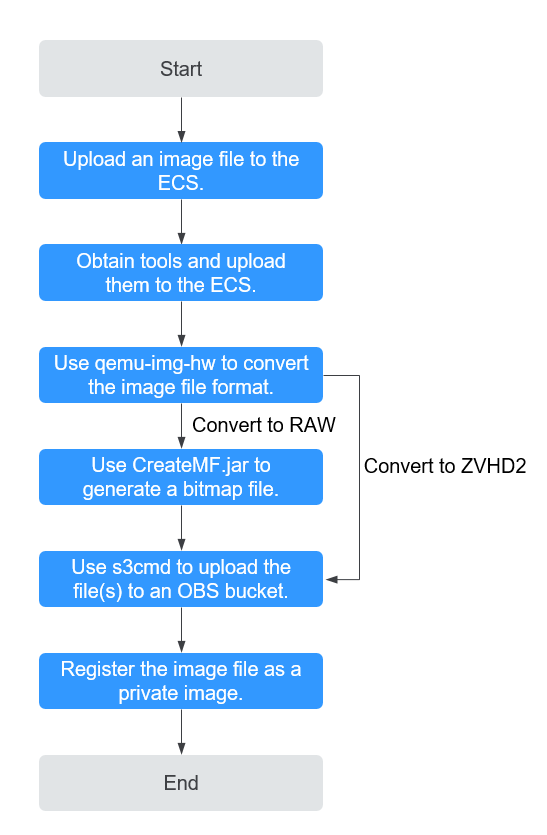
For details, see Fast Import of an Image File in Linux.
- Windows
You are advised to use a local PC running Windows to convert the file format.
Noteqemu-img cannot convert image files to the ZVHD2 format. You need to convert an image file to the RAW format and then use CreateMF.jar to generate a bitmap file.
Figure 2 Import process (Windows)
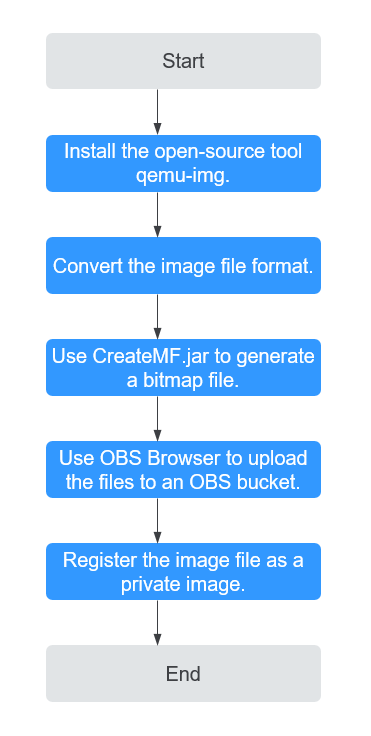
For details, see Fast Import of an Image File in Windows.