Scenarios
Before using a Xen ECS to create a Linux private image, you need to install native Xen and KVM drivers on the ECS.
This section describes how to install native KVM drivers.
If an ECS has no KVM drivers installed, the NICs of the ECS may not be detected and the ECS will be unable to communicate with other resources. Ensure that you have installed KVM drivers.
Prerequisites
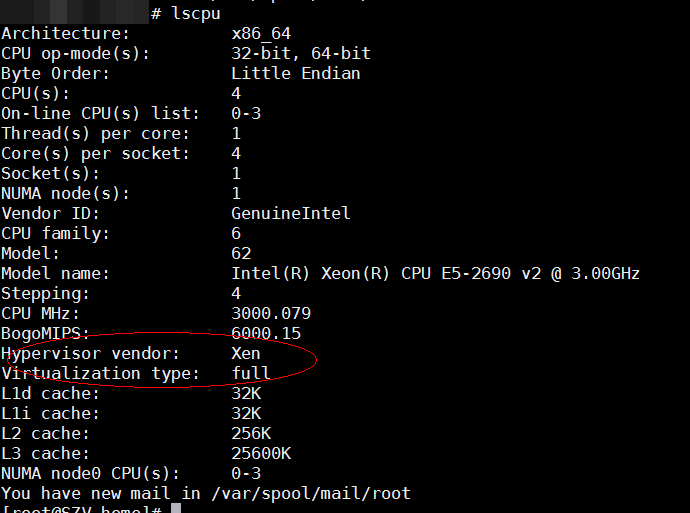
- The virtualization type of the ECS is Xen.
lscpu
- If the value of Hypervisor vendor is KVM, install drivers as instructed in (Optional) Installing Native KVM Drivers on a KVM ECS.
Figure 1 Checking the virtualization type of a Linux ECS
- The ECS kernel version must be later than 2.6.24.
- Disable your antivirus and intrusion detection software. You can enable them after the driver installation is complete.
- Operations in Changing Disk Identifiers in the GRUB File to UUID and Changing Disk Identifiers in the fstab File to UUID have been completed.
Uninstall PV Drivers
To ensure that you can successfully install native Xen and KVM drivers, you must uninstall PV drivers from the ECS first.
- Log in to the ECS as root using VNC.
- Check whether PV drivers are installed in the OS.ps -ef | grep uvp-monitor
- If the following information is displayed, PV drivers are installed.
- Otherwise, PV drivers are not installed. No further actions are required.
root 4561 1 0 Jun29 ? 00:00:00 /usr/bin/uvp-monitorroot 4567 4561 0 Jun29 ? 00:00:00 /usr/bin/uvp-monitorroot 6185 6085 0 03:04 pts/2 00:00:00 grep uvp-monitor - In the VNC login window, open the CLI. (For how to open the CLI, see the OS manual.)
- Uninstall PV drivers./etc/.uvp-monitor/uninstall
- If the following information is displayed, PV drivers are uninstalled successfully:The PV driver is uninstalled successfully. Reboot the system for the uninstallation to take effect.
- If the command output indicates that .uvp-monitor is not found, go to 5.-bash: /etc/.uvp-monitor/uninstall: No such file or directory
- If the following information is displayed, PV drivers are uninstalled successfully:
- To prevent log overflow, perform the following operations to delete uvp-monitor that failed to be applied in KVM:
- Check whether UVP user-mode programs are installed in the OS.rpm -qa | grep uvp
Information similar to the following is displayed:
libxenstore_uvp3_0-3.00-36.1.x86_64uvp-monitor-2.2.0.315-3.1.x86_64kmod-uvpmod-2.2.0.315-3.1.x86_64 - Delete the installation packages.rpm -e kmod-uvpmodrpm -e uvp-monitorrpm -e libxenstore_uv p
- Check whether UVP user-mode programs are installed in the OS.
Procedure
Modify the configuration file based on the Linux distribution.
Distribution | Configuration | Reference |
|---|---|---|
CentOS/EulerOS | The following uses CentOS 7.0 as an example:
| |
Ubuntu/Debian |
| |
SUSE/openSUSE | If the OS version is earlier than SUSE 12 SP1 or openSUSE 13:
| |
If the OS version is SUSE 12 SP1:
| ||
If the OS version is later than SUSE 12 SP1 or openSUSE 13:
|
For SUSE, run the following command to check whether xen-kmp (driver package for Xen PV) is installed:
rpm -qa |grep xen-kmp
If information similar to the following is displayed, xen-kmp is installed in the OS:
xen-kmp-default-4.2.2_04_3.0.76_0.11-0.7.5
If xen-kmp is not installed, obtain it from the ISO file and install it.
If you add built-in drivers to the initrd or initramfs file by mistake, the ECS will not be affected.
CentOS and EulerOS
- Run the following command to open the /etc/dracut.conf file:vi /etc/dracut.conf
- Press i to enter insert mode and add Xen PV and VirtIO drivers to add_drivers (the format varies depending on the OS).[root@CTU10000xxxxx ~]# vi /etc/dracut.conf# additional kernel modules to the defaultadd_drivers+="xen-blkfront xen-netfront virtio_blk virtio_scsi virtio_net virtio_pci virtio_ring virtio"......
- Press Esc, enter :wq, and press Enter. The system saves the change and exits the /etc/dracut.conf file.
- Run the following command to regenerate initrd:dracut -f /boot/initramfs-2.6.32-573.8.1.el6.x86_64.img
If the virtual file system is not the default initramfs, run dracut -f <actual-initramfs-or-initrd-filename>. You can obtain the actual initramfs or initrd file name from the grub.cfg file, which can be /boot/grub/grub.cfg, /boot/grub2/grub.cfg, or /boot/grub/grub.conf depending on the OS.
- Check whether native Xen and KVM drivers have been installed. If the virtual file system is initramfs, run the following commands:lsinitrd /boot/initramfs-`uname -r`.img | grep xenlsinitrd /boot/initramfs-`uname -r`.img | grep virtio
If the virtual file system is initrd, run the following commands:
lsinitrd /boot/initrd-`uname -r` | grep xenlsinitrd /boot/initrd-`uname -r` | grep virtioAssume that the virtual file system is initramfs. The command output will be:
[root@CTU10000xxxxx home]# lsinitrd /boot/initramfs-`uname -r`.img | grep xen-rwxr--r-- 1 root root 54888 Jul 16 17:53 lib/modules/2.6.32-573.8.1.el6.x86_64/kernel/drivers/block/ xen-blkfront.ko-rwxr--r-- 1 root root 45664 Jul 16 17:53 lib/modules/2.6.32-573.8.1.el6.x86_64/kernel/drivers/net/ xen-netfront.ko[root@CTU10000xxxxx home]# lsinitrd /boot/initramfs-`uname -r`.img | grep virtio-rwxr--r-- 1 root root 23448 Jul 16 17:53 lib/modules/2.6.32-573.8.1.el6.x86_64/kernel/drivers/block/ virtio_blk.ko-rwxr--r-- 1 root root 50704 Jul 16 17:53 lib/modules/2.6.32-573.8.1.el6.x86_64/kernel/drivers/net/ virtio_net.ko-rwxr--r-- 1 root root 28424 Jul 16 17:53 lib/modules/2.6.32-573.8.1.el6.x86_64/kernel/drivers/scsi/ virtio_scsi.kodrwxr-xr-x 2 root root 0 Jul 16 17:53 lib/modules/2.6.32-573.8.1.el6.x86_64/kernel/drivers/ virtio-rwxr--r-- 1 root root 14544 Jul 16 17:53 lib/modules/2.6.32-573.8.1.el6.x86_64/kernel/drivers/virtio/ virtio.ko-rwxr--r-- 1 root root 21040 Jul 16 17:53 lib/modules/2.6.32-573.8.1.el6.x86_64/kernel/drivers/virtio/ virtio_pci.ko-rwxr--r-- 1 root root 18016 Jul 16 17:53 lib/modules/2.6.32-573.8.1.el6.x86_64/kernel/drivers/virtio/ virtio_ring.koNoteIf you add built-in drivers to the initrd or initramfs file, the ECS will not be affected but such drivers cannot be shown by running the lsinitrd command. You can run the following commands to check whether there are built-in drivers in the kernel:
cat /boot/config-`uname -r` | grep CONFIG_VIRTIO | grep ycat /boot/config-`uname -r` | grep CONFIG_XEN | grep y
Ubuntu and Debian
- Run the following command to open the modules file:vi /etc/initramfs-tools/modules
- Press i to enter editing mode and add Xen PV and VirtIO drivers to the /etc/initramfs-tools/modules file (the format varies depending on the OS).[root@CTU10000xxxxx ~]#vi /etc/initramfs-tools/modules......# Examples:## raid1# sd_mOdxen-blkfrontxen-netfrontvirtio_blkvirtio_scsivirtio_netvirtio_pcivirtio_ringvirtio
- Press Esc, enter :wq, and press Enter. The system saves the change and exits the /etc/initramfs-tools/modules file.
- Run the following command to regenerate initrd:update-initramfs -u
- Run the following commands to check whether native Xen and KVM drivers have been installed:lsinitramfs /boot/initrd.img-`uname -r` |grep xenlsinitramfs /boot/initrd.img-`uname -r` |grep virtio[root@ CTU10000xxxxx home]# lsinitramfs /boot/initrd.img-`uname -r` |grep xenlib/modules/3.5.0-23-generic/kernel/drivers/net/ethernet/qlogic/ netxenlib/modules/3.5.0-23-generic/kernel/drivers/net/ethernet/qlogic/netxen/ netxen_nic.kolib/modules/3.5.0-23-generic/kernel/drivers/net/ xen-netbacklib/modules/3.5.0-23-generic/kernel/drivers/net/xen-netback/ xen-netback.kolib/modules/3.5.0-23-generic/kernel/drivers/block/ xen-blkbacklib/modules/3.5.0-23-generic/kernel/drivers/block/xen-blkback/ xen-blkback.ko[root@ CTU10000xxxxx home]# lsinitramfs /boot/initrd.img-`uname -r` |grep virtiolib/modules/3.5.0-23-generic/kernel/drivers/scsi/ virtio_scsi.koNote
If you add built-in drivers to the initrd or initramfs file by mistake, the ECS will not be affected. The drivers cannot be found by running the lsinitrd command. You can run the following commands to check whether there are built-in drivers in the kernel:
[root@ CTU10000xxxxx home] # cat /boot/config-`uname -r` | grep CONFIG_VIRTIO | grep yCONFIG_VIRTIO_BLK=yCONFIG_VIRTIO_NET=yCONFIG_VIRTIO=yCONFIG_VIRTIO_RING=yCONFIG_VIRTIO_PCI=yCONFIG_VIRTIO_MMIO_CMDLINE_DEVICES=y[root@ CTU10000xxxxx home] # cat /boot/config-`uname -r` | grep CONFIG_XEN | grep yCONFIG_XEN_BLKDEV_FRONTEND=yCONFIG_XEN_NETDEV_FRONTEND=y
SUSE and openSUSE (Earlier than SUSE 12 SP1 or openSUSE 13)
If the OS version is earlier than SUSE 12 SP1 or openSUSE 13, modify the /etc/sysconfig/kernel file. Before installing the drivers, run the following command to check whether xen-kmp (driver package for Xen PV) is installed: If information similar to the following is displayed, xen-kmp is installed: If xen-kmp is not installed, obtain it from the ISO package and install it first. If the virtual file system is not the default initramfs or initrd, run dracut -f <actual-initramfs-or-initrd-filename>. The actual initramfs or initrd file name can be obtained from the menu.lst or grub.cfg file (/boot/grub/menu.lst, /boot/grub/grub.cfg, or /boot/grub2/grub.cfg). The following is an example initrd file of SUSE 11 SP4: /boot/initrd.vmx in the initrd line is the initrd file actually used. So, the command used to regenerate initrd is dracut -f /boot/initrd.vmx. If /boot is missing from the initrd file path, you need to add it when you run the dracut -f command. For example, if the file path is /initramfs-xxx, the command should be dracut -f /boot/initramfs-xxx. lsinitrd /boot/initrd-`uname -r` | grep xen lsinitrd /boot/initrd-`uname -r` | grep virtio Before the modification: After the modification: lsinitrd /boot/initrd-`uname -r` | grep xen lsinitrd /boot/initrd-`uname -r` | grep virtio If you add built-in drivers to the initrd or initramfs file by mistake, the ECS will not be affected. The drivers cannot be found by running the lsinitrd command. You can run the following commands to check whether there are built-in drivers in the kernel:
SUSE and openSUSE (SUSE 12 SP1)
If the OS version is SUSE 12 SP1, modify the /etc/dracut.conf file and add Xen PV and VirtIO drivers. If the virtual file system is not the default initramfs, run the dracut -f <actual-initramfs-or-initrd-filename> command. The actual initramfs or initrd file name can be obtained from the grub.cfg file, which can be /boot/grub/grub.cfg, /boot/grub2/grub.cfg, or /boot/grub/grub.conf depending on the OS. If the virtual file system is initrd, run the following commands:
SUSE and openSUSE (Later than SUSE 12 SP1 or openSUSE 13)
If the OS version is later than SUSE 12 SP1 or openSUSE 13, modify the /etc/dracut.conf file and add Xen PV and VirtIO drivers.
The following uses SUSE Linux Enterprise Server 12 SP2 (x86_64) as an example: If the virtual file system is not the default initramfs, run the dracut -f <actual-initramfs-or-initrd-filename> command. The actual initramfs or initrd file name can be obtained from the grub.cfg file, which can be /boot/grub/grub.cfg, /boot/grub2/grub.cfg, or /boot/grub/grub.conf depending on the OS. If the virtual file system is initrd, run the following commands: Assume that the virtual file system is initrd. The command output will be: If you add built-in drivers to the initrd or initramfs file by mistake, the ECS will not be affected. The drivers cannot be found by running the lsinitrd command. You can run the following commands to check whether there are built-in drivers in the kernel:
Follow-up Procedure
Delete log files, historical records, and other data.
- Delete unnecessary key files.echo > /$path/$to/$root /.ssh/authorized_keysExample: echo > /root/.ssh/authorized_keysecho > /$path/$to/$none-root /.ssh/authorized_keysExample: echo > /home/linux/.ssh/authorized_keys
- Delete log files from the /var/log directory.rm -rf /var/log/*Note
Before deleting log files, back up log directories and log files required by application startup. For example, if the default Nginx log directory /var/log/nginx is deleted, Nginx may fail to be started.
- Delete historical records.echo > /root/.bash_historyhistory -c