Scenarios
Network I/O bandwidth can keep increasing to the point where a single vCPU cannot process all of the NIC interrupts. NIC multi-queue allows multiple vCPUs to process NIC interrupts, thereby improving network PPS and I/O performance.
ECSs Supporting NIC Multi-Queue
NIC multi-queue can only be enabled on an ECS with the specifications, image, and virtualization type described in this section.
- For details about the ECS flavors that support NIC multi-queue, see section "Instances" in Elastic Cloud Server User Guide.Note
If there is more than one NIC queue, NIC multi-queue is supported.
- Only KVM ECSs support NIC multi-queue.
- The Linux public images listed in Table 2 support NIC multi-queue.Note
- Windows does not commercially support NIC multi-queue. If you enable NIC multi-queue for a Windows image, an ECS created from such an image may take longer than normal to start.
- For Linux ECSs, you are advised to upgrade the kernel to 2.6.35 or later. Otherwise, NIC multi-queue is not supported.
Run uname -r to check the kernel version. If the version is earlier than 2.6.35, contact technical support to upgrade it.
OS | Image | Support for NIC Multi-Queue |
|---|---|---|
Windows | Windows Server 2008 WEB R2 64bit | Yes (only supported by private images) |
Windows Server 2008 Enterprise SP2 64bit | Yes (only supported by private images) | |
Windows Server 2008 R2 Standard/Datacenter/Enterprise 64bit | Yes (only supported by private images) | |
Windows Server 2008 R2 Enterprise 64bit_WithGPUdriver | Yes (only supported by private images) | |
Windows Server 2012 R2 Standard 64bit_WithGPUdriver | Yes (only supported by private images) | |
Windows Server 2012 R2 Standard/Datacenter 64bit | Yes (only supported by private images) |
OS | Image | Support for NIC Multi-Queue | Multi-Queue Enabled for Public Images by Default |
|---|---|---|---|
Linux | Ubuntu 14.04/16.04 Server 64bit | Yes | Yes |
openSUSE 42.2 64bit | Yes | Yes | |
SUSE Enterprise 12 SP1/SP2 64bit | Yes | Yes | |
CentOS 6.8/6.9/7.0/7.1/7.2/7.3/7.4/7.5/7.6 64bit | Yes | Yes | |
Debian 8.0.0/8.8.0/8.9.0/9.0.0 64bit | Yes | Yes | |
Fedora 24/25 64bit | Yes | Yes | |
EulerOS 2.2 64bit | Yes | Yes |
Operation Instructions
Assume that an ECS has the required specifications and virtualization type.
- If the ECS was created from a public image listed in ECSs Supporting NIC Multi-Queue, NIC multi-queue is enabled on the ECS by default. You do not need to enable NIC multi-queue manually.
- If the ECS was created from an external image file with an OS listed in ECSs Supporting NIC Multi-Queue, you may need to perform the following operations to enable NIC multi-queue:
Register the External Image File as a Private Image
Import the image file to the IMS console. For details, see Registering an Image File as a Private Image.
Enable NIC Multi-Queue for the Image
Windows does not commercially support NIC multi-queue. If you enable NIC multi-queue for a Windows image, an ECS created from such an image may take longer than normal to start.
Use any of the following methods to enable NIC multi-queue for an image:
Method 1:
Method 2:
Method 3: Add hw_vif_multiqueue_enabled to the image using an API.
- Obtain a token. For details, see Calling APIs > Authentication in Image Management Service API Reference.
- Call an API to update an image. For details, see "Modifying an Image (Native OpenStack API)" in Image Management Service API Reference.
- Add X-Auth-Token to the request header.
The value of X-Auth-Token is the token obtained in step 1.
- Add Content-Type to the request header.
Set Content-Type to application/openstack-images-v2.1-json-patch.
The request URI is in the following format:
PATCH /v2/images/{image_id}
The request body is as follows:
[{"op":"add","path":"/hw_vif_multiqueue_enabled","value": true}]
Create an ECS from the Private Image
Use the registered private image to create an ECS. For details, see the Elastic Cloud Server User Guide. Note the following when setting the parameters:
Enable NIC Multi-Queue on the ECS
KVM ECSs running Windows use private images to support NIC multi-queue.
For Linux ECSs, which run CentOS 7.4 as an example, perform the following operations to enable NIC multi-queue:
- Enable NIC multi-queue.
- Log in to the ECS.
- Run the following command to obtain the number of queues supported by the NIC and the number of queues with NIC multi-queue enabled:
ethtool -l NIC
- Run the following command to configure the number of queues used by the NIC:
ethtool -L NIC combined <number-of-queues>
Example:
[root@localhost ~]# ethtool -l eth0 #View the number of queues used by NIC eth0 .Channel parameters for eth0:Pre-set maximums:RX: 0TX: 0Other: 0Combined: 4 #Indicates that a maximum of four queues can be enabled for the NIC.Current hardware settings:RX: 0TX: 0Other: 0Combined: 1 #Indicates that one queue has been enabled.[root@localhost ~]# ethtool -L eth0 combined 4 #Enable four queues on NIC eth0 . - (Optional) Enable irqbalance so that the system automatically allocates NIC interrupts to multiple vCPUs.
- Run the following command to enable irqbalance:
service irqbalance start
- Run the following command to view the irqbalance status:
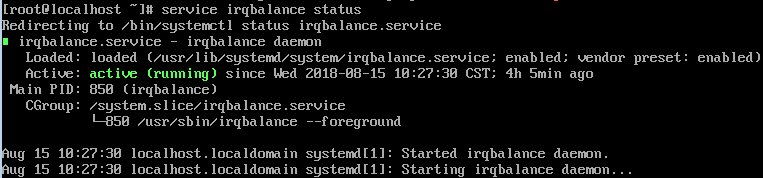
service irqbalance status
If the Active value in the command output contains active (running), irqbalance has been enabled.
Figure 1 Enabled irqbalance
- Run the following command to enable irqbalance:
- (Optional) Enable interrupt binding.
Enabling irqbalance allows the system to automatically allocate NIC interrupts, improving network performance. If the improved network performance fails to meet your expectations, manually configure interrupt affinity on the target ECS.
The detailed operations are as follows:
Run the following script so that each ECS vCPU responds the interrupt requests initialized by one queue. That is, one queue corresponds to one interrupt, and one interrupt binds to one vCPU.
#!/bin/bashservice irqbalance stopeth_dirs=$(ls -d /sys/class/net/eth*)if [ $? -ne 0 ];thenecho "Failed to find eth* , sleep 30" >> $ecs_network_logsleep 30eth_dirs=$(ls -d /sys/class/net/eth*)fifor eth in $eth_dirsdocur_eth=$(basename $eth)cpu_count=`cat /proc/cpuinfo| grep "processor"| wc -l`virtio_name=$(ls -l /sys/class/net/"$cur_eth"/device/driver/ | grep pci |awk {'print $9'})affinity_cpu=0virtio_input="$virtio_name""-input"irqs_in=$(grep "$virtio_input" /proc/interrupts | awk -F ":" '{print $1}')for irq in ${irqs_in[*]}doecho $((affinity_cpu%cpu_count)) > /proc/irq/"$irq"/smp_affinity_listaffinity_cpu=$[affinity_cpu+2]doneaffinity_cpu=1virtio_output="$virtio_name""-output"irqs_out=$(grep "$virtio_output" /proc/interrupts | awk -F ":" '{print $1}')for irq in ${irqs_out[*]}doecho $((affinity_cpu%cpu_count)) > /proc/irq/"$irq"/smp_affinity_listaffinity_cpu=$[affinity_cpu+2]donedone - (Optional) Enable XPS and RPS.
XPS allows the system with NIC multi-queue enabled to select a queue by vCPU when sending a data packet.
#!/bin/bash# enable XPS featurecpu_count=$(grep -c processor /proc/cpuinfo)dec2hex(){echo $(printf "%x" $1)}eth_dirs=$(ls -d /sys/class/net/eth*)if [ $? -ne 0 ];thenecho "Failed to find eth* , sleep 30" >> $ecs_network_logsleep 30eth_dirs=$(ls -d /sys/class/net/eth*)fifor eth in $eth_dirsdocpu_id=1cur_eth=$(basename $eth)cur_q_num=$(ethtool -l $cur_eth | grep -iA5 current | grep -i combined | awk {'print $2'})for((i=0;i<cur_q_num;i++))doif [ $i -eq $ cpu_count ];thencpu_id=1fixps_file="/sys/class/net/${cur_eth}/queues/tx-$i/xps_cpus"rps_file="/sys/class/net/${cur_eth}/queues/rx-$i/rps_cpus"cpuset=$(dec2hex "$cpu_id")echo $cpuset > $xps_fileecho $cpuset > $rps_filelet cpu_id=cpu_id*2donedone