Scenarios
You can export a private image to a standard OBS bucket and then download it to your local PC.
Background
You can export images of cloud servers from the cloud platform and then use the exported images to create cloud servers for use in on-premises clusters or private clouds. The following figure shows the process of exporting an image. Figure 1 Exporting an image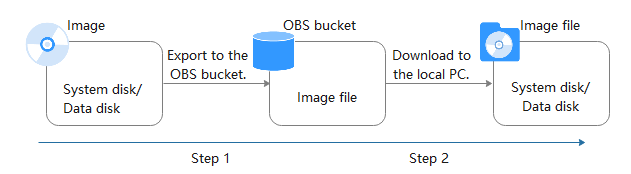
Constraints
Item | Description |
|---|---|
Region | An image can only be exported to a Standard bucket that is in the same region as the image. |
Image type | The following private images cannot be exported: |
Image format |
|
Image size | The image size must be less than 1 TiB. Images larger than 128 GiB and smaller than 1 TiB only support fast export. |
Time | The time required for exporting an image depends on the image size and the number of concurrent export tasks. |
Prerequisites
- You have Administrator permissions for OBS.
- An OBS bucket is available for storing the private image in the region where the private image is located.
If no OBS bucket is available, create one by referring to Object Storage Service User Guide. Select Standard for Storage Class.
Procedure
- Log in to the management console.
- Under Computing, click Image Management Service. The IMS console is displayed.
- Locate the row that contains the image to be exported, click More in the Operation column and select Export.
- In the displayed Export Image dialog box, set the following parameters:
- Fast Export: To export an image larger than 128 GiB, you must enable fast export, and you cannot specify the format of the exported image (which can only be ZVHD2). After exporting an image, you can use qemu-img-hw to convert it to your desired format. For details, see 3.Note
For details about the differences between standard and fast export, see What Are the Differences Between Standard and Fast Import/Export?
- Format: Select one from qcow2, vmdk, vhd, and zvhd as you need.
- Name: Enter a name that is easy to identify.
- Storage Path: Click
 to expand the bucket list and select an OBS bucket for storing the exported image.Note
An image can only be exported to a Standard bucket that is in the same region as the image. So, only such buckets are listed.
- Fast Export: To export an image larger than 128 GiB, you must enable fast export, and you cannot specify the format of the exported image (which can only be ZVHD2). After exporting an image, you can use qemu-img-hw to convert it to your desired format. For details, see 3.
- Click OK.
You can view the image export progress above the private image list.
Follow-up Procedure
After the image is exported, you can download it from the OBS bucket through the management console or OBS Browser+.