Scenarios
To ensure that you can use the user data injection function to inject initial custom information (such as the login password) into ECSs created from a private image, install Cloudbase-Init on the ECS that is used to create the image.
- If Cloudbase-Init is not installed, you cannot customize an ECS. Instead, you can only use the password in the image file to log in to the ECS.
- By default, ECSs created from a public image have Cloudbase-Init installed. You do not need to install or configure Cloudbase-Init on such ECSs.
- For ECSs created from external image files, install and configure Cloudbase-Init by performing the operations in this section.
Cloudbase-Init is open-source software. If the installed version has security vulnerabilities, you are advised to upgrade it to the latest version.
Prerequisites
- An EIP has been bound to the ECS.
- You have logged in to the ECS.
- The ECS uses DHCP to obtain IP addresses.
Install Cloudbase-Init
- On the Windows Start menu, choose Control Panel > Programs > Programs and Features and check whether the latest version Cloudbase-Init 1.1.2 is installed.
- If the latest version is installed, skip the subsequent steps and go to Configure Cloudbase-Init.
- If Cloudbase-Init is installed but it is not the latest version, uninstall Cloudbase-Init and go to the next step.
- If Cloudbase-Init is not installed, go to the next step.
- Check whether the OS is Windows desktop.
- Enable the administrator account (Windows 7 is used as an example).
- Click Start and choose Control Panel > System and Security > Administrative Tools.
- Double-click Computer Management.
- Choose System Tools > Local Users and Groups > Users.
- Right-click Administrator and select Properties.
- Deselect Account is disabled.
- Download the Cloudbase-Init installation package.
Download the Cloudbase-Init installation package of the appropriate version based on the OS architecture from the Cloudbase-Init official website (https://www.cloudbase.it/cloud-init-for-windows-instances/).
To obtain the stable version, visit:
- Double-click the Cloudbase-Init installation package.
- Click Next.
- Select I accept the terms in the License Agreement and click Next.
- Retain the default path and click Next.
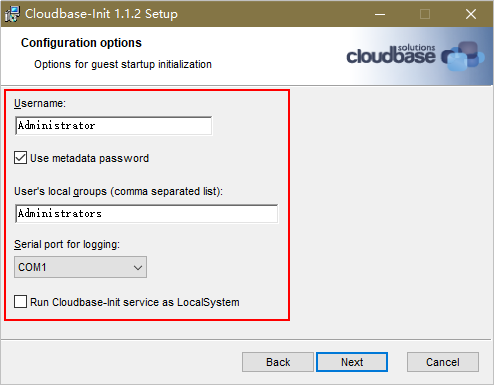
- In the Configuration options window, enter Administrator for Username, select COM1 for Serial port for logging, and deselect Run Cloudbase-Init service as LocalSystem.Note
The version number shown in the figure is for reference only.
Figure 1 Configuring parameters
- Click Next.
- Click Install.
- In the Files in Use dialog box, select Close the application and attempt to restart them and click OK.
- Check whether the version of the OS is Windows desktop.
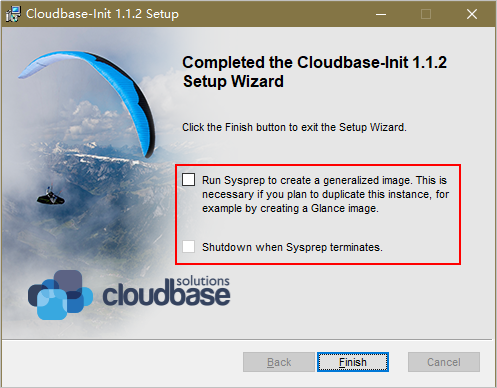
- In the Completed the Cloudbase-Init Setup Wizard window, ensure that neither option is selected.
Figure 2 Completing the Cloudbase-Init installation
 Note
NoteThe version number shown in the figure is for reference only.
- Click Finish.
Configure Cloudbase-Init
- Edit the configuration file C:\Program Files\Cloudbase Solutions\Cloudbase-Init\conf\cloudbase-init.conf in the Cloudbase-Init installation path.
- Add netbios_host_name_compatibility=false to the last line of the file so that the hostname can have a maximum of 63 characters.Note
If you are using NetBIOS in your network, the hostname cannot exceed 15 characters because NetBIOS has a 15-character limit.
- Add metadata_services=cloudbaseinit.metadata.services.httpservice.HttpService to enable the agent to access the IaaS OpenStack data source.
- Add plugins to configure the plugins that will be loaded. Separate plugins with commas (,). The information in bold is the keyword of each plugin.
- The following plugins are loaded by default. You can keep all or some of them as needed.plugins=cloudbaseinit.plugins.common.localscripts. LocalScriptsPlugin ,cloudbaseinit.plugins.common.mtu. MTUPlugin ,cloudbaseinit.plugins.windows.createuser. CreateUserPlugin ,cloudbaseinit.plugins.common.setuserpassword. SetUserPasswordPlugin ,cloudbaseinit.plugins.common.sshpublickeys. SetUserSSHPublicKeysPlugin ,cloudbaseinit.plugins.common.sethostname. SetHostNamePlugin ,cloudbaseinit.plugins.windows.extendvolumes. ExtendVolumesPlugin ,cloudbaseinit.plugins.common.userdata. UserDataPlugin ,cloudbaseinit.plugins.windows.licensing. WindowsLicensingPlugin
Plugin functions:
- LocalScriptsPlugin configures scripts.
- MTUPlugin configures MTU network interfaces.
- CreateUserPlugin creates a user.
- SetUserPasswordPlugin configures a password.
- SetUserSSHPublicKeysPlugin configures a key.
- SetHostNamePlugin configures a hostname.
- ExtendVolumesPlugin expands disk space.
- UserDataPlugin injects user data.
- WindowsLicensingPlugin activates Windows instances.
NoteIf you need to change the hostname of ECSs after they are created from this image, and services on the ECSs are sensitive to hostname changes, you are not advised to configure the SetHostNamePlugin here.
- Optional plugins:plugins=cloudbaseinit.plugins.windows.winrmlistener. ConfigWinRMListenerPlugin ,cloudbaseinit.plugins.windows.winrmcertificateauth. ConfigWinRMCertificateAuthPlugin
Plugin functions:
- ConfigWinRMListenerPlugin configures listening to remote logins.
- ConfigWinRMCertificateAuthPlugin configures remote logins without password authentication.Caution
The WinRM plug-ins use a weak cryptographic algorithm, which may cause security risks. So, you are advised not to load these plug-ins.
- The following plugins are loaded by default. You can keep all or some of them as needed.
- (Optional) Add the following configuration items to configure the number of retry times and interval for obtaining metadata:retry_count=40retry_count_interval=5
- (Optional) Add the following configuration item to prevent metadata network disconnections caused by the default route added by Windows:[openstack]add_metadata_private_ip_route=False
- (Optional) If the Cloudbase-Init version is 0.9.12 or later, you can customize the password length.
Change the value of user_password_length to customize the password length.
- (Optional) Add the following configuration item to disable password changing upon first login:
first_logon_behaviour=no
- (Optional) Add the following configuration item to ensure that time synchronization from BIOS persists through system restarts:
real_time_clock_utc=true
NoteThe registry entry RealTimeIsUniversal=1 allows the system to synchronize time from BIOS. If real_time_clock_utc=true is not added, Cloudbase-Init will set RealTimeIsUniversal back to 0, causing the system to not synchronize time from BIOS after a restart.
- Add netbios_host_name_compatibility=false to the last line of the file so that the hostname can have a maximum of 63 characters.
- Release the current DHCP address so that the created ECSs can obtain correct addresses.
In the Windows command line, run the following command to release the current DHCP address:
ipconfig /release
NoteThis operation will interrupt network connection and adversely affect ECS use. The network will automatically recover after the ECSs are started again.
- When creating an image using a Windows ECS, you need to change the SAN policy of the ECS to OnlineAll. Otherwise, EVS disks attached to the ECSs created from the image may be offline.
Windows has three types of SAN policies: OnlineAll, OfflineShared, and OfflineInternal.
Table 1 SAN policies Type
Description
OnlineAll
All newly detected disks are automatically brought online.
OfflineShared
All disks on sharable buses, such as iSCSI and FC, are left offline by default, while disks on non-sharable buses are kept online.
OfflineInternal
All newly detected disks are left offline.
- Execute cmd.exe and run the following command to query the current SAN policy of the ECS using DiskPart:
diskpart
- Run the following command to view the SAN policy of the ECS:
san
- If the SAN policy is OnlineAll, run the exit command to exit DiskPart.
- If the SAN policy is not OnlineAll, go to 3.c.
- Run the following command to change the SAN policy of the ECS to OnlineAll:
san policy=onlineall
- Execute cmd.exe and run the following command to query the current SAN policy of the ECS using DiskPart:
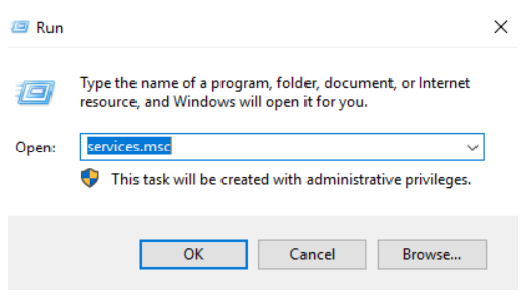
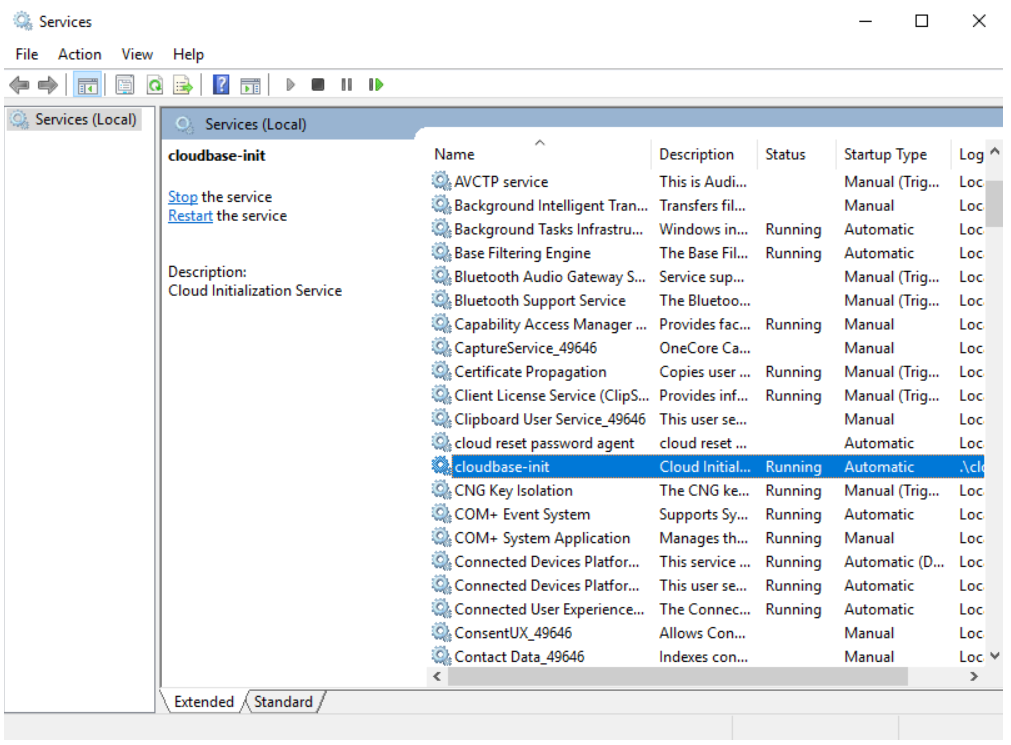
- Press Win+R to open the Run window. Enter services.msc and click OK. In the Services window, locate cloudbase-init. Set Startup type to Automatic.