Scenarios
If you have created and configured a Linux ECS based on your service requirements (for example, by installing software and setting up an application environment), you can create a system disk image based on this configured ECS. Then, all new ECSs created from this image will have the same software and environment preinstalled.
Creating a system disk image does not affect services on the cloud server or cause data loss.
Background
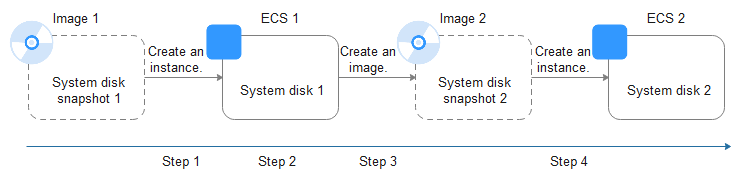
The following figure shows the process of creating a system disk image from a cloud server and using the image to create new cloud servers.
Figure 1 Creating a system disk image and using it to create new cloud servers
- System disk images are often used for application scale-out. They can also be used for hybrid cloud deployment. You can create system disk images for resource synchronization on and off cloud. The procedure is as follows:
- Create a system disk image from an ECS.Note
If the ECS is created from any of the following images, the system disk image cannot be exported:
- ISO image
- Private image created from a SUSE, Red Hat, Ubuntu, or Oracle Linux public image
- Export the image to an OBS bucket. For details, see Exporting an Image.
- Download the image file from the OBS bucket.
- Create a system disk image from an ECS.
- You can create an image from a running cloud server.
The image creation does not affect services on the cloud server.
In this process, do not stop, start, or restart the cloud server, or the image creation may fail.
- The time required for creating an image depends on the system disk size, network quality, and the number of concurrent tasks.
- A system disk image will be created in the same region as the cloud server that was used to create it.
- If a cloud server has expired or been released, you can use the system disk image created from the cloud server to restore it.
Prerequisites
Before creating a private image from an ECS:
- Delete any sensitive data the ECS may contain.
- Ensure that the ECS is in the Running or Stopped state.
- Check network configuration of the ECS and ensure that DHCP is configured for the NICs. For details, see Configuring DHCP.
- Check whether Cloud-Init has been installed on the ECS. The user data injection function on the management console is only available for new ECSs that have this tool installed. You can use data injection, for example, to set the login password for a new ECS. For details, see (Optional) Installing and Configuring Cloud-Init.
- Delete any network rules to prevent NIC name drift on the ECSs created from the image. For details, see Deleting Files from the Network Rule Directory.
- To ensure that the ECSs created from the image support KVM virtualization, the Linux ECS used to create the image has to be modified. For instance, the disk IDs in the GRUB and fstab files need to be UUID and native KVM drivers need to be installed.
For details, see (Optional) Installing Native KVM Drivers on a KVM ECS.
- If multiple data disks are attached to an ECS used to create a private image, the ECSs created from the image may be unavailable. You need to detach all data disks from the ECS before using it to create an image. For details, see Detaching Data Disks from an ECS.
- If data disks have been attached to the ECS and automatic partition mounting has been configured in the fstab file for the ECS, delete these configurations from the file before using the ECS to create a system disk image.
If an ECS is created from a public image, Cloud-Init has been installed by default. You can follow the guide to verify the installation.
Procedure
- Log in to the management console.
- Under Computing, click Image Management Service. The IMS console is displayed.
- Create a system disk image.
- Click Create Image in the upper right corner.
- Set image parameters.
Table 1 and Table 2 list the parameters in the Image Type and Source and Image Information areas, respectively.
Table 1 Image type and sourceParameter
Description
Type
Select Create Image.
Image Type
Select System disk image.
Source
Select a cloud server with required configurations.
Table 2 Image informationParameter
Description
Encryption
This parameter specifies whether the image will be encrypted. The value is provided by the system and cannot be changed.
- Only an unencrypted private image can be created from an unencrypted ECS.
- Only an encrypted private image can be created from an encrypted ECS.
Name
Set a name for the image.
Enterprise Project
Select an enterprise project from the drop-down list. This parameter is available only if you have enabled enterprise projects or your account is an enterprise account. To enable this function, contact your customer manager.
An enterprise project groups cloud resources, so you can manage resources and users by project.
Tag
This parameter is optional. Set tag keys and values for the image to make identification and management easier.
Description
This parameter is optional. Enter a description for the image.
- Click Apply Now.
- Confirm the settings and click Submit Application.
- Go back to the private image list and view the new system disk image.
The time required for creating an image depends on the ECS system disk size, network quality, and the number of concurrent tasks. When the image status changes to Normal, the image creation is complete.
Note- Do not perform any operations on the selected ECS or its associated resources during image creation.
- A cloud server created from an encrypted image is also encrypted. The key used for encrypting the cloud server is the same as that used for encrypting the image.
- An image created from an encrypted cloud server is also encrypted. The key used for encrypting the image is the same as that used for encrypting the cloud server.
- The size of a new image is determined based on the maximum disk space that was ever used, not the current disk usage.
Follow-up Procedure
After a system disk image is created, you can:
- Use the image to create new cloud servers. For details, see Creating an ECS from an Image.
- Use the image to change the OSs of existing cloud servers.