Scenarios
If multiple data disks are attached to the ECS used to create a private image, ECSs created from the image may be unavailable. Therefore, you need to detach all data disks from the ECS before using it to create a private image.
This section describes how to detach all data disks from an ECS.
Prerequisites
You have logged in to the ECS used to create a Linux private image.
Procedure
- Check whether the ECS has data disks.
Run the following command to check the number of disks attached to the ECS:
fdisk -l
- If the number is greater than 1, the ECS has data disks. Go to 2.
- If the number is equal to 1, no data disk is attached to the ECS. Go to 3.
- Run the following command to check the data disks attached to the ECS:
mount
- If the command output does not contain any EVS disk information, no EVS data disks need to be detached./dev/vda1 on / type ext4 (rw,relatime,data=ordered)
- If information similar to the following is displayed, go to 3:/dev/vda1 on / type ext4 (rw,relatime,data=ordered)/dev/vdb1 on /mnt/test type ext4 (rw,relatime,data=ordered)
- If the command output does not contain any EVS disk information, no EVS data disks need to be detached.
- Delete the configuration information in the fstab file.
- Run the following command to edit the fstab file:
vi /etc/fstab
- Delete the disk configuration from the fstab file.
The /etc/fstab file contains information about the file systems and storage devices automatically attached to the ECS when the ECS starts. The configuration about data disks automatically attached to the ECS needs to be deleted, for example, the last line shown in the following figure.
Figure 1 EVS disk configuration in the fstab file
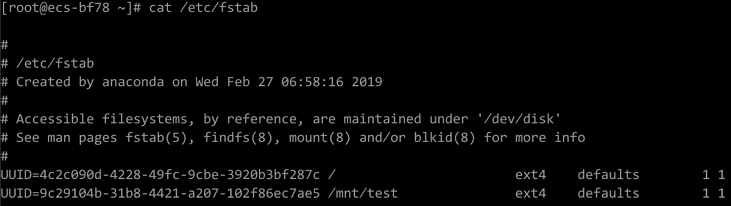
- Run the following command to edit the fstab file:
- Run the following command to detach data disks from the ECS:
Run the following command to detach the disks:
umount /dev/vdb1
- Run the following command to check the data disks attached to the ECS:
mount
If the command output contains no information about the data disks, they have been detached from the ECS.