Scenarios
If you want to remotely access an ECS, enable remote desktop connection for the source ECS when creating a private image. This function must be enabled for GPU-accelerated ECSs.
When registering an external image file as a private image, enable remote desktop connection on the VM where the external image file is located. You are advised to enable this function on the VM and then export the image file.
Prerequisites
You have logged in to the ECS used to create a Windows private image.
For details about how to log in to an ECS, see Elastic Cloud Server User Guide.
Procedure
- Before enabling this function, you are advised to set the resolution of the ECS to 1920×1080.
On the ECS, choose Start > Control Panel. Under Appearance and Personalization, click Adjust screen resolution. Then select a proper value from the Resolution drop-down list box.
- Choose Start, right-click Computer, and choose Properties from the shortcut menu.
- Click Remote settings.
- In the Remote tab, select Allow connections from computers running any version of Remote Desktop (less secure).
- Click OK.
- Choose Start > Control Panel and navigate to Windows Firewall.
- Choose Allow a program or feature through Windows Firewall in the left pane.
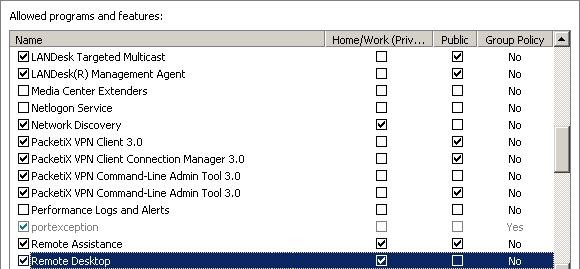
- Select programs and features that are allowed by the Windows firewall for Remote Desktop based on your network requirements and click OK in the lower part.
Figure 1 Configuring remote desktop