You can create custom policies to supplement system-defined policies and implement more refined access control.
You can create custom policies in either of the following ways:
- Visual editor: Select cloud services, actions, resources, and request conditions. This does not require knowledge of JSON syntax.
- JSON: Create a JSON policy or edit an existing one.
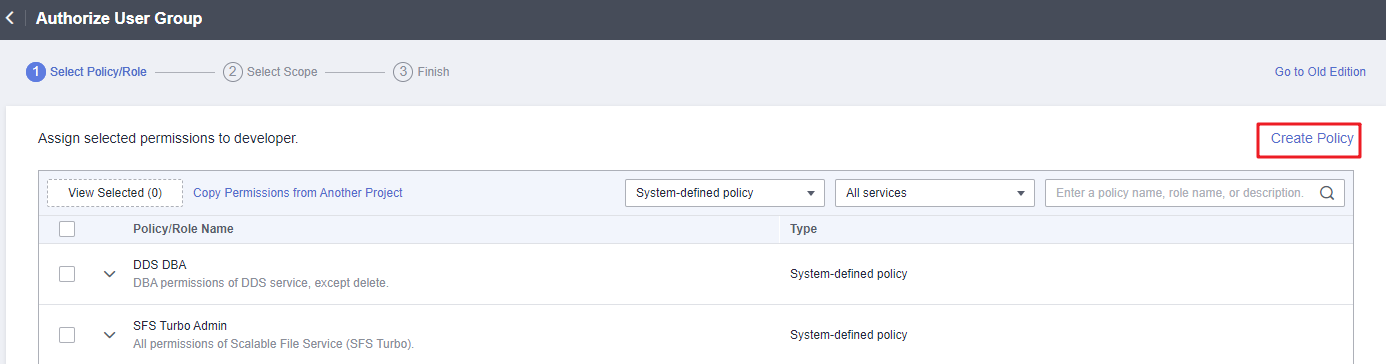
This section describes how to create custom policies on the Permissions > Policies/Roles page. You can also create custom policies during authorization (see Figure 1).
Figure 1 Creating a policy during authorization
Creating a Custom Policy in the Visual Editor
- Log in to the IAM console.
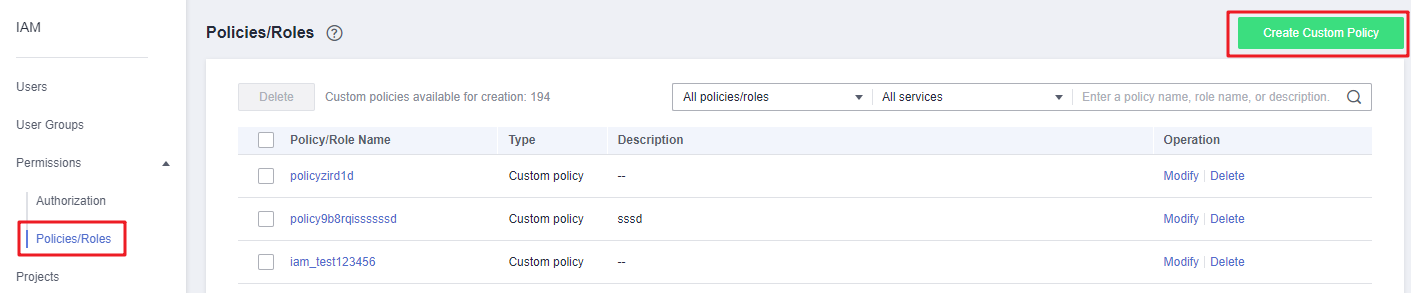
- On the IAM console, choose Permissions > Policies/Roles from the navigation pane, and click Create Custom Policy in the upper right corner.
Figure 2 Creating a custom policy
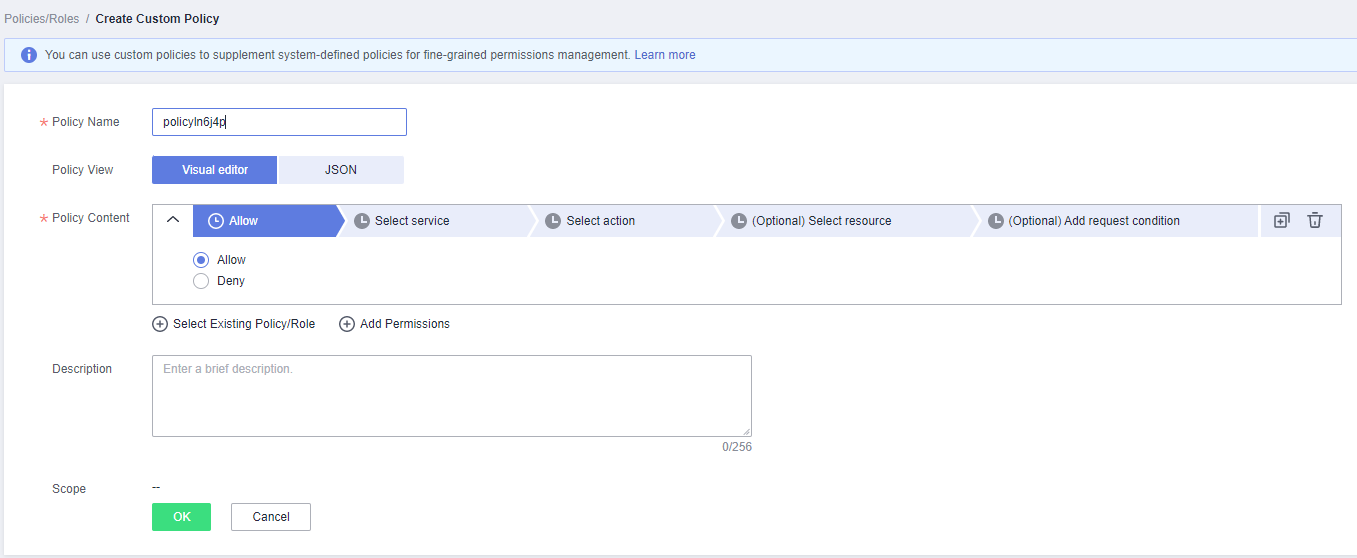
- Enter a policy name.
Figure 3 Entering a policy name
- Select a scope based on the type of services related to this policy. For more information about service types, see "Permissions".
- Global services: Select this option if the services to which the policy is related must be deployed in the Global region. When creating custom policies for globally deployed services, specify the scope as Global services. Custom policies of this scope must be attached to user groups for global services.
- Project-level services: Select this option if the services to which the policy is related must be deployed in specific regions. When creating custom policies for regionally deployed services, specify the scope as Project-level services. Custom policies of this scope must be attached to user groups for specific projects except global services.
For example, when creating a custom policy containing the action evs:volumes:create for EVS, specify the scope as Project-level services.
NoteA custom policy can contain actions of multiple services that are globally accessible or accessible through region-specific projects. To define permissions required to access both global and project-level services, create two custom policies and specify the scope as Global services and Project-level services respectively.
- Select Visual editor for Policy View.
- Set the policy content.
- Select Allow or Deny.
- Select a cloud service.Note
- Only one cloud service can be selected for each permission block. To configure permissions for multiple cloud services, click Add Permissions, or switch to the JSON view (see Creating a Custom Policy in JSON View).
- A custom policy can contain permissions for either global or project-level services. To define permissions required to access both global and project-level services, enclose the permissions in two separate custom policies for refined authorization.
- Select actions.
- (Optional) Select all resources, or select specific resources by specifying their paths.
Table 1 Resource type Parameter
Description
Specific
Permissions for specific resources. For example, to define permissions for buckets whose names start with TestBucket, specify the bucket resource path as OBS:*:*:bucket:TestBucket*.
NOTE:- Specifying bucket resources
Format: "OBS:*:*:bucket:Bucket name".
For bucket resources, IAM automatically generates the prefix of the resource path: obs:*:*:bucket:. For the path of a specific bucket, add the bucket name to the end. You can also use a wildcard character (*) to indicate any bucket. For example, obs:*:*:bucket:* indicates any OBS bucket.
- Specifying object resources
Format: "OBS:*:*:object:Bucket name/object name".
For object resources, IAM automatically generates the prefix of the resource path: obs:*:*:object:. For the path of a specific object, add the bucket name/object name to the end of the resource path. You can also use a wildcard character (*) to indicate any object in a bucket. For example, obs:*:*:object:my-bucket/my-object/* indicates any object in the my-object directory of the my-bucket bucket.
All
Permissions for all resources.
- (Optional) Add request conditions by specifying condition keys, operators, and values.
Table 2 Condition parameters Name
Description
Condition Key
A key in the Condition element of a statement. There are global and service-specific condition keys. Global condition keys (starting with g:) are available for operations of all services, whereas service-specific condition keys (starting with a service abbreviation name such as obs:) are available only for operations of the corresponding service. For details, see the user guide of the corresponding cloud service. Condition keys are case insensitive.
Operator
Used together with a condition key and condition value to form a complete condition statement.
Value
Used together with a condition key and an operator that requires a keyword, to form a complete condition statement.
Figure 4 Adding a request condition
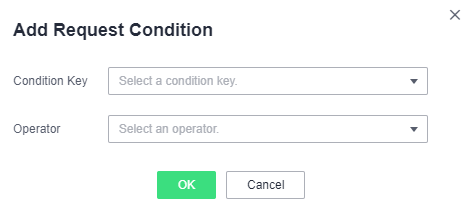
Table 3 Global condition keys Global Condition Key
Type
Description
g:CurrentTime
Time
Time when an authentication request is received. The time is in ISO 8601 format, for example, 2012-11-11T23:59:59Z.
g:DomainName
String
Account name.
g:MFAPresent
Boolean
Whether to obtain a token through MFA authentication.
g:MFAAge
Number
Validity period of a token obtained through MFA authentication. This condition must be used together with g:MFAPresent.
g:ProjectName
String
Project name.
g:UserId
String
IAM user ID.
g:UserName
String
IAM username.
- (Optional) Switch to the JSON view and modify the policy content in JSON format.Note
If the modified policy content is incorrect, check and modify the content again, or click Reset to cancel the modifications.
- (Optional) To add another permission block for the policy, click Add Permissions. Alternatively, click the plus (+) icon on the right of an existing permission block to clone its permissions.
- (Optional) Enter a brief description for the policy.
- Click OK.
- Attach the policy to a user group. Users in the group then inherit the permissions defined in this policy.Note
You can attach custom policies to a user group in the same way as you attach system-defined policies. For details, see Creating a User Group and Assigning Permissions.
Creating a Custom Policy in JSON View
- Log in to the IAM console.
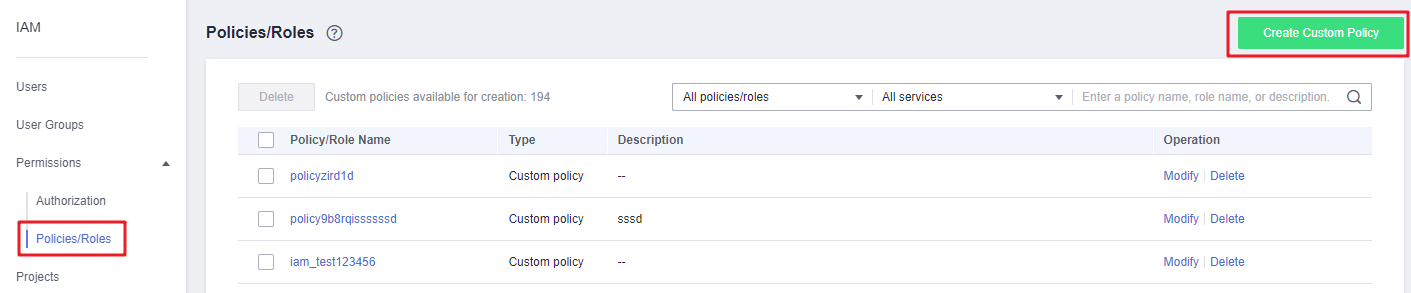
- On the IAM console, choose Permissions > Policies/Roles from the navigation pane, and click Create Custom Policy in the upper right corner.
Figure 5 Creating a custom policy
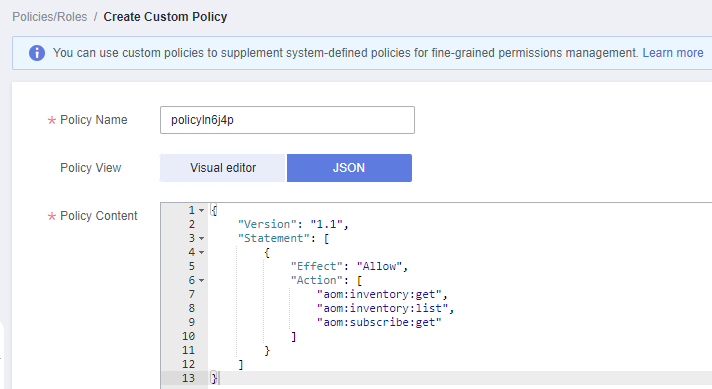
- Enter a policy name.
Figure 6 Entering a policy name
- Select a scope based on the type of services related to this policy. For more information about service types, see "Permissions".
- Global services: Select this option if the services to which the policy is related must be deployed in the Global region. When creating custom policies for globally deployed services, specify the scope as Global services. Custom policies of this scope must be attached to user groups for global services.
- Project-level services: Select this option if the services to which the policy is related must be deployed in specific regions. When creating custom policies for regionally deployed services, specify the scope as Project-level services. Custom policies of this scope must be attached to user groups for specific projects except global services.
For example, when creating a custom policy containing the action evs:volumes:create for EVS, specify the scope as Project-level services.
NoteA custom policy can contain actions of multiple services that are globally accessible or accessible through region-specific projects. To define permissions required to access both global and project-level services, create two custom policies and specify the scope as Global services and Project-level services respectively.
- Select JSON for Policy View.
- (Optional) Click Select Existing Policy/Role and select a policy/role to use it as a template, for example, select EVS Admin.Note
If you select multiple policies, all of them must have the same scope, that is, either Global services or Project-level services. To define permissions required to access both global and project-level services, enclose the permissions in two separate custom policies for refined authorization.
- Click OK.
- Modify the statement in the template.
- Effect: Set it to Allow or Deny.
- Action: Enter the actions listed in the API actions table (see Figure 7) of the EVS service, for example, evs:volumes:create.
Figure 7 API actions
 Note
NoteThe version of each custom policy is fixed at 1.1.
- (Optional) Enter a brief description for the policy.
- Click OK. If the policy list is displayed, the policy is created successfully. If a message indicating incorrect policy content is displayed, modify the policy.
- Attach the policy to a user group. Users in the group then inherit the permissions defined in this policy.Note
You can attach custom policies to a user group in the same way as you attach system-defined policies. For details, see Creating a User Group and Assigning Permissions.