Precautions
In the disk performance test, if the first sector number is not 4-KiB aligned, the disk performance will be greatly affected. Ensure that the first sector number is 4-KiB aligned before you start the test.
To test the performance of a shared disk, the following requirements must be met: If these ECSs fail to meet the anti-affinity requirement, the shared disk cannot reach the optimal performance.
The testing process for Windows and Linux is different.
Windows
The way you test disk performance depends on the server OS. This section uses Windows Server 2019 Standard 64-bit as an example. For other Windows OSs, see the corresponding OS documentations.
Install the performance measurement tool Iometer before the test. You can obtain the tool at http://www.iometer.org/.
- Log in to the server.
- Press win+R to open the Run window. Enter msinfo32 and click OK.
The system information window is displayed.
- Choose components > storage > disks. In the right pane, view the partition offset.
- If 4096 can be divided by the parameter value, the partition is 4-KiB aligned. Go to 4.
- If 4096 cannot be divided by the parameter value, the partition is not 4-KiB aligned. Ensure 4-KiB alignment for the partition before continuing the test.Notice
If you delete the partition and select another first sector number for 4-KiB alignment, you will lose all the data on that partition.
- Use Iometer to test the disk performance. For details, see the Iometer product documentation.
When the disk IOPS and throughput are tested, the parameter settings for Iometer and fio are the same. For details, see Table 1.
The following example uses Iometer to test the disk performance.
- Set the workflow.
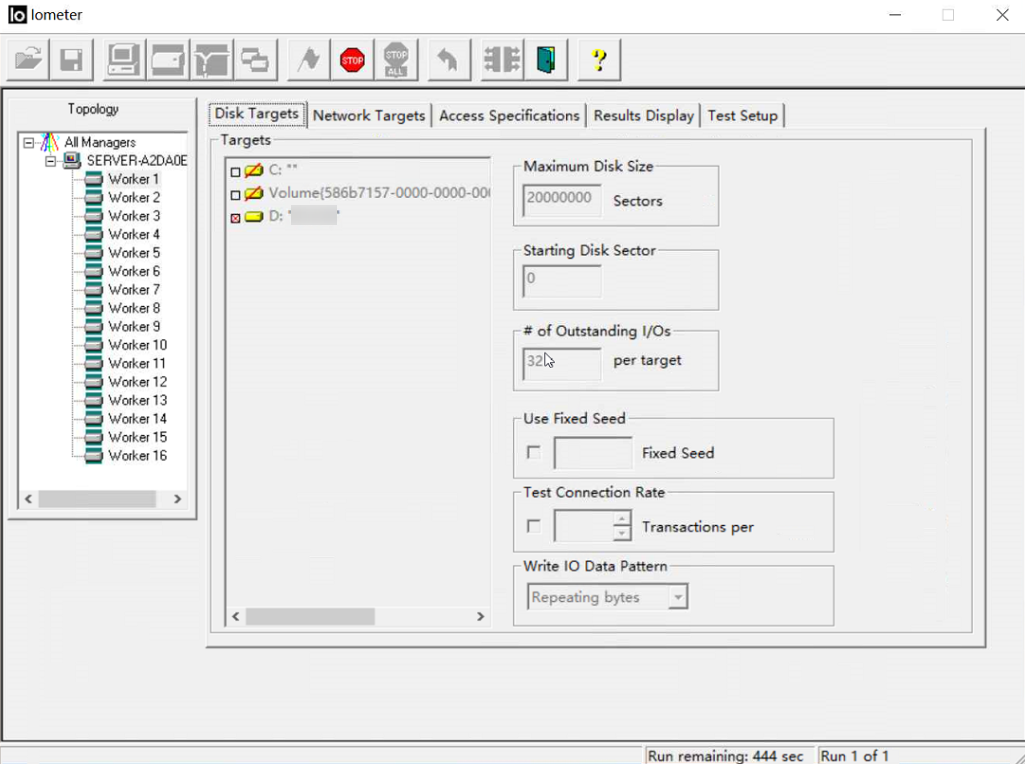
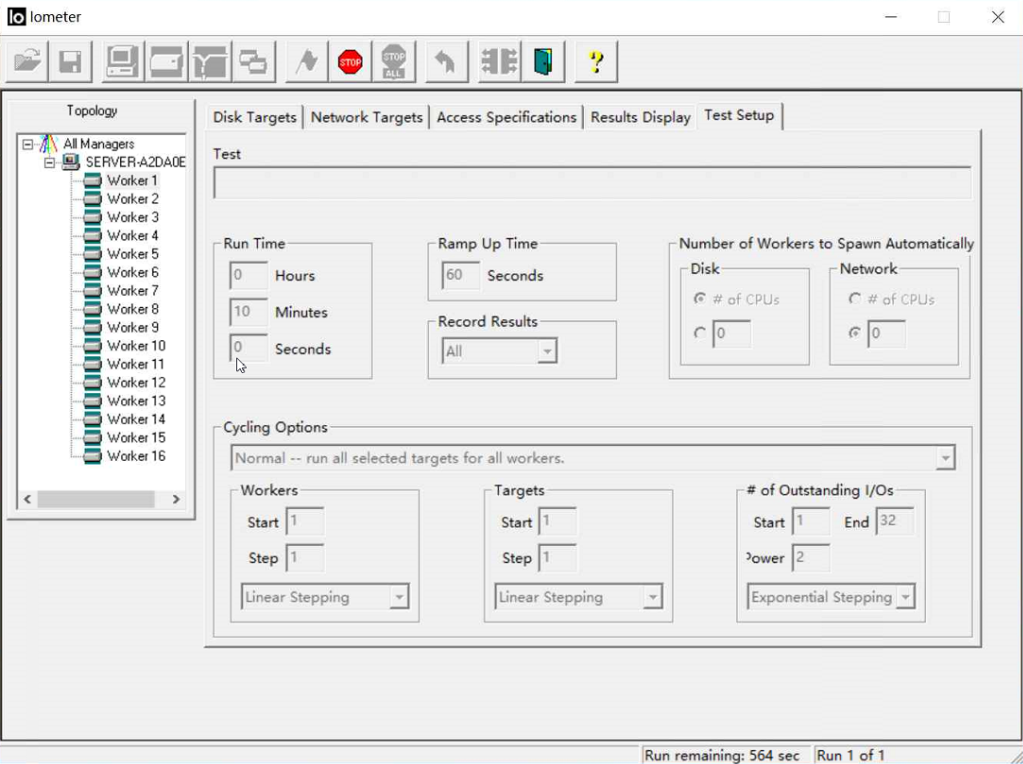
- Set the test run time.
In this example, the test run time is set to 10 minutes, with 60 seconds ramp up time. Disk performance is tested after the writes are stable.
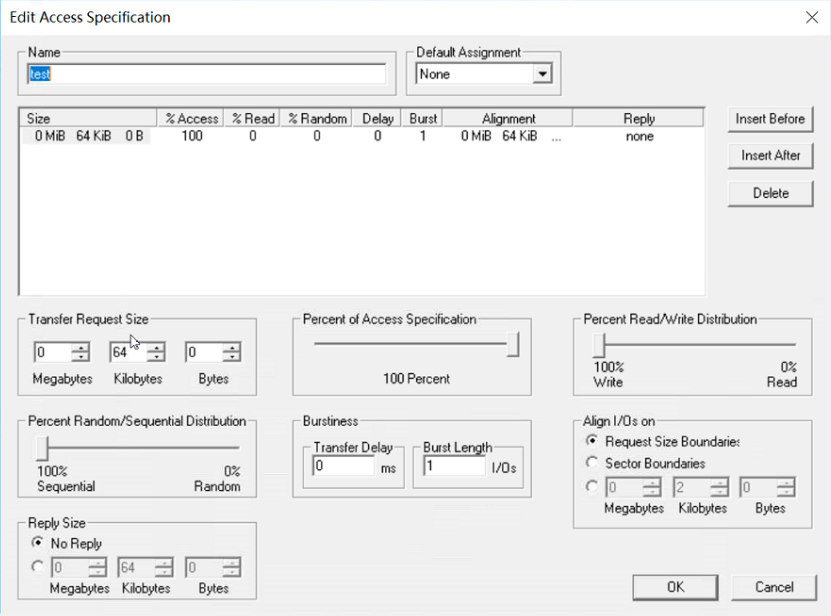
- Set the data block size and read/write policy. In this example, the disk size is set to 64 KiB, the policy is 100% sequential write.
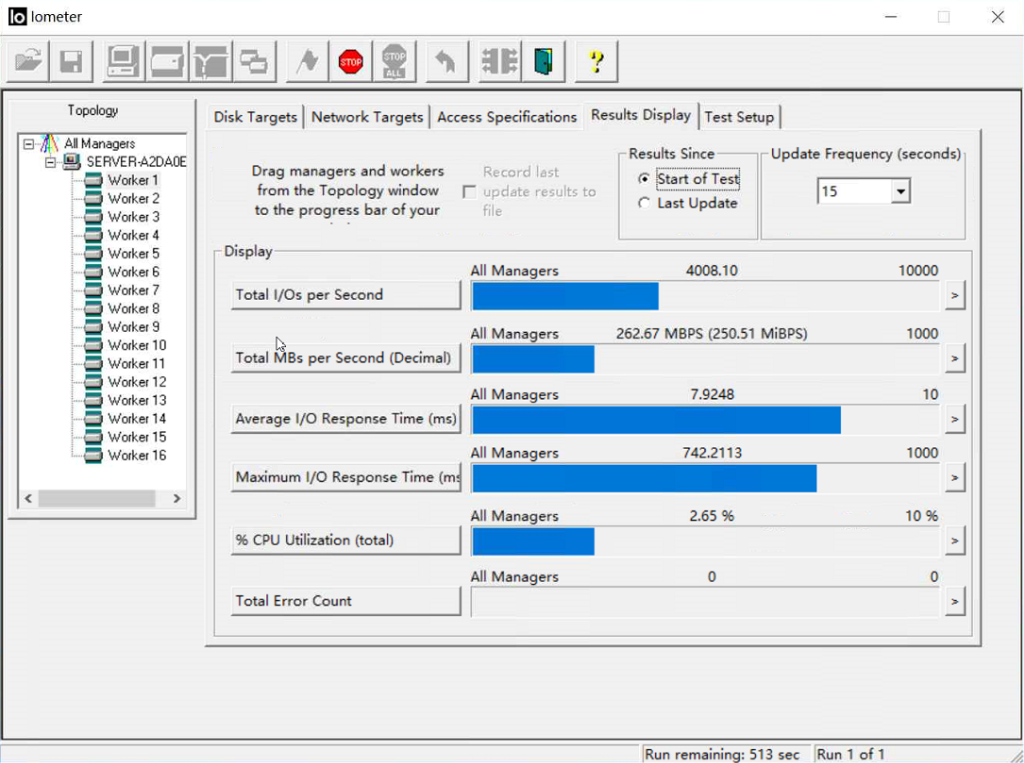
- View the test results.
- Set the workflow.
Linux
If you use an old version Linux OS, for example CentOS 6.5, and run fdisk to create partitions, the default first sector number will not be 4-KiB aligned, which will greatly affect the test performance. For this reason, if such an OS is used, you are advised to select a new first sector number, one that is 4-KiB aligned, when creating partitions.
The way you test disk performance depends on the server OS. This section uses CentOS 7.2 64-bit as an example. For other Linux OSs, see the corresponding OS documentations.
- Log in to the server and switch to user root.
- Install the performance test tool fio.
yum install fio
- Before you start the test, run the following command to check whether the first sector number is 4-KiB aligned:
fdisk -lu
Information similar to the following is displayed:
[root@ecs-centos sdc]# fdisk -luDisk /dev/xvda: 10.7 GiB, 10737418240 bytes, 20971520 sectorsUnits = sectors of 1 * 512 = 512 bytesSector size (logical/physical): 512 bytes / 512 bytesI/O size (minimum/optimal): 512 bytes / 512 bytesDisk label type: dosDisk identifier: 0x7db77aa5Device Boot Start End Blocks Id System/dev/xvda1 * 2048 20968919 10483436 83 LinuxDisk /dev/xvdb: 10.7 GiB, 10737418240 bytes, 20971520 sectorsUnits = sectors of 1 * 512 = 512 bytesSector size (logical/physical): 512 bytes / 512 bytesI/O size (minimum/optimal): 512 bytes / 512 bytesDisk /dev/xvdc: 53.7 GiB, 53687091200 bytes, 104857600 sectorsUnits = sectors of 1 * 512 = 512 bytesSector size (logical/physical): 512 bytes / 512 bytesI/O size (minimum/optimal): 512 bytes / 512 bytesDisk label type: dosDisk identifier: 0x3cf3265cDevice Boot Start End Blocks Id System/dev/xvdc1 2048 41943039 20970496 83 Linux- If 8 can be divided by the first sector number, the number is 4-KiB aligned. Go to 4.
- If 8 cannot be divided by the first sector number, the number is not 4-KiB aligned. Delete the partition and select a 4-KiB aligned first sector number for the new partition before continuing the test.Notice
If you delete the partition and select another first sector number for 4-KiB alignment, you will lose all the data on that partition.
- Run the following commands and use fio to test the disk performance:
- To test random write IOPS, run the following command: fio -direct=1 -iodepth=128 -rw=randwrite -ioengine=libaio -bs=4k -size=10G -numjobs=1 -runtime=600 -group_reporting -filename=/opt/fiotest/fiotest.txt -name=Rand_Write_IOPS_Test
- To test random read IOPS, run the following command: fio -direct=1 -iodepth=128 -rw=randread -ioengine=libaio -bs=4k -size=10G -numjobs=1 -runtime=600 -group_reporting -filename=/opt/fiotest/fiotest.txt -name=Rand_Read_IOPS_Test
- To test write throughput, run the following command: fio -direct=1 -iodepth=32 -rw=write -ioengine=libaio -bs=1024k -size=10G -numjobs=1 -runtime=600 -group_reporting -filename=/opt/fiotest/fiotest.txt -name=Write_BandWidth_Test
- To test read throughput, run the following command: fio -direct=1 -iodepth=32 -rw=read -ioengine=libaio -bs=1024k -size=10G -numjobs=1 -runtime=600 -group_reporting -filename=/opt/fiotest/fiotest.txt -name=Read_BandWidth_Test
- To test single-queue, random read latency, run the following command: fio -direct=1 -iodepth=1 -rw=randread -ioengine=libaio -bs=4k -size=10G -numjobs=1 -runtime=60 -group_reporting -filename=/opt/fiotest/fiotest.txt -name=Rand_Read_LATE_TestNotice
- When using fio to perform a raw disk performance test, ensure that no partitions and file systems have been created on the disk and there is no data stored on the disk. Or, the raw disk test will damage the file system, and data on the disk will become read-only. In this case, your only option will be to delete the disk and buy a new one to continue the test.
- Do not perform the test on a disk with service data on it. If such test is a must, you are advised to perform the test as follows:
- Back up the disk data before the test as you may damage the data on the disk.
- Specify a file, for example -filename=/opt/fiotest/fiotest.txt, to test the performance of the file system.
Table 1 lists the fio test parameters.
Table 1 Parameter description Parameter
Description
direct
Defines whether direct I/O is used.
- Set to 0: buffered I/O is used.
- Set to 1: direct I/O is used.
iodepth
Defines the I/O queue depth.
This queue depth refers to the queue depth of each thread regardless of whether a single or multiple threads are used in the test. Total concurrent I/Os of fio = iodepth × numjobs Examples:
- If there is a single thread and -iodepth=32, the I/O queue depth of this thread is 32 and the total concurrent I/Os of fio is 32 (32 × 1).
- If there are three threads and -iodepth=32, the I/O queue depth of each thread is 32 and the total concurrent I/Os of fio is 96 (32 × 3).
rw
Defines the test read/write policy.
- randread: random read
- randwrite: random write
- read: sequential read
- write: sequential write
- randrw: mixed random read/write
ioengine
Defines how fio delivers the I/O request (synchronously or asynchronously).
- Synchronous I/O: Only one I/O request is delivered at a time, and the response is returned after the kernel has processed the request. That said, the single-thread I/O queue depth is always less than 1, and multi-thread concurrent processing can be used to handle such issues. Normally, 16 to 32 concurrent working threads fully occupy the I/O queue depth.
- Asynchronous I/O: Multiple I/O requests are delivered using libaio at a time. Wait for the process to complete and reduce the interaction times to improve efficiency.
bs
Defines the I/O block size. The unit can be KiB, Kb, MiB, and Mb, and the default value is 4 KiB.
size
Defines the amount of data processed by the test I/Os. If parameters, such as runtime, are not specified, the test ends when fio has processed all the specified data amount.
The value can be a number with a unit or percentage. A number with a unit indicates the read/write data amount, for example size=10G, indicating a 10-GiB read/write data amount. A percentage indicates the ratio of read/write data amount to the total size of files, for example size=20%, indicating the read/write data amount takes 20% of the total file space.
numjobs
Defines the number of concurrent threads.
runtime
Defines the test time.
If this parameter is not specified, the test ends until the specified data amount is processed by the block size defined using parameter size.
group_reporting
Defines the test result display mode. The parameter value displays the statistics on a single thread instead of that on all jobs.
filename
Defines the name of the test file or device.
- If a file is specified, the performance of the file system is tested. Example: -filename=/opt/fiotest/fiotest.txt
- If a device name is specified, the performance of the raw disk is tested. Example: -filename=/dev/vdbNOTICE:
If the test is performed on a disk already has partitions and file systems created as well as data on it, user parameter filename to specify a file so that the original file system is not damaged and the data is not overwritten.
name
Defines the test task name.