Overview
Cloud Backup and Recovery (CBR) enables you to easily back up Elastic Cloud Servers (ECSs), Bare Metal Servers (BMSs), Elastic Volume Service (EVS) disks, and SFS Turbo file systems. In case of a virus attack, accidental deletion, or software or hardware fault, you can use the backup to restore data to any point when the data was backed up.
CBR Architecture
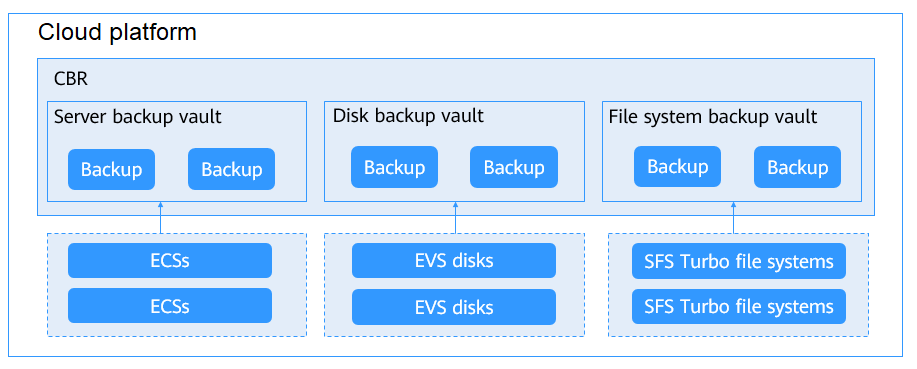
CBR involves backups, vaults, and policies.
Backup
A backup is a copy of a particular chunk of data and is usually stored elsewhere so that it can be used to restore the original data in the event of data loss.
The following types of backups are available:
- Cloud server backup: uses the consistency snapshot technology to protect data for ECSs. Backups of non-database servers are common server backups, and those of database servers are database server backups.
- Cloud disk backup: provides snapshot-based data protection for EVS disks.
- SFS Turbo backup: protects data for SFS Turbo file systems.
Vault
CBR stores backups in vaults. Before creating a backup, you need to create at least one vault and associate it with the resources you want to back up. Then the resources can be backed up to the associated vaults.
Different types of resources must be backed up to different types of vaults. For example, cloud servers must be backed up to server backup vaults, not disk backup vaults or any other types of vaults.
Policy
- A backup policy defines the timing, frequency, and retention of backups. Once applied to a vault, CBR will automatically back up data as specified.
Figure 1 CBR architecture
Backup Mechanism
CBR in-cloud backup offers block-level backup. The first backup is a full backup of all used data space. For example, if a disk size is 100 GB and 40 GB has been used, only the 40 GB is backed up. Subsequent backups are incremental backups. An incremental backup backs up only the data that has changed since the last backup, reducing backup time and saving storage space.
When a backup is deleted, data blocks that are referenced by other backups will not be deleted, ensuring that these backups can still be used for restoration. Both a full backup and an incremental backup can be used to restore data to a given backup point in time.
When creating a backup for a disk, CBR also creates a snapshot for it. CBR keeps only the latest snapshot. Every time it creates a new snapshot, it deletes the old snapshot.
CBR stores backups in OBS to ensure data security.
Backup Options
CBR supports one-off backup and periodic backup. A one-off backup task is manually created by users and is executed only once. Periodic backup tasks are automatically executed based on a user-defined backup policy.
Item | One-Off Backup | Periodic Backup |
|---|---|---|
Backup policy | Not required | Required |
Number of backup tasks | One manual backup task | Periodic tasks driven by a backup policy |
Backup name | User-defined backup name, which is manualbk_xxxx by default | System-assigned backup name, which is autobk_xxxx by default |
Backup mode | Full backup for the first time and incremental backup subsequently, by default | Full backup for the first time and incremental backup subsequently, by default |
Application scenario | Executed before patching or upgrading the OS or upgrading an application on a resource. A one-off backup can be used to restore the resource to the original state if the patching or upgrading fails. | Executed for routine maintenance of a resource. The latest backup can be used for restoration if an unexpected failure or data loss occurs. |