Scenarios
EVS transfer allows you to transfer disks from one account to another. After a transfer succeeds, the ownership of the disk belongs to the target account only.
Users can use disk transfer via API only. For more information, see chapter "EVS Transfer" in the Elastic Volume Service API Reference.
Constraints
- Encrypted EVS disks cannot be transferred.
- EVS disks with backups and snapshots available cannot be transferred.
- EVS disks associated with backup policies cannot be transferred.
- EVS disks used as system disks cannot be transferred.
Procedure
The following example shows you how to transfer an EVS disk from account A to account B. User A belongs to account A, and user B belongs to account B. User A creates the transfer. User B accepts the transfer using the transfer ID (transfer_id) and authentication key (auth_key). After the transfer has been accepted, the transfer is complete. Figure 1 shows the basic transfer process. Figure 1 EVS disk transfer process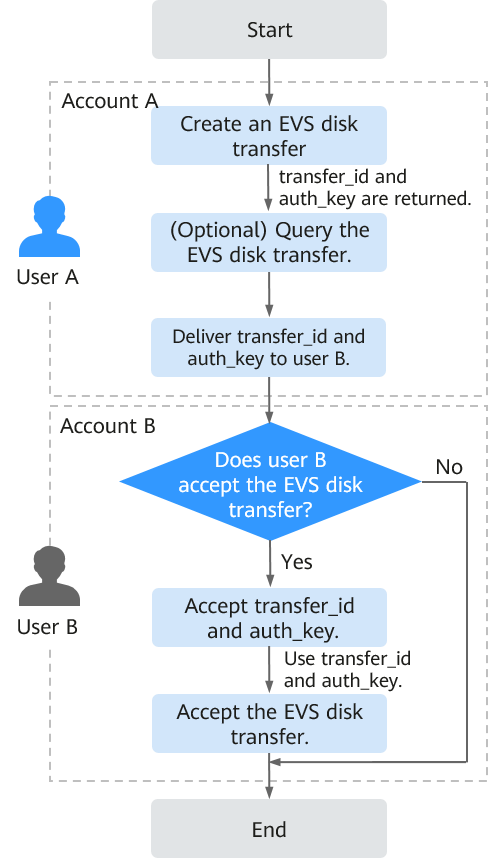
- User A creates the transfer. For details, see "Creating a Disk Transfer" in the Elastic Volume Service API Reference.
After the transfer is successfully created, transfer_id and auth_key are returned.
- (Optional) User A views the disk transfer. For details, see "Querying Details of a Disk Transfer" in the Elastic Volume Service API Reference. If multiple disk transfers have been created, user A can query all disk transfers. For details, see "Querying All Disk Transfers" or "Querying Details of All Disk Transfers" in the Elastic Volume Service API Reference.
- User A delivers the returned transfer_id and auth_key to user B.
- Check whether user B is going to accept the disk transfer.
- If yes, go to 5.
- If no, no further action is required.
User A can delete the unaccepted disk transfer. For details, see "Deleting a Disk Transfer" in the Elastic Volume Service API Reference.
- User B accepts transfer_id and auth_key.
- User B accepts the transfer through transfer_id and auth_key. For details, see "Accepting a Disk Transfer" in the Elastic Volume Service API Reference.