What Is Disk Sharing?
Enterprise systems, such as financial transaction systems or large-scale databases, require high data availability and rapid access. Traditional storage solutions often struggle to support simultaneous access to the same data blocks from multiple servers, resulting in performance bottlenecks and increased access latency. Ensuring that multiple servers can share data efficiently and reliably is therefore essential. EVS addresses this challenge. You can attach a shared EVS disk to multiple cloud servers and enjoy concurrent read and write operations across the servers. This high-performance disk can deliver strong reliability for your application, and you can attach one shared disk to up to 16 servers.
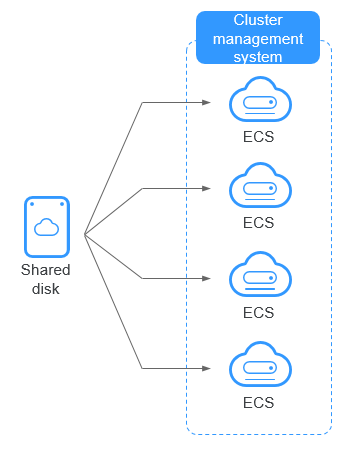
A shared file system or cluster management system must be set up before you can properly use a shared disk. If you simply attach a shared disk to multiple servers, data cannot be shared between those servers and may be overwritten.
Figure 1 Application scenario of shared EVS disks
Use Cases of Shared Disks
- High availability (HA) failover: A shared disk can be attached to multiple ECSs or BMSs. When the active node fails, cluster software (such as Windows MSCS or Veritas VCS) uses SCSI reservations to quickly switch services to the standby node. The standby node can read the data left by the active node without replication. This ensures recovery within seconds and keeps mission-critical services uninterrupted.
- Data sharing: To share files across servers, you can deploy a shared file system or a cluster management system such as a CFS cluster. If you attach a disk to two servers without CFS, each server maintains its own file allocation table, which can lead to severe data overwriting and file system corruption. CFS runs at the operating system layer. It coordinates read and write operations from multiple nodes on the same disk, manages disk space and metadata in a unified way, and ensures data consistency during concurrent access.
Advantages
- Multiple attachments: A shared EVS disk can be attached to a maximum of 16 servers.
- High-performance: The random read/write IOPS of a shared ultra-high I/O disk can reach up to 160,000.
- High-reliability: Shared EVS disks support both manual and automatic backup, delivering highly reliable data storage.
- Wide range of use: Shared EVS disks can be used for Linux RHCS clusters where only shared VBD disks are needed. They can also be used for Windows MSCS and Veritas VCS clusters that require SCSI reservations.
Specifications and Performance
Shared EVS disks have the same specifications and performance as non-shared EVS disks.
How Do I Use Shared VBD and SCSI Disks?
You can create shared VBD disks or shared SCSI disks. You are advised to attach a shared disk to ECSs in the same ECS anti-affinity group. This ensures that the ECSs are placed on different physical servers, improving service availability and reliability. Concepts of ECS anti-affinity groups and SCSI reservations: For details about ECS groups, see section "Managing ECS Groups" in the Elastic Cloud Server User Guide.
Constraints on Shared Disks
- A shared disk can be attached to a maximum of 16 servers.
- The sharing attribute of a disk cannot be changed after the disk is created.
- Shared disks can only be used as data disks, not system disks.
- A shared file system or cluster management system must be set up before you can properly use a shared disk. If you simply attach a shared disk to multiple servers, data cannot be shared between those servers and may be overwritten.
- When a shared disk is attached to multiple servers, the total performance of the disk on all servers cannot exceed the maximum allowed on a single disk.
Creating a Shared EVS Disk
You need to select Share when buy disks on the console.
Attaching a Shared EVS Disk
A non-shared EVS disk can only be attached to one server, whereas a shared EVS disk can be attached to up to 16 servers.
For details, see Attaching a Shared Disk.
Deleting a Shared EVS Disk
Because a shared EVS disk can be attached to multiple servers, ensure that the shared EVS disk is detached from all the servers before deletion.
For details, see Deleting an EVS Disk.
Data Sharing Principles and Common Usage Mistakes
A shared EVS disk is essentially the disk that can be attached to multiple servers for use. It is similar to a physical disk in that the disk can be attached to multiple physical servers, and each server can read data from and write data to any space on the disk. If no data read/write rules, such as the read/write sequence and meaning, between these servers are defined, data reads and writes between these servers may conflict, or other unpredictable errors may occur.
Shared disks are block storage devices that provide shared access for servers, but they do not have the cluster management capability. You need to deploy a cluster system to manage shared disks. Common cluster management systems include Windows MSCS, Linux RHCS, Veritas VCS, and Veritas CFS.
If shared EVS disks are not managed by a cluster system, the following issues may occur: When a shared EVS disk is attached to two servers (server A and server B), server A cannot recognize the disk spaces allocated to server B, vice versa. That said, a disk space allocated to server A may be already used by server B. In this case, repeated disk space allocation occurs, which leads to data errors. For example, a shared EVS disk has been formatted into an ext3 file system and attached to server A and server B. Server A has written metadata into the file system in space R and space G. Then server B has written metadata into space E and space G. In this case, the data written into space G by server A will be replaced. When the metadata in space G is read, an error will occur. When a shared EVS disk is attached to two servers (server A and server B), the application on server A has read the data in space R and space G, then cached the data. At that time, other processes and threads on server A would then read this data directly from the cache. At the same time, if the application on server B has modified the data in space R and space G, the application on server A cannot detect this data change and still reads this data from the cache. As a result, the modified data cannot be viewed on server A. For example, a shared EVS disk has been formatted into an ext3 file system and attached to server A and server B. Both servers have cached the metadata in the file system. Then server A has created a new file (file F) on the shared disk, but server B cannot detect this modification and still reads data from its cached data. As a result, file F cannot be viewed on server B.
Before you buy a shared EVS disk, determine its device type (VBD or SCSI) based on the applications that will use the shared disk. Shared SCSI EVS disks support SCSI reservations. Before using SCSI reservations, you need to install a driver in the server OS and ensure that the OS image is included in the compatibility list.
If you simply attach a shared disk to multiple servers, data or files cannot be shared between the servers, because the shared disk does not have the cluster management capability. To share files between servers, build a shared file system or deploy a cluster management system.
Helpful Links
For more disk sharing FAQs, see Sharing.